
Introduction
This manual provides essential information for the safe and efficient operation, maintenance, and troubleshooting of your Shark ICZ260EUT Cordless Vacuum Cleaner. Please read these instructions carefully before using the appliance and retain them for future reference.
The Shark ICZ260EUT is designed for versatile cleaning across various surfaces. It features DuoClean technology with two motorized brush-rolls for seamless transition between carpets and hard floors. The Anti-Hair Wrap technology actively removes hair from the brush-roll during cleaning, making it ideal for homes with pets. The removable Lithium-Ion battery provides extended run time. The Lift-Away feature allows for easy cleaning under furniture and converts into a handheld vacuum for stairs, upholstery, and other surfaces using the included accessories. The Anti-Allergen Complete Seal system captures 99.9% of dust and allergens.
Important Safety Instructions
When using electrical appliances, basic safety precautions should always be observed, including the following:
- Read all instructions before using this vacuum cleaner.
- Always disconnect the appliance from the charger before cleaning or performing maintenance.
- Do not use outdoors or on wet surfaces.
- Do not allow to be used as a toy. Close attention is necessary when used by or near children.
- Use only as described in this manual. Use only manufacturer's recommended attachments.
- Do not use with a damaged cord or plug. If appliance is not working as it should, has been dropped, damaged, left outdoors, or dropped into water, return it to SharkNinja Operating LLC for examination, repair, or adjustment.
- Do not pull or carry by cord, use cord as a handle, close a door on cord, or pull cord around sharp edges or corners. Do not run appliance over cord. Keep cord away from heated surfaces.
- Do not unplug by pulling on cord. To unplug, grasp the plug, not the cord.
- Do not handle plug or vacuum cleaner with wet hands.
- Do not put any object into openings. Do not use with any opening blocked; keep free of dust, lint, hair, and anything that may reduce airflow.
- Keep hair, loose clothing, fingers, and all parts of body away from openings and moving parts.
- Do not pick up anything that is burning or smoking, such as cigarettes, matches, or hot ashes.
- Do not use to pick up flammable or combustible liquids, such as gasoline, or use in areas where they may be present.
- Do not use without dust cup and/or filters in place.
- Use extra care when cleaning on stairs.
- Prevent unintentional starting. Ensure the switch is in the OFF position before picking up or carrying the appliance.
- Recharge only with the charger specified by the manufacturer.
- Under abusive conditions, liquid may be ejected from the battery; avoid contact. If contact accidentally occurs, flush with water. If liquid contacts eyes, additionally seek medical help.
What's in the Box
- Shark Cordless Vacuum Cleaner Unit
- 2x Removable Lithium-Ion Batteries
- 2x Battery Chargers (EU plug)
- Pet Multi-Tool
- Dusting Brush
- Upholstery Tool
- Crevice Tool
- User Manual
Assembly and Setup
Follow these steps to assemble your Shark ICZ260EUT vacuum cleaner:
- Unpack Components: Carefully remove all parts from the packaging.
- Attach Wand to Floor Nozzle: Insert the wand into the floor nozzle until it clicks securely into place.
- Attach Handheld Vacuum to Wand: Slide the handheld vacuum onto the top of the wand until it clicks securely.
- Charge Batteries: Insert the removable batteries into the provided chargers and plug them into a power outlet. Ensure batteries are fully charged before first use. The LED indicators on the battery will show charging status.

Image: The Shark vacuum in Lift-Away mode, demonstrating how to clean under furniture. The main unit detaches from the wand, allowing for flexible cleaning.
Operating Instructions
Power and Mode Selection
- Power On/Off: Press the power button located on the handheld unit to turn the vacuum on or off.
- Surface Settings: Select the appropriate surface setting for your cleaning task:
- Hard Floor Setting: For bare floors and delicate area rugs. The brush-rolls spin slower.
- Carpet Setting: For carpets and rugs. The brush-rolls spin faster to pick up embedded debris.
- ECO Mode: For extended run time, use ECO mode with non-motorized tools. This mode conserves battery power.
Using DuoClean Technology
The DuoClean floor nozzle features two brush-rolls that work together to clean all floor types without needing to switch nozzles. The soft front brush-roll pulls in large particles and polishes hard floors, while the bristle brush-roll deep cleans carpets.

Image: A detailed view of the DuoClean floor nozzle, showing both the soft front brush-roll and the bristle brush-roll, along with the integrated LED lights.
Lift-Away Mode
To use the Lift-Away feature, press the Lift-Away button on the main unit. This detaches the handheld vacuum from the wand, allowing you to clean hard-to-reach areas, under furniture, or above-floor surfaces with ease. Attach desired accessories directly to the handheld unit or the end of the wand.
Handheld Vacuum and Accessories
Detach the handheld vacuum from the wand for versatile cleaning. Connect the included accessories directly to the handheld unit for specific tasks:
- Pet Multi-Tool: Ideal for removing pet hair from upholstery, stairs, and other surfaces.
- Dusting Brush: For delicate surfaces like blinds, shelves, and electronics.
- Upholstery Tool: Designed for cleaning sofas, cushions, and other fabric surfaces.
- Crevice Tool: Perfect for tight spaces, corners, and along edges.

Image: A user cleaning a sofa using the Shark vacuum in handheld mode with an upholstery attachment.

Image: A user cleaning carpeted stairs with the Shark vacuum in handheld mode, demonstrating its portability and ease of use for elevated surfaces.
Maintenance
Emptying the Dust Cup
Empty the dust cup after each use or when debris reaches the MAX FILL line.
- Ensure the vacuum is powered off.
- Press the dust cup release latch and lift the dust cup off the handheld vacuum.
- Hold the dust cup over a trash bin and press the empty button to open the bottom flap.
- Tap gently to remove any clinging debris. Close the flap securely.
- Reattach the dust cup to the handheld vacuum until it clicks.
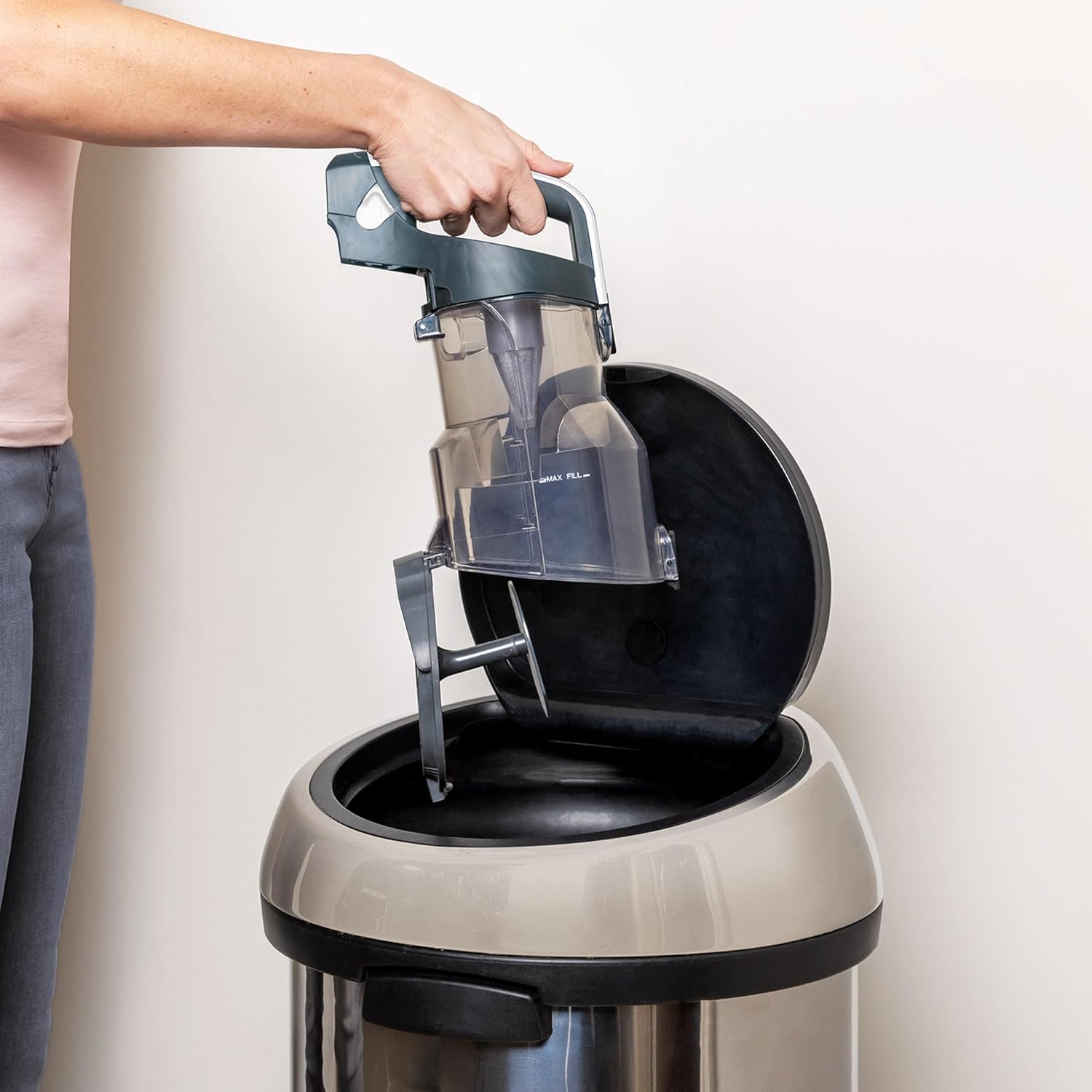
Image: A hand holding the dust cup over a trash can, demonstrating the easy emptying process.
Cleaning Filters
Regularly clean the filters to maintain optimal suction power. Rinse filters with cold water only and allow them to air dry completely for at least 24 hours before reinstalling.
- Pre-Motor Filters (Foam & Felt): Located inside the dust cup. Rinse every month.
- Post-Motor Filter (HEPA): Located at the base of the handheld unit. Rinse every 3 months.
Cleaning Brush-Rolls (Anti-Hair Wrap)
The Anti-Hair Wrap technology minimizes hair tangles, but occasional maintenance may be required.
- Ensure the vacuum is powered off and unplugged from the charger.
- Open the brush-roll garage by sliding the release buttons on the floor nozzle.
- Lift out the brush-rolls. Remove any debris or hair that may have accumulated.
- Reinstall the brush-rolls, ensuring they click into place. Close the brush-roll garage securely.
Troubleshooting
| Problem | Possible Cause | Solution |
|---|---|---|
| Vacuum not picking up debris. |
|
|
| Brush-rolls not spinning. |
|
|
| Vacuum turns off on its own. |
|
|
| Battery not charging. |
|
|
Specifications
| Feature | Detail |
|---|---|
| Brand | Shark |
| Model Number | ICZ260EUT |
| Color | White |
| Product Dimensions (L x W x H) | 26 x 25 x 108 cm |
| Weight | 5.5 Kilograms |
| Power | 1000 Milliwatts |
| Voltage | 28.8 Volts |
| Sound Level | 80 Decibels |
| Run Time | Up to 100 minutes (using two batteries consecutively in ECO mode, with non-motorized tool) |
| Special Features | Anti-Hair Wrap function, DuoClean suction head, LED lighting, Lift-Away Technology, Cordless, 2 Removable Batteries |
| Filter Type | Fabric (Anti-Allergen Complete Seal) |
| Surface Recommendation | Carpet, Hard floors, Interior, Car, All floors |
| Power Source | Battery powered |
| Included Components | Vacuum cleaner, 2 Batteries, 2 Chargers, Pet Multi-Tool, Dusting Brush, Upholstery Tool, Crevice Tool, User Manual |
Warranty and Support
Your Shark ICZ260EUT Cordless Vacuum Cleaner comes with a 5-year limited warranty on the vacuum unit and a 2-year limited warranty on the batteries. To activate your warranty, please register your product on the official Shark website.
For technical support, replacement parts, or warranty claims, please visit the official Shark website or contact their customer service department. Ensure you have your model number (ICZ260EUT) and proof of purchase available.
Online Support: www.sharkclean.com
Official Product Videos
No relevant official product videos from the seller were found for this model.


