

1. Introduction
The iSpring WSP100ARB Spin Down Sediment Water Filter is designed to provide a crucial first line of defense for your home's water system. It effectively filters out particulate matter, sediment, rust, and other water pollutants, protecting downstream pipelines, water heaters, washing machines, and other appliances from potential damage and extending their lifespan. This reusable filter features a touch-screen auto-flushing module and a built-in housing scraper for convenient maintenance.

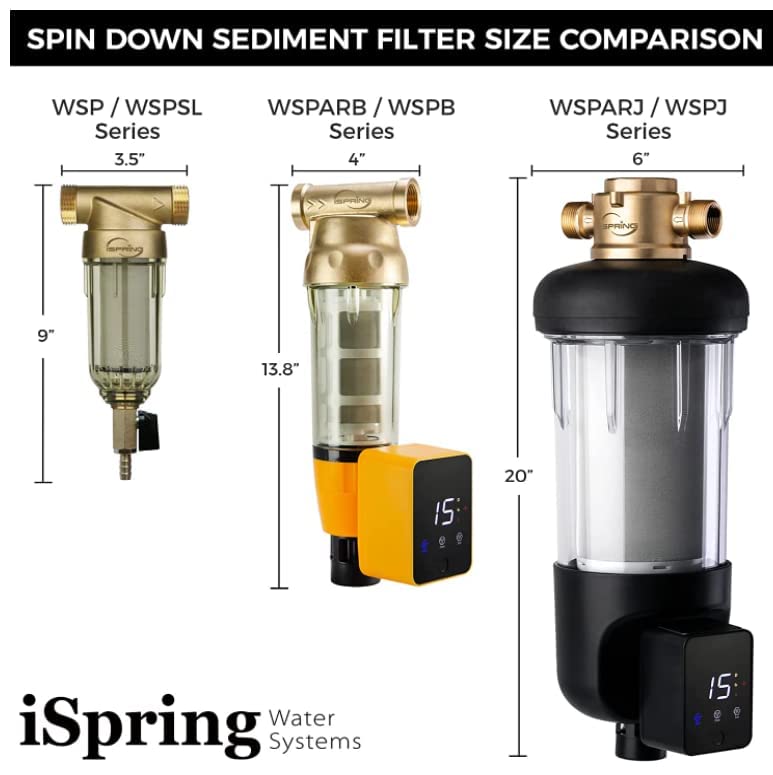
Diagram illustrating the whole house protection provided by the sediment filter, safeguarding appliances like dishwashers, washing machines, water heaters, and undersink filtration systems.
2. Safety Information & Precautions
- This system must be installed in a dry indoor environment, away from direct heat sources.
- This system is only suitable for municipal tap water and well water within the temperature range of 40°F - 100°F (4°C - 38°C).
- Do not allow wastewater or corrosive liquids to pass through the filter.
- The filter must be installed upright. During installation, ensure that the water flow direction marked on the valve body is the same as the direction of water flow within the pipeline.
- The installation location must provide reliable drainage.
- The frequency that the filter screen will need to be flushed will depend on the quality of the water passing through the screen. It may be necessary to flush the filter screen at least once every month.
Please contact us immediately if you have any questions or concerns.
3. What's in the Box
Upon unpacking, please verify that all the following components are included:
- WSP100ARB Spin Down Sediment Water Filter
- Power adapter
- 3x AA batteries (optional, for auto-flushing module)
- User manual
- Housing wrench
- Mounting bracket
- Plumber's tape
- Drain line and connector
- Spare O-rings
The iSpring WSP100ARB filter shown alongside its housing wrench.
4. Required Tools for Installation
Ensure you have the following tools on hand before beginning the installation process:
- Pipe Cutter
- Spanner Wrench
- Large Jaw Plier
- Water Bucket
5. Installation Guide
Follow these steps carefully to install your iSpring WSP100ARB Spin Down Sediment Water Filter:
Installation and Startup Video
Official installation and startup guide for iSpring WSPAR-B and WSP-B Series filters. This video provides visual instructions for each step of the installation process.
- Step 1: Shut Off Main Water Line & Drain Pressure
Shut off the main water line to your house. Open the nearest faucet to drain out water and release any pressure from the pipe. - Step 2: Select Location & Cut Pipe
Find a suitable location for the filter on your cold water line. Measure and cut the water inlet pipe. Use a bucket to catch any remaining water from the pipe. - Step 3: Apply Plumber's Tape & Connectors
Apply plumber's tape evenly on the machine head threads. Screw the connectors to the threads and tighten them with a wrench. - Step 4: Install Batteries (Optional)
Remove the battery cover on the auto-flushing module and insert three AA batteries. Batteries are not required if you are using the power adapter. - Step 5: Drain Line Assembly
Remove the drain cover. Install the small O-ring to the connector. Screw the drain connector to the drain port. Connect the drain line to the drain connector. Tighten the nut to secure the drain line and reinstall the drain cover. - Step 6: Mount Filter to Pipeline
Mount the bracket on the wall and install the filter to the pipeline. Please make sure the direction arrow on the machine head is the same as the direction of the water flow within the pipeline. - Step 7: Connect Drain Line to Drainage
Connect or insert the drain line to a drain pipe or a drain hole.

Detailed assembly diagram for the WSP50ARB model, showing all components and their arrangement.
6. Operating the Auto-Flushing Module
The iSpring WSP100ARB series features an auto-flushing module for convenient maintenance. It is preset to flush for 15 seconds every 15 days, but this can be adjusted based on your source water quality.

Close-up of the integrated auto-flushing module's touch screen display, showing controls for auto, drain, and settings.
Adjusting Auto-Flushing Settings:
- Step 1: Turn On Screen
Press the Home button once to turn on the screen. - Step 2: Adjust Flush Frequency (Days)
Press the Set button to enter the adjust mode. Press the '+' or '-' mark on the touchscreen to adjust the flush frequency in days. Adjust accordingly per the quality of your source water. - Step 3: Adjust Flush Run Time (Seconds)
Press the Set button again to adjust the flush run time in seconds. Press the '+' or '-' mark on the touchscreen to adjust the flush run time in seconds. Adjust accordingly per the quality of your source water. - Manual Flushing:
To perform a manual flush, press the "Drain" button on the touchscreen. Press "Drain" button again to close the valve manually. - Reset to Default:
Press the "Auto" button on the touchscreen to set the module back to the default settings.
7. Maintenance
Regular maintenance ensures the longevity and optimal performance of your iSpring Spin Down Sediment Water Filter.
Housing Scraper:
Both the WSP-ARB and WSP-B Series have a built-in housing scraper. The interior housing surface of the filter can easily be cleaned by turning the scraper knob.
NOTE:
If normal scraping or rinsing does not remove the buildup in the filter housing, we recommend removing the filter assembly for a more thorough cleaning.
Flushing Frequency:
We recommend flushing the filter at least once every month, depending on the quality of the water being filtered. Adjust the auto-flushing settings as described in the Operating section to match your water conditions.
8. Troubleshooting
If you encounter any issues with your iSpring WSP100ARB filter, please refer to the following general troubleshooting tips. For more detailed assistance, consult the full user manual or contact iSpring customer support.
- Low Water Pressure: Check if the filter screen is clogged. Perform a manual flush or increase the auto-flushing frequency. Ensure the main water supply is fully open.
- Leaking Connections: Verify that all connections are properly tightened. Ensure plumber's tape was applied correctly to threaded connections. Check O-rings for proper seating and damage.
- Auto-Flushing Module Not Responding: Check battery installation and power adapter connection. Ensure the screen is active.
- Visible Sediment After Flushing: The filter screen may require a more thorough manual cleaning by removing the filter assembly. Consider increasing flushing frequency.
9. Specifications
| Feature | Specification |
|---|---|
| Product Dimensions | 20 x 10 x 6 inches; 5.96 Pounds (20"L x 10"W x 6"H) |
| Item Model Number | WSP100ARB |
| Brand | iSpring |
| Special Feature | Self Cleaning |
| Installation Type | Freestanding |
| Power Source | Corded Electric |
| Maximum Flow Rate | 35 Gallons Per Minute |
| Upper Temperature Rating | 100 Degrees Fahrenheit |
| UPC | 810004171596 |
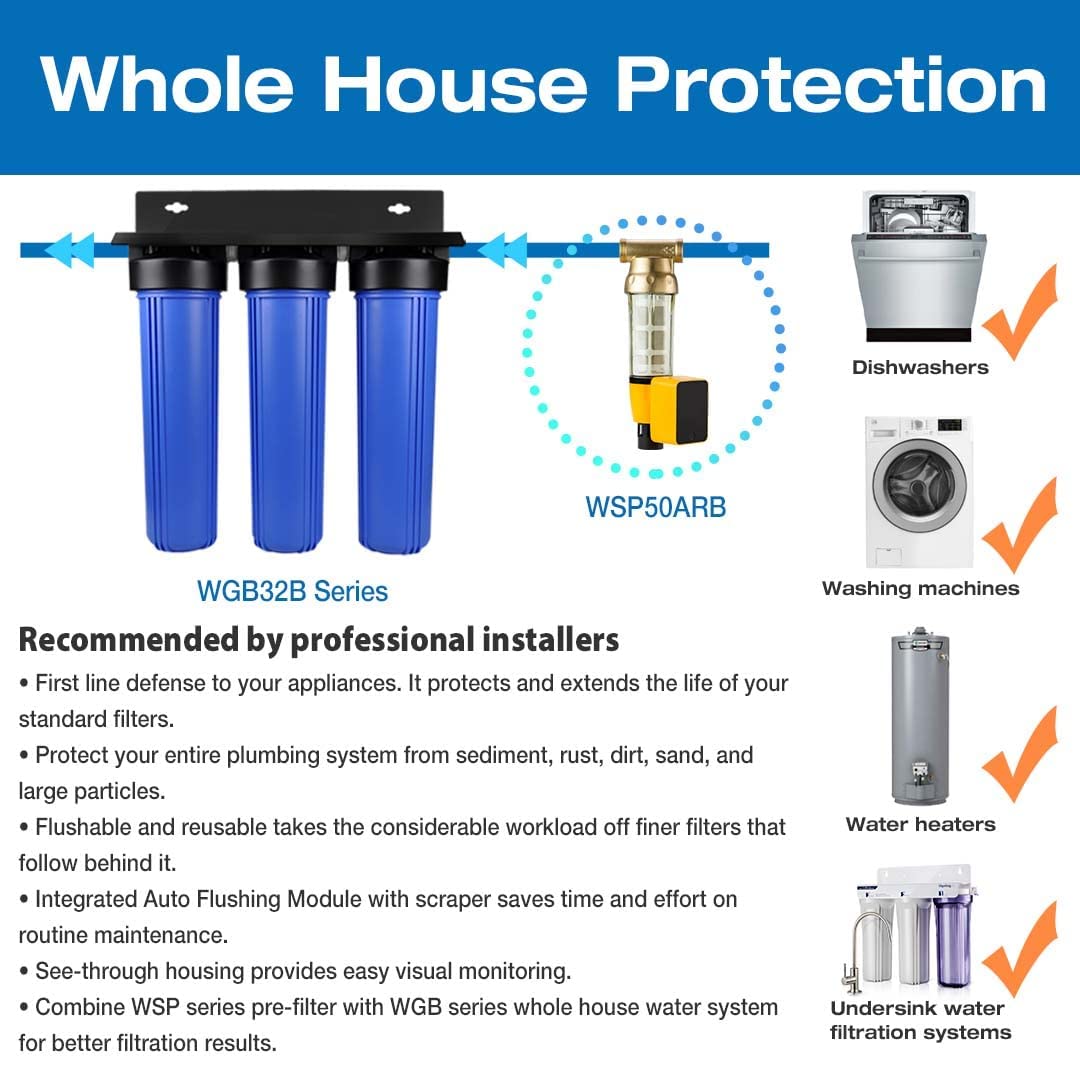
Comparison of iSpring spin down sediment filter sizes, including WSP-ARB series.

Image highlighting the reinforced brass construction of the filter head, tested and certified against NSF/ANSI standards.
10. Warranty & Support
iSpring is committed to providing quality, reliable products and service. For warranty information, product registration, or technical support, please refer to the full user manual included with your product or visit the official iSpring website. You can also contact iSpring customer support directly for any questions or concerns.


