
1. Introduction
Thank you for purchasing the Lenco PDR-031 Portable DAB+ Radio. This manual provides essential information for the safe and efficient operation of your device. Please read it thoroughly before use and retain it for future reference.
Safety Information
- Do not expose the unit to rain, moisture, or extreme temperatures.
- Avoid placing the unit near heat sources or in direct sunlight.
- Do not disassemble or modify the unit. Refer all servicing to qualified personnel.
- Ensure proper ventilation around the unit.
- Use only the specified power adapter for charging.
2. Package Contents
Please check that all items are present and in good condition:
- Lenco PDR-031 Portable DAB+ Radio
- Micro-USB Charging Adapter
- User Manual (this document)
3. Product Overview
Familiarize yourself with the various parts and controls of your Lenco PDR-031 radio.
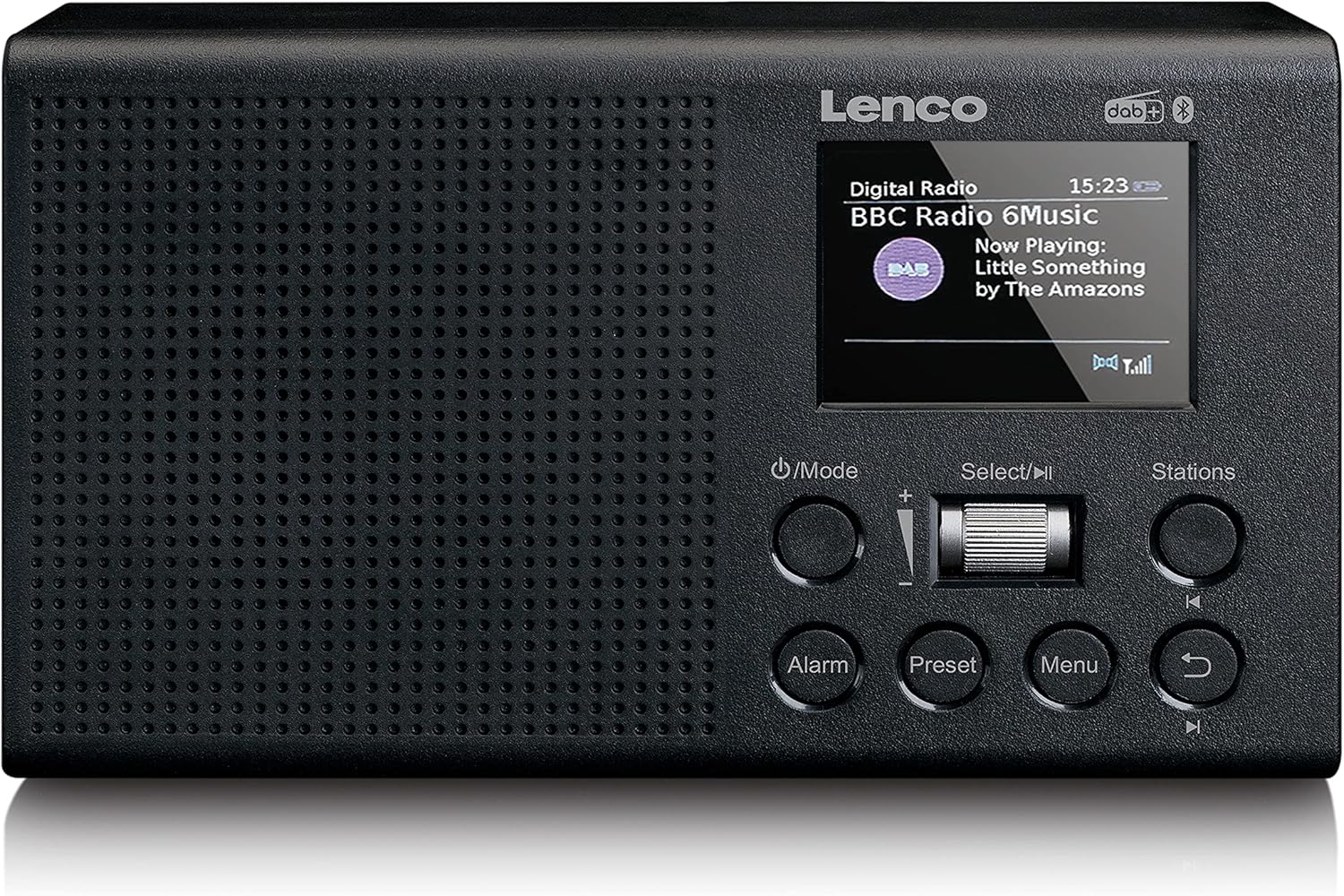

Controls and Ports:
- Power/Mode Button: Press to turn on/off or switch between DAB+, FM, Bluetooth, and AUX modes.
- Select/Play/Pause Dial: Rotate to navigate menus or adjust volume. Press to confirm selection or play/pause audio.
- Stations Button: Access saved stations or station list.
- Alarm Button: Set and manage alarms.
- Preset Button: Store and recall favorite radio stations.
- Menu Button: Access system settings and options.
- Back Button: Return to the previous menu or screen.

- DC IN (Micro-USB): For connecting the charging adapter.
- AUX IN: 3.5mm input for connecting external audio devices.
- AUX OUT: 3.5mm output for connecting headphones or external speakers.
- Telescopic Antenna: Extend for optimal radio reception.
4. Setup
4.1 Powering On and Charging
The Lenco PDR-031 has a built-in 2200 mAh rechargeable battery. Before first use, it is recommended to fully charge the device.
- Connect the supplied Micro-USB charging adapter to the DC IN port on the back of the radio.
- Plug the adapter into a suitable power outlet.
- The charging indicator on the display will show the charging status.
- Once fully charged, disconnect the adapter.
4.2 Antenna Setup
For optimal radio reception, fully extend the telescopic antenna located on the back of the unit.

5. Operating Instructions
5.1 Basic Operation
- Power On/Off: Press the Power/Mode button to turn the radio on or off.
- Mode Selection: Press the Power/Mode button repeatedly to cycle through available modes: DAB+, FM, Bluetooth, and AUX.
- Volume Control: Rotate the Select/Play/Pause dial to adjust the volume.
5.2 DAB+ Radio Operation
- Switch to DAB+ mode using the Power/Mode button.
- The radio will automatically scan for available DAB+ stations upon first use. If not, press the Menu button and select 'Full Scan'.
- Rotate the Select/Play/Pause dial to browse the list of available stations.
- Press the Select/Play/Pause dial to select a station.
Storing and Recalling DAB+ Presets:
- To store a station: While listening to a station, press and hold the Preset button. Rotate the dial to select a preset number (1-20), then press the dial to confirm.
- To recall a station: Press the Preset button briefly. Rotate the dial to select the desired preset, then press the dial to confirm.
5.3 FM Radio Operation
- Switch to FM mode using the Power/Mode button.
- To auto-scan: Press and hold the Select/Play/Pause dial. The radio will scan and stop at the next strong station.
- To manual tune: Briefly press the Select/Play/Pause dial, then rotate it to fine-tune the frequency.
Storing and Recalling FM Presets:
- To store a station: While listening to a station, press and hold the Preset button. Rotate the dial to select a preset number (1-20), then press the dial to confirm.
- To recall a station: Press the Preset button briefly. Rotate the dial to select the desired preset, then press the dial to confirm.
5.4 Bluetooth Operation
The PDR-031 can connect to external devices via Bluetooth to stream audio.
- Switch to Bluetooth mode using the Power/Mode button. The display will show 'Bluetooth Pairing'.
- Enable Bluetooth on your external device (e.g., smartphone, tablet).
- Search for 'Lenco PDR-031' in your device's Bluetooth list and select it to pair.
- Once paired, you can play audio from your device through the radio.
5.5 AUX Input Usage
Connect external audio sources like MP3 players or CD players to the radio.
- Switch to AUX mode using the Power/Mode button.
- Connect one end of a 3.5mm audio cable (not supplied) to the AUX IN port on the radio.
- Connect the other end of the cable to the headphone jack or audio output of your external device.
- Play audio from your external device.
5.6 AUX Output Usage
Connect headphones or external speakers to the radio for private listening or enhanced sound.
- Connect one end of a 3.5mm audio cable (not supplied) to the AUX OUT port on the radio.
- Connect the other end of the cable to your headphones or the audio input of external speakers.
- Audio will now be routed through the connected device.
5.7 Alarm Function
Set alarms to wake up to your favorite radio station or a buzzer.
- Press the Alarm button.
- Follow the on-screen prompts to set the alarm time, alarm source (DAB+, FM, or Buzzer), and volume.
- Press the Select/Play/Pause dial to confirm each setting.
6. Maintenance
6.1 Cleaning
To maintain the appearance of your radio, clean it regularly.
- Wipe the surface with a soft, dry cloth.
- Do not use abrasive cleaners, waxes, or solvents as they may damage the finish.
6.2 Battery Care
To prolong the life of the built-in Lithium-Ion battery:
- Avoid completely discharging the battery.
- Charge the battery regularly, even if the radio is not in frequent use.
- Store the unit in a cool, dry place if not used for extended periods.
7. Troubleshooting
If you encounter issues with your Lenco PDR-031, refer to the following common problems and solutions:
| Problem | Possible Cause | Solution |
|---|---|---|
| No power | Battery is depleted; Power adapter not connected properly. | Charge the battery; Ensure the Micro-USB adapter is securely connected. |
| No sound | Volume is too low; Incorrect mode selected; AUX cable not fully inserted. | Increase volume; Select the correct mode (DAB+, FM, Bluetooth, AUX); Re-insert AUX cable firmly. |
| Poor radio reception | Antenna not extended; Weak signal area. | Fully extend the telescopic antenna; Try relocating the radio to an area with better signal. |
| Bluetooth pairing fails | Radio not in pairing mode; Device too far; Previously paired device connected. | Ensure radio is in Bluetooth mode; Move device closer; Disconnect from other Bluetooth devices. |
8. Specifications
| Feature | Detail |
|---|---|
| Model Number | PDR-031BK |
| Dimensions (L x W x H) | 18 x 4.9 x 10.8 cm |
| Weight | 390 Grams |
| Display | 2.4-inch TFT LCD Color Display |
| Radio Tuner | DAB+, PLL FM |
| Audio Output | 2W RMS Speaker, Passive Subwoofer |
| Connectivity | Bluetooth, AUX In, AUX Out, Micro-USB |
| Battery | 2200 mAh Lithium-Ion (built-in) |
| Power Source | Battery operated |

9. Warranty and Support
Lenco products are manufactured to high quality standards. This product is covered by a manufacturer's warranty in accordance with applicable laws and regulations in your country of purchase. For detailed warranty terms and conditions, please refer to the documentation provided with your purchase or visit the official Lenco website.
For technical support or service inquiries, please contact Lenco customer service through their official channels. Keep your proof of purchase for warranty claims.


