
Audio System US08
Audio System US08 Passive Under-Seat Subwoofer User Manual
Model: US08
Product Overview
The Audio System US08 is a compact and powerful passive under-seat subwoofer designed to enhance the bass response in your vehicle's audio system. It features an extremely heavy die-cast aluminum housing, contributing to its robust build and acoustic performance. With a weight of 6.0 kg, this subwoofer is engineered for durability and efficient sound delivery.
Key features include two passive membranes on both sides, optimizing its low-frequency output. It operates within a frequency range of 20-150 Hz and offers flexible impedance options of 2 ohms or 4 ohms, making it compatible with various amplifier setups. The US08 delivers a maximum power output of 400 Watts, providing deep and impactful bass.
Its compact dimensions (approximately 345mm length x 70mm height x 250mm depth) allow for convenient installation under most car seats, saving valuable trunk space.
Important Safety Information
Please read all safety instructions carefully before installing and operating the Audio System US08 subwoofer. Failure to follow these guidelines may result in injury, damage to the product, or damage to your vehicle.
- Always disconnect the vehicle's battery negative terminal before beginning any installation work to prevent electrical shorts.
- Ensure all wiring connections are secure and properly insulated to prevent short circuits and fire hazards.
- Do not install the subwoofer in locations where it may obstruct vehicle controls, airbags, or passenger movement.
- Avoid exposing the subwoofer to excessive moisture, dust, or extreme temperatures.
- If you are unsure about any part of the installation process, seek professional assistance from a qualified car audio technician.
- Operate the subwoofer within its specified power ratings to prevent damage.
Package Contents
Verify that all items are present in the package before proceeding with installation:
- Audio System US08 Passive Under-Seat Subwoofer
- Mounting Hardware (brackets, screws)
- User Manual (this document)
Installation Guide
1. Before Installation
- Choose a suitable mounting location, typically under a front seat, ensuring adequate clearance and ventilation.
- Ensure the chosen location does not interfere with seat movement, wiring, or other vehicle components.
- Gather all necessary tools: wire strippers, crimpers, screwdrivers, drill (if needed for mounting).
- Disconnect the vehicle's negative battery terminal.
2. Mounting the Subwoofer
The US08 is designed for under-seat installation. Use the provided mounting brackets and screws to secure the subwoofer firmly to the vehicle's floor. Ensure the mounting surface is strong enough to support the subwoofer's weight (6.0 kg) and withstand vehicle vibrations.

Figure 1: Front view of the US08 subwoofer, showing the main speaker grille and Audio System logo.

Figure 2: Rear view of the US08 subwoofer, illustrating the mounting points and heat dissipation fins.
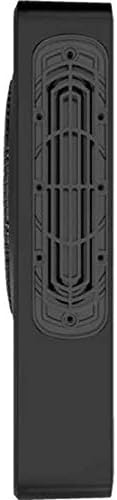
Figure 3: Side profile of the US08 subwoofer, highlighting its slim design suitable for under-seat placement.
Refer to Figure 2 for the location of the mounting points on the subwoofer's chassis. Mark the drilling locations on the vehicle floor, drill pilot holes if necessary, and secure the subwoofer using appropriate fasteners.
3. Wiring Connections
The US08 is a passive subwoofer and requires an external amplifier (not included) for operation. Ensure your amplifier is capable of driving a 2-ohm or 4-ohm load, depending on how you configure the subwoofer's impedance (if selectable, though the description implies it supports both). Connect the subwoofer to the amplifier's subwoofer output terminals using high-quality speaker wire.
- Positive (+) Connection: Connect the positive terminal of the subwoofer to the positive output terminal of your amplifier.
- Negative (-) Connection: Connect the negative terminal of the subwoofer to the negative output terminal of your amplifier.
- Ensure all connections are tight and free from frayed wires that could cause short circuits.
- Route all wiring safely, away from moving parts, sharp edges, and heat sources.
Operating Your Subwoofer
Once the subwoofer is correctly installed and wired to an amplifier, you can begin operating your audio system. The performance of the US08 will depend on the settings of your external amplifier and head unit.
- Initial Power-On: After reconnecting the vehicle's battery, turn on your car's audio system.
- Amplifier Settings: Adjust the gain, low-pass filter (LPF), and phase settings on your amplifier to achieve optimal sound integration with your main speakers. A typical LPF setting for a subwoofer is between 80Hz and 120Hz.
- Sound Tuning: Play various types of music to fine-tune the subwoofer's output. Aim for a balanced sound where the bass blends seamlessly with the rest of your audio system, rather than overpowering it.
Maintenance and Care
Proper maintenance ensures the longevity and optimal performance of your Audio System US08 subwoofer.
- Cleaning: Use a soft, dry cloth to wipe down the exterior of the subwoofer. Do not use harsh chemicals, solvents, or abrasive cleaners.
- Ventilation: Ensure the subwoofer's heat dissipation fins (visible in Figure 2 and 3) are not obstructed to allow for proper airflow and prevent overheating.
- Connections: Periodically check all wiring connections to ensure they remain secure and free from corrosion.
- Storage: If storing the subwoofer for an extended period, keep it in a cool, dry place away from direct sunlight and extreme temperatures.
Troubleshooting
If you experience issues with your Audio System US08 subwoofer, refer to the table below for common problems and their solutions.
| Problem | Possible Cause | Solution |
|---|---|---|
| No Sound from Subwoofer |
|
|
| Distorted Sound |
|
|
| Subwoofer Overheating |
|
|
Technical Specifications
| Feature | Specification |
|---|---|
| Model Number | US08 |
| Type | Passive Under-Seat Subwoofer |
| Maximum Power Output | 400 Watts |
| Frequency Range | 20-150 Hz |
| Impedance | 2 ohms / 4 ohms |
| Dimensions (L x W x H) | 25 x 25 x 7 cm |
| Weight | 6 Kilograms |
| Housing Material | Die-cast Aluminum |
Warranty and Customer Support
Audio System products are manufactured to the highest quality standards. For information regarding warranty coverage, terms, and conditions, please refer to the warranty card included with your purchase or visit the official Audio System website.
If you encounter any issues not covered in this manual or require further assistance, please contact Audio System customer support. Have your product model number (US08) and purchase details ready when contacting support.
Related documentsUS08


Ask a question about this manual
Ask about setup, troubleshooting, compatibility, parts, safety, or missing instructions. Manuals+ will review the question and use this page’s manual context to help answer it.