
1. Important Safety Instructions
Please read all instructions carefully before operating this product. Retain this manual for future reference.
- Do not place the unit near heat sources such as radiators, heat registers, stoves, or other apparatus that produce heat.
- Do not block any ventilation openings. Install in accordance with the manufacturer's instructions.
- Protect the power cord from being walked on or pinched, particularly at plugs, convenience receptacles, and the point where they exit from the apparatus.
- Only use attachments/accessories specified by the manufacturer.
- Unplug this apparatus during lightning storms or when unused for long periods of time.
- Refer all servicing to qualified service personnel. Servicing is required when the apparatus has been damaged in any way, such as power-supply cord or plug is damaged, liquid has been spilled or objects have fallen into the apparatus, the apparatus has been exposed to rain or moisture, does not operate normally, or has been dropped.
2. What's in the Box
Carefully unpack your Pyle PPHP122SM.5 system and ensure all components are present:
- PA Speaker System
- Speaker Stand
- Wired Microphone
- Remote Control
- Power Adapter

3. Product Overview
The Pyle PPHP122SM.5 is a portable PA speaker system designed for various audio applications, featuring robust sound output and versatile connectivity.
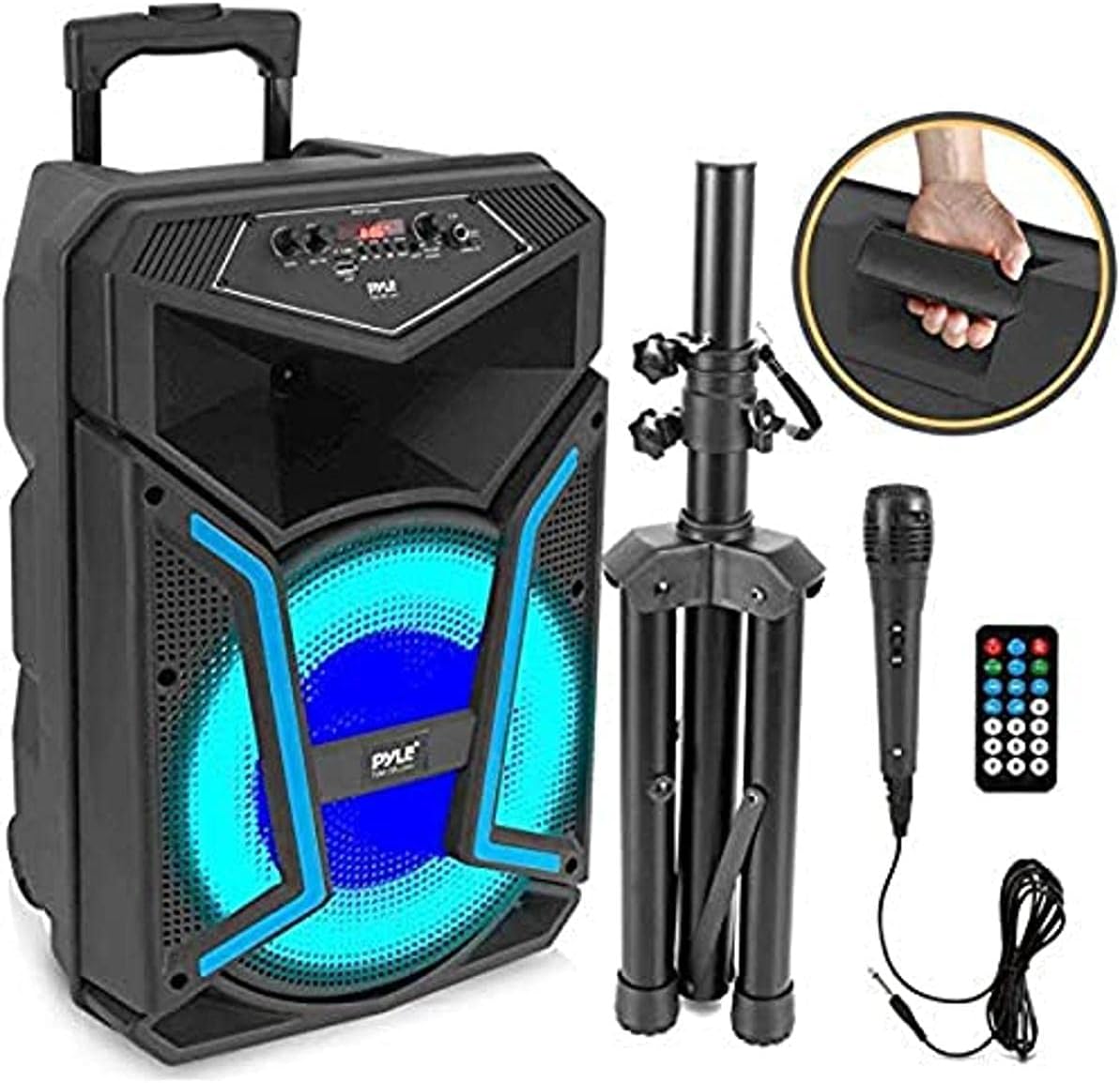
Key Features:
- High-Powered Loudspeaker Design (800 Watt MAX)
- Bluetooth Wireless Music Streaming (Version 5.0, up to 32 ft range)
- Multi-Color Flashing LED Party Lights
- FM Radio with Digital LCD Display
- Built-in Rechargeable Battery (Up to 2+ hours)
- MP3 Audio File Playback via USB Flash Memory Reader (up to 32GB) and Micro SD Memory Card Reader
- Aux (3.5mm) Input Jack
- 1/4'' (6.5mm) Microphone Input
- Convenient Rolling Wheels & Extending Carry Handle for portability
4. Setup
4.1 Initial Charging
Before first use, fully charge the speaker's built-in rechargeable battery. Connect the provided power adapter to the speaker's power input and then to a wall outlet. The Low Battery Level LED Indicator Light will show charging status.
4.2 Speaker Stand Assembly
The speaker includes a stand for elevated sound projection. Extend the legs of the stand and secure them. Place the speaker onto the top pole of the stand. Ensure the stand is stable on a flat surface before placing the speaker.

4.3 Connecting the Microphone
Plug the wired microphone into the 1/4'' (6.5mm) Microphone Input jack on the control panel.
5. Operating Instructions
5.1 Control Panel Overview

5.2 Power On/Off
Locate the POWER switch on the control panel. Flip it to the 'ON' position to power on the speaker. Flip to 'OFF' to power down.
5.3 Bluetooth Wireless Streaming
- Power on the PPHP122SM.5 speaker.
- Press the 'MODE' button on the control panel or remote until 'BLUE' appears on the digital display, indicating Bluetooth mode.
- Enable Bluetooth on your smartphone, tablet, or other device.
- Search for the Bluetooth network name 'PYLEUSA' and select it to pair.
- Once paired, the speaker will emit a confirmation tone, and you can begin streaming audio wirelessly.
5.4 USB/SD Card Playback
- Insert a USB flash drive or Micro SD card (up to 32GB) containing MP3 audio files into the respective slot on the control panel.
- The speaker will automatically switch to USB/SD mode and begin playback. If not, press the 'MODE' button to select.
- Use the playback controls (Play/Pause, Next/Previous Track) on the control panel or remote to manage your music.
5.5 FM Radio Operation
- Press the 'MODE' button until 'FM' appears on the digital display.
- Press the 'SCAN' button to automatically scan and save available FM radio stations.
- Use the 'CH-' and 'CH+' buttons to navigate through the saved stations.
5.6 AUX Input
Connect external audio devices (e.g., MP3 players, laptops) using a 3.5mm audio cable to the 'AUX IN' jack. Press the 'MODE' button to select AUX input.
5.7 Microphone and Karaoke Function
After connecting the wired microphone, adjust the 'MIC.VOL' knob to control the microphone volume. Use the 'ECHO' knob to add an echo effect to your vocals.

5.8 Party Lights
The speaker features multi-color flashing LED party lights. These lights can be activated or deactivated using the 'LED Sw' switch on the control panel.
5.9 Portability
The PPHP122SM.5 is designed for easy transport with its built-in rolling wheels and extending carry handle.

6. Maintenance
6.1 Cleaning
Wipe the speaker's exterior with a soft, dry cloth. Do not use harsh chemicals or abrasive cleaners. Ensure no liquids enter the speaker's openings.
6.2 Battery Care
To prolong battery life, avoid fully discharging the battery frequently. Recharge the unit regularly, especially if it will be stored for extended periods.
6.3 Storage
Store the speaker in a cool, dry place away from direct sunlight and extreme temperatures when not in use.
7. Troubleshooting
- No Power: Ensure the power adapter is securely connected and the unit is charged. Check the power switch position.
- No Sound: Check the master volume level. Ensure the correct input mode (Bluetooth, USB, AUX, FM) is selected. Verify external device volume.
- Bluetooth Not Connecting: Make sure the speaker is in Bluetooth mode. Ensure your device's Bluetooth is on and 'PYLEUSA' is selected. Move closer to the speaker (within 32 ft).
- Microphone Not Working: Ensure the microphone is securely plugged into the 1/4'' input. Adjust the 'MIC.VOL' knob.
- USB/SD Playback Issues: Ensure the USB drive or SD card is formatted correctly and contains MP3 files. Check that the storage device is not larger than 32GB.
8. Specifications
| Feature | Specification |
|---|---|
| Power Output | 800 Watt MAX |
| Sound System | 12'' Subwoofer, 1'' Tweeter |
| Bluetooth Version | 5.0 |
| Wireless Range | Up to 32 ft. |
| Impedance | 4 Ohm |
| Frequency Response | 55-20kHz |
| S/N Ratio | 60dB +/-3dB |
| SPL | 94dB (1W/M) |
| T.H.D. | <1% |
| USB Interface Type | 2.0 |
| Digital Audio File Support | MP3 |
| Maximum USB Flash/SD Support | 32GB |
| Wired Mic Cable Length | 9.8 ft. |
| Speaker Stand Height | 3.2 ft. |
| Construction Material | Engineered ABS Housing |
| Battery Life | Up to 2+ Hours |
| PA Speaker Battery Type | 3.7V Li-ion - 3000mAh |
| Speaker Power Supply | 120/240V, Switchable (5V/2A) |
| Total Speaker Size (L x W x H) | 13.5'' x 11.6'' x 21.3'' inches |
| Item Weight | 5 pounds |
9. Warranty and Support
Pyle products are designed and manufactured to the highest quality standards. For warranty information or technical support, please visit the official Pyle website or contact their customer service department. Keep your purchase receipt as proof of purchase.


