
NKF RMT-B119A
NKF RMT-B119A Remote Control User Manual
Model: RMT-B119A
Brand: NKF
1. Introduction
This manual provides comprehensive instructions for the NKF RMT-B119A replacement remote control, designed for various Sony DVD and Blu-ray Disc players. This remote offers a direct replacement experience, requiring no complex programming or pairing. Simply install the batteries, and it is ready for use.

Image 1.1: Front and back view of the NKF RMT-B119A remote control. The remote is black with clearly labeled buttons on the front and a textured back for grip.
2. Setup: Battery Installation
To begin using your RMT-B119A remote control, you must first install the batteries. This remote requires two (2) AAA 1.5V alkaline batteries.
- Locate the battery compartment on the back of the remote control.
- Press down on the latch and slide the battery cover downwards to open it.
- Insert two (2) AAA 1.5V alkaline batteries, ensuring that the positive (+) and negative (-) terminals align correctly with the markings inside the compartment.
- Slide the battery cover back into place until it clicks securely.
No programming or pairing is required after battery installation. The remote is ready for immediate use with compatible Sony DVD/Blu-ray players.

Image 2.1: Close-up view of the battery compartment on the back of the RMT-B119A remote, showing the correct orientation for inserting two AAA batteries.
3. Operating the Remote Control
The RMT-B119A remote control provides full functionality for your compatible Sony DVD or Blu-ray Disc player. Below is a guide to its primary buttons and their functions.

Image 3.1: Diagram of the RMT-B119A remote control with key buttons labeled for easy identification and understanding of their functions.
Key Button Functions:
- TV Power (I/O): Turns the connected TV on or off.
- Open/Close: Opens or closes the disc tray.
- Input: Switches the input source on the TV.
- Number Keys (0-9): Used for direct track selection or inputting numbers.
- VOL +/-: Adjusts the volume level.
- Subtitle: Toggles subtitle display.
- Display: Shows on-screen information.
- Colored Buttons (Yellow, Blue, Red, Green): Functionality varies by disc or menu.
- Top Menu: Accesses the main menu of a disc.
- Pop Up/Menu: Accesses the pop-up menu during playback.
- Navigation Pad (Up, Down, Left, Right, Enter): Used to navigate menus and select options.
- Return: Goes back to the previous screen or menu.
- Options: Displays context-sensitive options.
- Home: Returns to the player's home screen.
- Playback Controls (Prev, Play, Pause, Next, Stop, Fast Forward, Rewind): Standard media playback functions.
- NETFLIX: Direct access button for the Netflix application.
- SEN: Direct access button for Sony Entertainment Network (or similar smart features).
Compatible Models:
This remote control is compatible with a wide range of Sony DVD and Blu-ray Disc player models, including but not limited to:
- BDP-BX110
- BDP-BX310
- BDP-BX510
- BDP-BX59
- BDP-S1100
- BDP-S3100
- BDP-S390
- BDP-S5100
- BDP-S580
- BDP-S590

Image 3.2: The RMT-B119A remote control shown alongside a Sony Blu-ray player and TV, illustrating its intended use and listing compatible models.
4. Maintenance
Proper care and maintenance will extend the life of your remote control.
- Cleaning: Use a soft, dry cloth to clean the remote. Do not use liquid cleaners or abrasive materials.
- Battery Replacement: Replace batteries when the remote's response becomes sluggish or it stops functioning. Always replace both batteries at the same time with new ones.
- Storage: Store the remote in a cool, dry place away from direct sunlight and extreme temperatures. If the remote will not be used for an extended period, remove the batteries to prevent leakage.
- Avoid Liquids: Do not expose the remote to water or other liquids, as this can cause internal damage.
5. Troubleshooting
If you encounter issues with your remote control, try the following troubleshooting steps:
- Remote Not Responding:
- Check if the batteries are inserted correctly with the correct polarity (+/-).
- Replace the batteries with new AAA 1.5V alkaline batteries.
- Ensure there are no obstructions between the remote control and the Blu-ray/DVD player's infrared sensor.
- Make sure you are within the effective operating range (typically up to 10 meters / 33 feet).
- Specific Buttons Not Working:
- Clean the remote's surface and buttons to ensure no debris is interfering with button presses.
- Verify that the function you are trying to use is supported by your specific Sony player model.
6. Specifications
| Feature | Detail |
|---|---|
| Model Number | RMT-B119A |
| Brand | NKF |
| Product Dimensions | 5.9 x 2 x 1.18 inches |
| Item Weight | 2.08 ounces |
| Batteries Required | 2 x AAA 1.5V Alkaline (Not Included) |
| Color | Black |
| Special Feature | No Programming Required |
| Max Supported Devices | 1 |
| Compatible Devices | Sony Blu-ray Disc Players |
| Manufacturer | NKF |
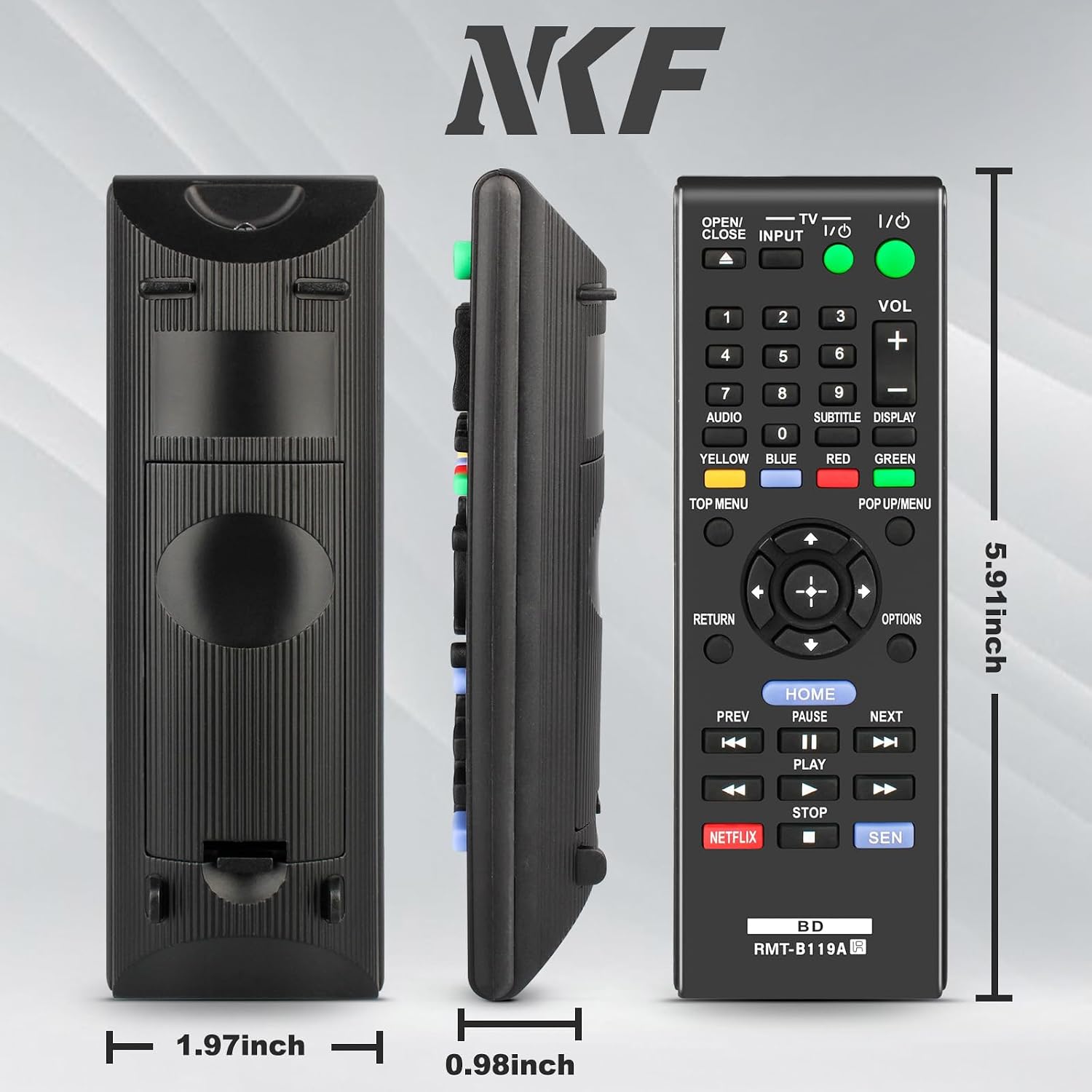
Image 6.1: Visual representation of the RMT-B119A remote control's dimensions, showing its length (5.91 inches), width (1.97 inches), and thickness (0.98 inches).
7. Warranty and Support
Specific warranty details for this product are not provided in this manual. For any product-related inquiries, technical support, or warranty information, please refer to the seller or manufacturer's official support channels.
You may also visit the NKF Store on Amazon for additional product information and support resources.
Ask a question about this manual
Ask about setup, troubleshooting, compatibility, parts, safety, or missing instructions. Manuals+ will review the question and use this page’s manual context to help answer it.