
Alpicool CX50
Alpicool CX50 Portable Refrigerator User Manual
Model: CX50 | Brand: Alpicool
1. Introduction
The Alpicool CX50 Portable Refrigerator is designed for versatile cooling and freezing on the go. Ideal for car, RV, truck, travel, fishing, and outdoor activities, this unit operates on 12V/24V DC power and can achieve temperatures as low as -4°F (-20°C). Its robust design includes a trolley and wheels for easy transport, a 3-stage battery protection system, and a vibration-resistant structure, ensuring reliable performance wherever your adventures take you.
2. Safety Information
- Ensure the power supply voltage matches the refrigerator's requirements (12V/24V DC).
- Do not operate the appliance if the power cord is damaged.
- Keep ventilation openings clear of obstructions.
- Avoid placing the refrigerator in direct sunlight or near heat sources.
- Do not use electrical appliances inside the food storage compartments unless they are of the type recommended by the manufacturer.
- Always disconnect the power before cleaning or performing maintenance.
- This appliance is not intended for use by persons (including children) with reduced physical, sensory or mental capabilities, or lack of experience and knowledge, unless they have been given supervision or instruction concerning use of the appliance by a person responsible for their safety.
3. Product Features
- Super Storage Space: 53 Quart (50 Liter) capacity, capable of holding approximately 52 cans of cola.
- Freezes Without Ice: Achieves deep chilling down to -4°F (-20°C), eliminating the need for ice.
- Function Upgrades: Features a new LCD display panel with a USB socket for charging mobile devices.
- Enhanced Portability: Individual trolley design with heavy-duty handles and wheels for easy transport.
- Car Battery Protection: Equipped with a temperature memory function and 3 adjustable levels (Low, Med, High) to prevent vehicle battery drain.
- Durable Insulation: Reliable sealing property construction with thick, high-density foam insulation for sustained cooling performance.
- Vibration Resistant: Designed to protect the device safety while driving on rough roads.
- Angle Operation: Safe to run on angles up to 45° from horizontal, suitable for 4WDing.
4. Package Contents
Upon unpacking, please verify that all items listed below are present and in good condition:
- 1 x Alpicool CX50 Fridge Freezer Unit
- 1 x DC Power Cord (12V/24V)
- 1 x Instruction Book (This Manual)
5. Setup
5.1 Unpacking and Placement
Carefully remove the refrigerator from its packaging. Place the unit on a stable, level surface, ensuring adequate ventilation around all sides, especially near the air vents. Avoid placing it directly against walls or in enclosed spaces that could restrict airflow.

Image: The Alpicool CX50 Portable Refrigerator, showcasing its compact design and integrated trolley handle for easy transport.
5.2 Power Connection
Connect the provided DC power cord to the refrigerator's DC input port. Plug the other end into your vehicle's 12V or 24V DC power outlet (cigarette lighter socket). Ensure the connection is secure.
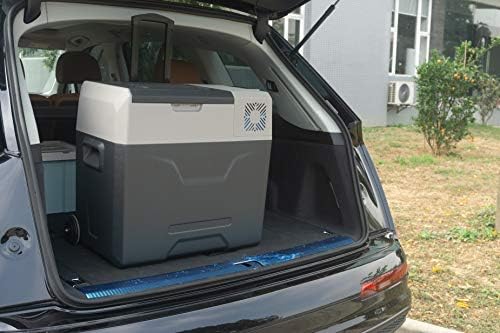
Image: The Alpicool CX50 refrigerator positioned securely in the trunk of a car, demonstrating its suitability for vehicle use.
6. Operating Instructions
6.1 Powering On/Off
Press the power button on the control panel to turn the unit on. The LCD display will illuminate, showing the current internal temperature. Press and hold the power button for a few seconds to turn the unit off.

Image: A close-up view of the Alpicool CX50's control panel, featuring the LCD screen displaying temperature and battery voltage, along with the USB charging port.
6.2 Temperature Control
Use the '+' and '-' buttons on the control panel to adjust the desired temperature. The display will show the set temperature briefly before reverting to the current internal temperature. The unit will automatically adjust its cooling to reach and maintain the set temperature.
6.3 Battery Protection Settings
The CX50 features a 3-stage battery protection system to prevent your vehicle's battery from running down. To adjust the setting (Low, Med, High), press the 'Settings' button (gear icon) repeatedly until the battery icon flashes. Use the '+' or '-' buttons to select the desired protection level. 'High' offers the most protection for your vehicle battery, while 'Low' allows the refrigerator to operate longer before cutting off.
6.4 USB Charging
A USB charging port is integrated into the control panel. You can use this port to charge small electronic devices such as smartphones or tablets while the refrigerator is powered on.
6.5 Using the Trolley and Wheels
Extend the telescopic handle by pressing the release button and pulling it upwards. The integrated wheels allow for easy rolling of the refrigerator, making it convenient to move even when fully loaded.

Image: The Alpicool CX50 refrigerator with its telescopic handle fully extended, highlighting its portability features like the integrated wheels.
7. Maintenance
7.1 Cleaning
To clean the interior and exterior of the refrigerator, use a soft cloth dampened with mild detergent and water. Do not use abrasive cleaners or solvents. Ensure the unit is unplugged before cleaning. Dry thoroughly before reconnecting power.
7.2 Storage
When storing the refrigerator for extended periods, ensure it is clean and dry. Leave the lid slightly ajar to prevent odors and mold growth. Store in a dry, well-ventilated area away from direct sunlight and extreme temperatures.
8. Troubleshooting
If you encounter issues with your Alpicool CX50, please refer to the following common troubleshooting steps:
- Unit not powering on: Check the power connection and ensure the DC outlet is functioning. Verify your vehicle's battery voltage is sufficient.
- Not cooling effectively: Ensure the lid is properly sealed. Check for obstructions around the ventilation openings. Verify the temperature setting is appropriate.
- Display error codes: Refer to the specific error code in a more detailed troubleshooting guide (if available from manufacturer) or contact customer support.
- Unusual noise: A slight humming from the compressor is normal. If the noise is loud or unusual, ensure the unit is on a stable surface and not vibrating against anything.
For further assistance, please contact Alpicool customer support.
9. Specifications
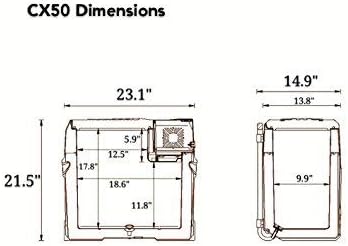
Image: Technical diagram illustrating the precise dimensions of the Alpicool CX50 Portable Refrigerator.

Image: The Alpicool CX50 with its lid open, demonstrating its internal capacity by showing various sizes of beverage containers.
| Specification | Value |
|---|---|
| Brand Name | Alpicool |
| Model Name | CX50 |
| Item Weight | 29.5 pounds |
| Product Dimensions | 23.07 x 14.88 x 21.46 inches |
| Capacity | 53 Quarts (50 Liters) |
| Installation Type | Portable |
| Voltage | 12 Volts / 24 Volts DC |
| Wattage | 45 watts |
| Number Of Doors | 1 |
| Special Feature | Portable |
| First Available Date | October 7, 2018 |
10. Warranty and Support
Alpicool products are manufactured to high-quality standards. For specific warranty details and customer support, please refer to the warranty card included with your product or visit the official Alpicool website. Keep your purchase receipt as proof of purchase for any warranty claims.
For any running questions or technical assistance, please contact Alpicool seller support.
Related documentsCX50


Ask a question about this manual
Ask about setup, troubleshooting, compatibility, parts, safety, or missing instructions. Manuals+ will review the question and use this page’s manual context to help answer it.