
1. Introduction
Thank you for choosing the MI MDZ-27-DI Wireless Bluetooth Soundbar. This soundbar is designed to enhance your audio experience for movies, gaming, and music playback. Featuring 8 sound drivers, it delivers rich and balanced audio. Its minimalist design integrates seamlessly with various home décors. This manual provides essential information for setup, operation, and maintenance of your new soundbar.
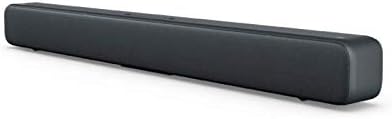
Figure 1.1: The MI MDZ-27-DI Wireless Bluetooth Soundbar, showcasing its sleek, dark grey design and compact form factor.
2. Safety Information
- Do not expose the soundbar to water or moisture.
- Do not block any ventilation openings. Install in accordance with the manufacturer's instructions.
- Do not install near any heat sources such as radiators, heat registers, stoves, or other apparatus (including amplifiers) that produce heat.
- Protect the power cord from being walked on or pinched, particularly at plugs, convenience receptacles, and the point where they exit from the apparatus.
- Only use attachments/accessories specified by the manufacturer.
- Unplug this apparatus during lightning storms or when unused for long periods of time.
- Refer all servicing to qualified service personnel. Servicing is required when the apparatus has been damaged in any way, such as power-supply cord or plug is damaged, liquid has been spilled or objects have fallen into the apparatus, the apparatus has been exposed to rain or moisture, does not operate normally, or has been dropped.
3. Package Contents
Please check the package for the following items:
- MI MDZ-27-DI Wireless Bluetooth Soundbar
- Power Adapter/Cable
- S/PDIF Cable (Note: Optical/Aux cables may need to be purchased separately depending on your TV model)
- User Manual (this document)
4. Product Features
The MI MDZ-27-DI Soundbar offers a range of features designed for an immersive audio experience:
- 8 Sound Drivers: Equipped with multiple drivers for a rich and balanced audio profile.
- Multiple Connectivity Options: Supports S/PDIF, Optical, Aux-in, Line-in, and Bluetooth 4.2 LE for versatile connection to various devices.
- Minimalist Design: A sleek bar shape with a fabric mesh exterior that complements any décor.
- Enhanced Bass: Delivers deep and clear bass for an improved listening experience.
- Easy Setup: Designed for a quick and hassle-free installation, whether on a table or wall-mounted.
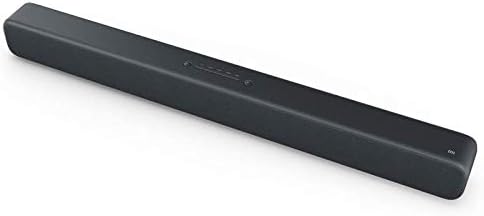
Figure 4.1: The soundbar's top panel, featuring integrated control buttons for power and input selection.
5. Setup and Installation
5.1 Placement Options
The MI Soundbar can be placed on a tabletop or mounted on a wall.
Tabletop Placement:
Place the soundbar on a stable, flat surface in front of your TV or desired listening area. Ensure there is adequate space around the soundbar for proper ventilation.
Wall Mounting:
The soundbar is designed for easy wall mounting. To mount, determine the desired mounting height. Mark the position for the first wall hole (A1). Then, horizontally to the right of A1, mark the position for the second wall hole (A2) at a distance of 416 mm. Ensure the wall can support the weight of the soundbar (approximately 1.92 kg).
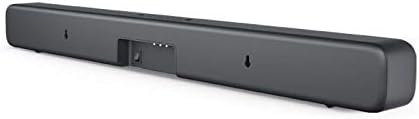
Figure 5.1: The rear of the soundbar, highlighting the input ports and the integrated wall mounting points.
5.2 Initial Setup
- Connect Power: Plug the power cable into the soundbar's power input and then into a wall outlet.
- Connect Audio Source: Choose your preferred audio connection method (S/PDIF, Optical, Aux-in, or Bluetooth) and connect the soundbar to your TV, mobile device, or other audio source. Refer to Section 6 for detailed connectivity instructions.
- Power On: Press the power button on the soundbar to turn it on.
6. Operating Instructions
6.1 Controls
The MI Soundbar features integrated controls on its top panel:
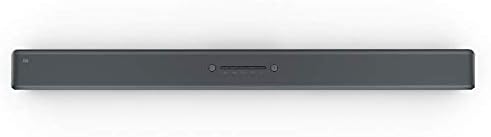
Figure 6.1: Close-up of the soundbar's top-mounted control buttons, including power, volume, and input selection.
- Power Button: Press to turn the soundbar On or Off.
- Volume Up/Down: Adjust the sound output level.
- Input/Source Button: Cycle through available input sources (Bluetooth, S/PDIF, Optical, Aux-in, Line-in).
Note: The MI MDZ-27-DI Soundbar does not include a remote control. Volume and source selection must be adjusted directly on the unit or via the connected device (e.g., TV remote for TV volume).
6.2 Connectivity Options
The soundbar offers several ways to connect to your audio sources:
- Bluetooth:
- Ensure the soundbar is powered on.
- Press the Input/Source button until the Bluetooth indicator light is active.
- On your mobile device or computer, enable Bluetooth and search for "MI Soundbar" (or similar).
- Select the soundbar from the list to pair. Once paired, the indicator light will become solid.
- S/PDIF (Coaxial Digital Audio):
Connect the provided S/PDIF cable from your TV's S/PDIF output to the soundbar's S/PDIF input. Select S/PDIF as the input source on the soundbar.
- Optical (Digital Audio):
Connect an optical audio cable (not included) from your TV's Optical output to the soundbar's Optical input. Select Optical as the input source on the soundbar.
- Aux-in (3.5mm Analog Audio):
Connect a 3.5mm audio cable (not included) from your device's headphone jack or Aux output to the soundbar's Aux-in port. Select Aux-in as the input source on the soundbar.
- Line-in (RCA Analog Audio):
Connect an RCA audio cable (not included) from your device's Line-out to the soundbar's Line-in ports. Select Line-in as the input source on the soundbar.
7. Maintenance
To ensure the longevity and optimal performance of your MI Soundbar, follow these maintenance guidelines:
- Cleaning: Use a soft, dry cloth to wipe the exterior of the soundbar. Do not use liquid cleaners, aerosols, or abrasive cleaning agents.
- Ventilation: Ensure that the ventilation openings are not blocked by dust or debris. Periodically clean around these areas.
- Storage: If storing the soundbar for an extended period, unplug it from the power outlet and store it in a cool, dry place away from direct sunlight and extreme temperatures.
8. Troubleshooting
If you encounter issues with your MI Soundbar, refer to the following common troubleshooting steps:
| Problem | Possible Cause | Solution |
|---|---|---|
| No power | Power cable not connected; Power outlet not working. | Ensure power cable is securely connected. Try a different power outlet. |
| No sound | Incorrect input source selected; Volume too low; Cable not connected properly. | Press the Input/Source button to select the correct input. Increase the volume on the soundbar and your source device. Check all audio cable connections. |
| Bluetooth pairing issues | Soundbar not in pairing mode; Device too far; Previous device still connected. | Ensure soundbar is in Bluetooth pairing mode. Move device closer to soundbar. Disconnect from any previously paired devices. |
| Sound distortion at high volumes | Volume set too high; Poor audio source quality. | Reduce the volume. Try a different audio source to check if the issue persists. |
9. Specifications
| Feature | Detail |
|---|---|
| Product Dimensions | 83 x 7.2 x 8.7 cm |
| Weight | 1.92 kg |
| Model Number | MDZ-27-DI |
| Brand | MI |
| Connectivity Technology | Bluetooth (4.2 LE), S/PDIF, Optical, Aux-in, Line-in |
| Audio Output Mode | Stereo |
| Mounting Type | Wall Mount, Tabletop Mount |
| Material | Fabric mesh exterior |
| Manufacturer | Xiaomi |
10. Warranty and Support
For warranty information and technical support, please refer to the warranty card included with your product or visit the official MI website. Keep your purchase receipt as proof of purchase for any warranty claims.
For further assistance, you may contact MI customer service through their official channels.