
1. Introduction
The Electro Voice EVOLVE30M-W is a compact and powerful active PA speaker system designed for solo musicians, small groups, and mobile entertainers. It offers exceptional sound coverage and performance in a portable and easy-to-use package. The system includes a subwoofer, a column array, and a pole for simple and intuitive setup.
Key features include a 10-inch subwoofer housed in a 15mm plywood enclosure, a column array with six 2.8-inch neodymium drivers, and an integrated cable pole with magnetic locking for quick assembly. The system boasts 1000W peak power, a wide 120° x 40° coverage angle, and a maximum SPL of 122 dB.
2. Product Components and Overview
The EVOLVE30M-W system consists of three main components:
- Subwoofer: Houses the 10-inch woofer and the amplifier, with integrated QuickSmartDSP and control panel.
- Column Array: Contains six 2.8-inch neodymium drivers for high-frequency reproduction.
- Two-Piece Pole: Connects the column array to the subwoofer, featuring integrated cabling and magnetic locking.

Figure 2.1: Exploded view showing the subwoofer, pole, and column array components.

Figure 2.2: The EVOLVE30M-W system components laid out, including the subwoofer, pole sections, column array, and protective bags.
3. Setup Instructions
Setting up your EVOLVE30M-W system is quick and straightforward:
- Position the Subwoofer: Place the subwoofer on a stable, flat surface where you intend to use the system. Ensure adequate ventilation around the unit.
- Assemble the Pole: Connect the two sections of the aluminum pole. The integrated cabling will automatically connect as you join the sections.
- Insert the Pole into Subwoofer: Carefully insert the assembled pole into the designated slot on top of the subwoofer. The magnetic lock will secure it in place.
- Attach the Column Array: Place the column array onto the top of the pole. Ensure it clicks securely into position. The electrical connection for the array is made automatically through the pole.
- Connect Power: Plug the power cable into the subwoofer's power inlet and then into a suitable AC power outlet.

Figure 3.1: The EVOLVE30M-W system fully assembled and ready for use.

Figure 3.2: Another front view of the assembled EVOLVE30M-W, highlighting its sleek design.
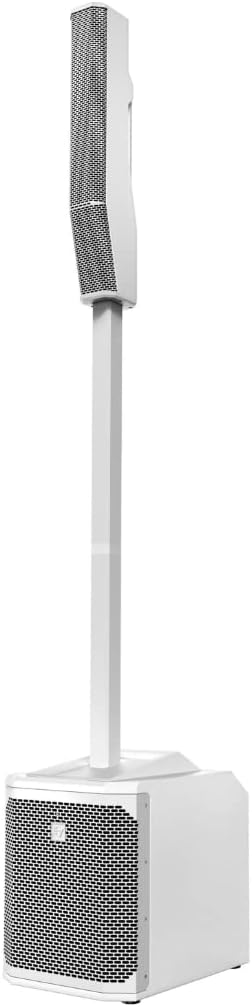
Figure 3.3: Side profile of the assembled EVOLVE30M-W system.
4. Operating Instructions
The EVOLVE30M-W features a comprehensive control panel and QuickSmartDSP for easy operation and sound optimization.
4.1 Control Panel and Connections
The rear panel of the subwoofer provides all necessary inputs, outputs, and controls:

Figure 4.1: Detailed view of the EVOLVE30M-W control panel.

Figure 4.2: Angled perspective of the EVOLVE30M-W control panel, showing input and output sections.
- Inputs:
- 6 x XLR/TRS Combo Jacks (Inputs 1-4 for Line/Mic, Inputs 5/6 for Line)
- 1 x 3.5mm Minijack (Aux In)
- 1 x Stereo RCA (Aux In)
- 1 x 6.3mm Hi-Z Jack (for instruments)
- 1 x 6.3mm Footswitch Jack
- Outputs:
- 1 x XLR Mix Out
- 1 x XLR Aux Out
- QuickSmartDSP Display and Control Knob: Navigate menus, adjust settings, and select presets.
- Master Volume: Controls the overall output level of the system.
- Bluetooth Pairing Button: For connecting Bluetooth audio devices.
4.2 QuickSmartDSP Functions
The integrated QuickSmartDSP provides advanced processing with single-knob control and an LCD screen:
- 4 Presets: Music, Live, Speech, Club – optimize sound for different applications.
- Multi-Band EQ: Fine-tune the frequency response.
- 5 User Presets: Save your custom settings for quick recall.
- Output Delay: Adjust delay for proper time alignment in multi-speaker setups.
- Phantom Power: Enable for condenser microphones on relevant inputs.
- Input Level Control: Adjust individual input gains.
- Master Level Control: Overall system volume.
4.3 EV QuickSmart Mobile App
The EV QuickSmart Mobile App allows you to configure, control, and monitor up to six EVOLVE systems simultaneously from your mobile device. Download the app from your device's app store for enhanced control capabilities.
5. Maintenance
Proper maintenance ensures the longevity and optimal performance of your EVOLVE30M-W system:
- Cleaning: Use a soft, dry cloth to clean the exterior surfaces of the subwoofer, pole, and column array. For stubborn dirt, a slightly damp cloth can be used, followed by a dry cloth. Do not use abrasive cleaners or solvents.
- Storage: When not in use, store the system in a dry, temperate environment. Utilize the included transport bag for the column array and pole to protect them during transport and storage.
- Ventilation: Ensure the subwoofer's ventilation grilles are clear of obstructions to prevent overheating.
- Cable Care: Inspect all cables regularly for signs of wear or damage. Replace any damaged cables immediately.
6. Troubleshooting
If you encounter issues with your EVOLVE30M-W system, refer to the following common troubleshooting steps:
- No Power:
- Check if the power cable is securely connected to both the subwoofer and the power outlet.
- Ensure the power switch on the subwoofer is in the 'ON' position.
- Verify the power outlet is functional by plugging in another device.
- No Sound:
- Check all audio cable connections from your source devices to the subwoofer inputs.
- Ensure the Master Volume knob is turned up.
- Verify individual input levels are not set too low or muted via the DSP.
- Confirm the column array is properly seated on the pole and the pole is securely connected to the subwoofer.
- Distorted Sound:
- Reduce the input level from your source device or the input gain on the subwoofer to prevent clipping.
- Check for damaged cables.
- Ensure the system is not being overdriven (Master Volume too high).
- Bluetooth Connection Issues:
- Ensure Bluetooth is enabled on your source device.
- Press and hold the Bluetooth pairing button on the subwoofer to enter pairing mode.
- Move your source device closer to the subwoofer.
- Try unpairing and re-pairing the device.
For more complex issues or if the problem persists, please contact Electro-Voice customer support or refer to the official product support website.
7. Specifications
Detailed technical specifications for the Electro Voice EVOLVE30M-W active PA speaker system:
| Feature | Specification |
|---|---|
| Model Number | EVOLVE30M-W |
| Power Output (Peak) | 1000 W |
| Frequency Response (-3 dB) | 43 - 20,000 Hz |
| Frequency Response (-10 dB) | 37 - 20,000 Hz |
| Maximum SPL | 122 dB |
| Coverage Angle (H x V) | 120° x 40° |
| Crossover Frequency | 200 Hz |
| Subwoofer Driver | 10-inch Woofer |
| Column Array Drivers | 6 x 2.8-inch Neodymium Drivers |
| Subwoofer Enclosure Material | 15mm Plywood |
| Column Array Material | Composite |
| Pole Material | Aluminum |
| Subwoofer Dimensions (H x W x D) | 530 x 345 x 471 mm (20.9 x 13.6 x 18.5 inches) |
| Column Array Dimensions (H x W x D) | 825 x 102 x 172 mm (32.5 x 4.0 x 6.8 inches) |
| Pole Dimensions (H x W x D) | 929 x 48.5 x 55 mm (36.6 x 1.9 x 2.2 inches) |
| Subwoofer Weight | 20.3 kg (44.75 lbs) |
| Column Array Weight | 4.7 kg (10.36 lbs) |
| Pole Weight | 1.25 kg (2.76 lbs) |
| Total System Weight (approx.) | 26.25 kg (57.87 lbs) |
| Connectivity | Auxiliary, Bluetooth |
| Special Features | Portable |
8. Warranty and Support
For detailed warranty information, please refer to the warranty card included with your product or visit the official Electro-Voice website. Warranty terms and conditions may vary by region.
For technical support, service, or additional product information, please contact Electro-Voice customer service or visit their official support portal. You can typically find contact details on the Electro-Voice website or in the product packaging.
Online Resources:
- Official Electro-Voice Website: www.electrovoice.com
- Product Support Pages: Refer to the support section on the official website for FAQs, software updates, and additional documentation.


