
Introduction
Welcome to your new Taylor GS Mini-e Koa Plus acoustic-electric guitar. This manual provides essential information for setting up, operating, and maintaining your instrument to ensure optimal performance and longevity. The GS Mini-e Koa Plus features a solid Hawaiian koa top and layered koa back and sides, offering a warm, robust tone with surprising projection. Its compact size makes it ideal for portability without compromising sound quality.
This instrument combines traditional acoustic craftsmanship with modern electronics, allowing for versatile performance both unplugged and amplified.
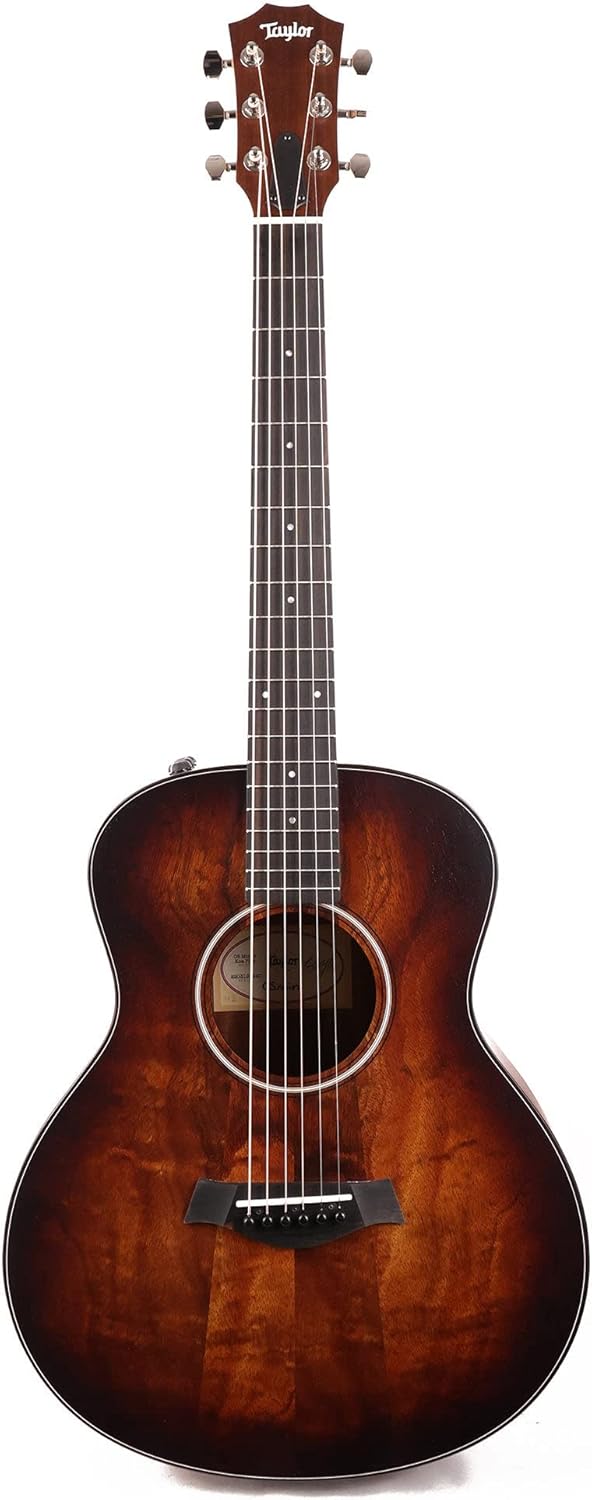
Figure 1: Front view of the Taylor GS Mini-e Koa Plus guitar.

Figure 2: Back view of the Taylor GS Mini-e Koa Plus guitar.
Setup
Unpacking and Initial Inspection
Carefully remove your guitar from its Aerocase. Inspect the instrument for any signs of damage that may have occurred during shipping. Ensure all included accessories, such as the instrument cable, are present.

Figure 3: The included Taylor Aerocase for transport and protection.
Battery Installation
The onboard electronics require one 9V battery. Locate the battery compartment, typically on the side or near the output jack. Open the compartment, insert a fresh 9V alkaline battery, ensuring correct polarity, and close the compartment securely.
Tuning Your Guitar
Before playing, tune your guitar. Standard tuning from lowest to highest string is E-A-D-G-B-e. Use a digital tuner for accuracy. Gently turn the tuning pegs to adjust string tension until each string reaches the correct pitch.

Figure 4: Front view of the guitar headstock with tuning pegs.

Figure 5: Back view of the guitar headstock and tuning machines.
Connecting to an Amplifier
To use the guitar's acoustic-electric capabilities, connect one end of the instrument cable to the guitar's output jack and the other end to an acoustic amplifier or PA system. Adjust volume and tone controls on both the guitar and amplifier as desired.
Operation
Playing Your Guitar
Hold the guitar comfortably. Experiment with different strumming and picking techniques. The GS Mini-e Koa Plus is designed for a rich, full-bodied sound despite its smaller size. Explore various chords and melodies to familiarize yourself with the instrument's response.

Figure 6: Detail of the guitar's body and soundhole.
Using Onboard Electronics
Your guitar is equipped with an onboard pickup system. Adjust the volume and tone controls, typically located on the upper bout of the guitar, to shape your amplified sound. Start with controls at a neutral position and make small adjustments to find your preferred tone.
Maintenance
Cleaning
Wipe down your guitar after each use with a soft, lint-free cloth to remove sweat and oils. For a deeper clean, use guitar-specific cleaning products sparingly. Avoid abrasive cleaners or solvents.
String Replacement
Strings should be replaced regularly, depending on playing frequency. Replace one string at a time to maintain neck tension. Refer to online resources or a qualified technician for detailed string changing instructions.
Fretboard Care
Periodically clean the ebony fretboard with a damp cloth and apply a small amount of fretboard conditioner to prevent drying and cracking.
Humidity Control
Wood guitars are sensitive to humidity changes. Store your guitar in its Aerocase when not in use, ideally in an environment with stable humidity (45-55% relative humidity). Extreme dryness or humidity can cause damage.
Storage
Always store your guitar in its Aerocase to protect it from dust, impacts, and environmental fluctuations.
Troubleshooting
Common Issues and Solutions
- Poor Tuning Stability: Ensure strings are properly stretched. Check tuning machine screws for tightness. Old strings can also cause tuning issues; consider replacing them.
- String Buzz: This can be caused by low action, uneven frets, or improper neck relief. Minor adjustments may be possible, but often requires professional setup.
- No Sound When Plugged In: Check the 9V battery. Ensure the instrument cable is fully inserted and functional. Verify amplifier settings and connections.
- Distorted or Weak Amplified Sound: Check battery level. Ensure cable is not faulty. Adjust gain settings on your amplifier.
For persistent issues or complex repairs, consult a qualified guitar technician or contact Taylor Guitars customer support.
Specifications
| Feature | Detail |
|---|---|
| Model | FG02016011001751084 |
| Scale Length | 23-1/2 inches (23.5 Inches) |
| Nut & Saddle | Nubone Nut and Micarta Saddle |
| Bracing System | X Bracing |
| Number of Frets | 20 |
| Tuners | Taylor Nickel |
| Included Case | Aerocase |
| Body Dimensions | Length: 17 5/8 inches, Width: 14 3/8 inches, Depth: 4 7/16 inches (Overall: 44 x 21 x 9 inches) |
| Top Finish | Varnish |
| Back and Side Finish | Varnish |
| Back Configuration | Layered Koa |
| Rosette Size | Three Ring |
| Neck Width | 1-11/16 inches |
| Neck Material | Tropical Mahogany |
| Fretboard Material | Ebony |
| Required Batteries | 1 x 9V (Alkaline) |
| Item Weight | 9 pounds |
| Connector Type | 1/4" (6.35mm) jack |
| Number of Strings | 6 |
| Hand Orientation | Right |
Important Safety Information
- Avoid exposing the guitar to extreme temperatures or rapid temperature changes.
- Keep the guitar away from direct sunlight and heat sources.
- Do not expose the guitar to excessive moisture or humidity.
- Handle the guitar with care to prevent drops or impacts.
- When changing strings, be mindful of sharp string ends.
- Ensure proper ventilation if using any cleaning or conditioning products.
Warranty and Support
For information regarding your Taylor guitar's warranty, please refer to the documentation provided at the time of purchase or visit the official Taylor Guitars website. For technical support, service, or parts, please contact Taylor Guitars customer service directly.
Official Taylor Guitars Website: www.taylorguitars.com
