
Severin HV 7157
SEVERIN HV 7157 2-in-1 Cordless Stick and Handheld Vacuum Cleaner User Manual
1. Introduction
Thank you for choosing the SEVERIN HV 7157 2-in-1 Cordless Stick and Handheld Vacuum Cleaner. This appliance is designed for efficient and flexible cleaning of various surfaces. This manual provides essential information for the safe and effective use, maintenance, and troubleshooting of your vacuum cleaner. Please read these instructions carefully before first use and keep them for future reference.
2. Important Safety Instructions
Always observe the following safety precautions to prevent electric shock, fire, or injury:
- This appliance is intended for domestic use only. Do not use it outdoors or for commercial purposes.
- Do not handle the plug or appliance with wet hands.
- Keep hair, loose clothing, fingers, and all parts of the body away from openings and moving parts.
- Do not vacuum up water, liquids, hot ashes, burning cigarettes, sharp objects, or flammable/combustible materials.
- Ensure the dust container and filter are correctly installed before use.
- Use only the original charger supplied with the appliance.
- Do not attempt to repair the appliance yourself. Contact authorized service personnel for repairs.
- Store the appliance in a dry place when not in use.
3. Package Contents
Please check that all items are present in the packaging:
- Main unit (integrated handheld vacuum)
- Removable XL aluminum suction tube (70 cm)
- S'Power high-speed motor brush with LED lighting
- 3-in-1 accessory kit (cushion brush, furniture brush, crevice tool)
- Wall mount
- Charger
- User Manual
4. Product Overview
Familiarize yourself with the components of your SEVERIN HV 7157 vacuum cleaner:

Figure 1: The main handheld vacuum unit with dust container and handle.

Figure 2: The SEVERIN HV 7157 assembled as a cordless stick vacuum with the extension tube and motor brush.
- Main Unit: Contains the motor, dust container, and battery. Functions as a handheld vacuum.
- XL Suction Tube: Connects the main unit to the floor brush for stick vacuum operation.
- S'Power Motor Brush: Features a 2-in-1 brush roll with blue bristles for pet hair and red bristles for fine dust. Includes LED lighting for dark areas.
- 3-in-1 Accessory Tool: A versatile tool combining a crevice nozzle, cushion brush, and furniture brush for various cleaning tasks.
- On/Off Switch: Located on the handle for easy operation.
5. Setup and Assembly
Your SEVERIN HV 7157 can be used as a stick vacuum or a handheld vacuum.
5.1 Assembling the Stick Vacuum
- Insert the XL aluminum suction tube into the main unit until it clicks securely into place.
- Attach the S'Power motor brush to the other end of the XL suction tube, ensuring it clicks firmly.
- Your stick vacuum is now ready for use.
5.2 Using as a Handheld Vacuum
To use the appliance as a handheld vacuum, simply detach the XL suction tube and motor brush from the main unit. You can then attach the 3-in-1 accessory tool directly to the main unit for targeted cleaning.
6. Charging the Battery
The SEVERIN HV 7157 is equipped with a modern Li-Ion battery (22.2 V/2200 mAh) that offers no memory effect and minimal self-discharge.

Figure 3: The vacuum cleaner charging while mounted on the wall.
- Connect the charger to the charging port on the main unit.
- Plug the charger into a suitable wall outlet.
- The charging indicator light will illuminate to show that the battery is charging.
- A full charge takes approximately 3 hours.
- The battery features protection against overcharge and deep discharge.
- For convenient storage and charging, use the provided wall mount.
7. Operating Instructions
Your vacuum cleaner offers flexible cleaning options.
7.1 Power On/Off and Suction Levels
- Press the On/Off switch on the handle to start the vacuum cleaner.
- The appliance has two power levels:
- Level 1: Motor brush ON. Provides maximum runtime of approximately 25 minutes. Ideal for deep cleaning carpets and removing pet hair.
- Level 2: Motor brush OFF. Provides maximum runtime of approximately 30 minutes. Suitable for hard floors and lighter debris.
7.2 Using the S'Power Motor Brush
The S'Power motor brush is designed for effective cleaning on both hard floors and carpets.
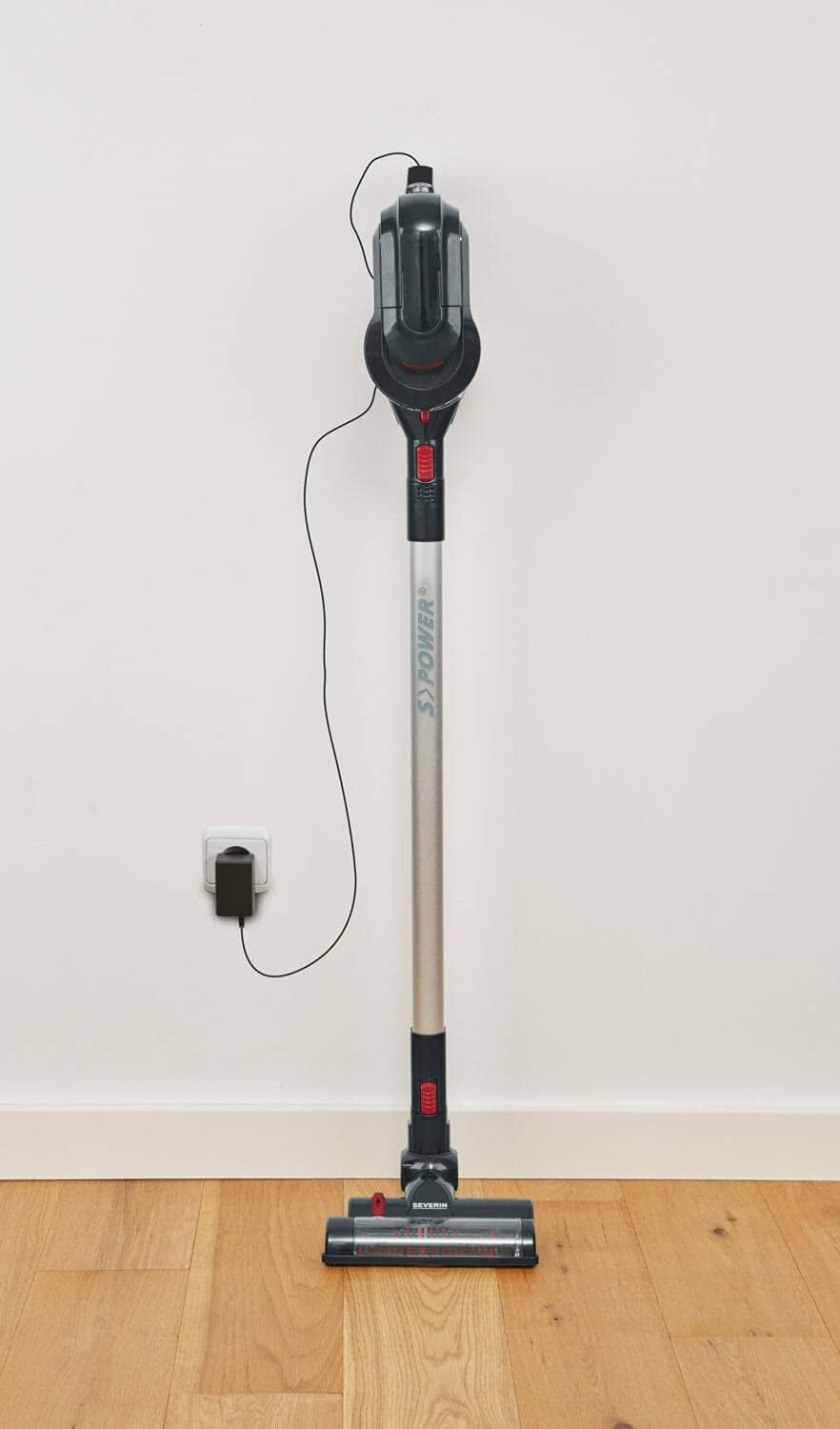
Figure 4: Close-up of the motor brush head showing the LED lighting for improved visibility.
- The brush roll features a 2-in-1 design: blue bristles for pet hair and red bristles for fine dust.
- The integrated LED lighting illuminates dark areas, such as under furniture, to ensure no dirt is missed.
- The 180° swivel joint allows for extremely flexible and easy maneuvering around obstacles and into tight spaces.
7.3 Handheld Vacuum Operation and Accessories
The integrated handheld vacuum is perfect for quick clean-ups and hard-to-reach areas.

Figure 5: Using the handheld vacuum to clean car seats effectively.

Figure 6: The handheld unit with an accessory tool cleaning an armchair.

Figure 7: Cleaning a surface with the handheld vacuum and brush attachment.
- Detach the main unit from the extension tube to use it as a handheld vacuum.
- Attach the 3-in-1 accessory tool directly to the main unit. This tool is ideal for cleaning cushions, furniture, and reaching into narrow crevices.
7.4 Cleaning Stairs and Elevated Surfaces

Figure 8: The stick vacuum configuration is suitable for cleaning stairs.
The lightweight and maneuverable design, combined with the 180° swivel joint, makes the HV 7157 suitable for cleaning stairs and other elevated surfaces with ease.
8. Maintenance and Cleaning
Regular maintenance ensures optimal performance and extends the lifespan of your vacuum cleaner.
8.1 Emptying the Dust Container
- The dust container has a capacity of 650 ml. Empty it regularly to maintain suction power.
- To empty, detach the dust container from the main unit.
- Open the container and dispose of the collected dust and debris.
- Close the container securely and reattach it to the main unit.
8.2 Cleaning the HEPA Filter
- The appliance is equipped with a HEPA filter, which should be cleaned periodically.
- Remove the filter from the dust container.
- Tap the filter gently to remove loose dust. If necessary, rinse it under cold running water.
- Ensure the filter is completely dry before reinserting it into the vacuum cleaner. Do not use the appliance with a wet filter.
8.3 Cleaning the Motor Brush Roll
- The brush roll in the S'Power motor brush is removable for easy cleaning.
- Follow the instructions in the diagram (refer to product packaging or separate manual for visual guide) to unlock and remove the brush roll.
- Remove any tangled hair, threads, or debris from the brush roll.
- Reinsert the brush roll and lock it securely in place.
9. Troubleshooting
If you encounter issues with your vacuum cleaner, refer to the following common problems and solutions:
| Problem | Possible Cause | Solution |
|---|---|---|
| Vacuum cleaner does not turn on. | Battery is discharged. | Charge the battery for 3 hours. |
| Reduced suction power. | Dust container is full. | Empty the dust container. |
| HEPA filter is clogged. | Clean or replace the HEPA filter. | |
| Nozzle or tube is blocked. | Check and clear any blockages in the nozzle, tube, or brush head. | |
| Motor brush not rotating. | Brush roll is tangled with hair/debris. | Remove and clean the brush roll. |
| Motor brush function is off (Level 2). | Switch to Level 1 to activate the motor brush. |
If the problem persists after trying these solutions, please contact Severin customer service.
10. Technical Specifications
| Model Number: | HV 7157 |
| Brand: | Severin |
| Color: | Black / Garnet Red |
| Dimensions (L x W x H): | 12 x 33 x 23 cm |
| Weight: | 2.02 kg |
| Dust Container Capacity: | 650 ml |
| Power: | 140 Watts |
| Voltage: | 22.2 Volts |
| Battery Type: | Lithium-ion (22.2 V / 2200 mAh), replaceable |
| Charging Time: | Approx. 3 hours |
| Runtime (Motor Brush ON): | Max. 25 minutes |
| Runtime (Motor Brush OFF): | Max. 30 minutes |
| Filter Type: | HEPA filter |
| Special Features: | LED lighting, 180° swivel joint, 2-in-1 motor brush |
11. Warranty and Support
Your SEVERIN HV 7157 vacuum cleaner comes with a standard manufacturer's warranty. Please refer to the warranty card included in your packaging for specific terms and conditions, including the warranty period and coverage details.
For technical support, spare parts, or warranty claims, please contact Severin customer service. Contact information can typically be found on the Severin website or on your product packaging.
Related documentsHV 7157


Ask a question about this manual
Ask about setup, troubleshooting, compatibility, parts, safety, or missing instructions. Manuals+ will review the question and use this page’s manual context to help answer it.