
OWI Inc OWI-997
OWI RE/CO Wireless Remote-Controlled Robot Kit
Model: OWI-997
Brand: OWI Inc
1. Introduction
This manual provides comprehensive instructions for the assembly, setup, operation, and maintenance of your OWI RE/CO Wireless Remote-Controlled Robot Kit, Model OWI-997. The RE/CO Robot is a do-it-yourself kit designed to introduce users to robotics and engineering principles through hands-on construction and interactive play. It features tank-like tracks for off-road capability and a wireless remote for various control modes.
2. Safety Information
- Adult Supervision: This product is recommended for ages 8 and up. Adult supervision is advised during assembly and operation, especially for younger users.
- Small Parts: The kit contains small parts which may pose a choking hazard for children under 3 years old. Keep all components out of reach of infants and toddlers.
- Battery Safety:
- Use only the specified battery type (AAA).
- Do not mix old and new batteries, or different types of batteries.
- Insert batteries with correct polarity (+/-).
- Remove exhausted batteries promptly.
- Do not recharge non-rechargeable batteries.
- Keep batteries away from heat and open flames.
- Electrical Components: Handle electrical components with care. Do not expose the robot or remote to water or excessive moisture.
- Moving Parts: Keep fingers, hair, and loose clothing away from moving parts (tracks, gears) during operation to prevent injury.
3. Package Contents
Your OWI RE/CO Robot Kit includes all necessary components for assembly and operation. Please verify that all parts are present before beginning assembly.
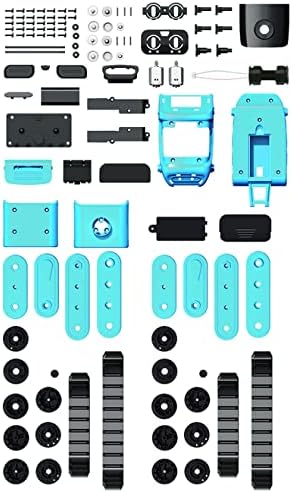
Image: All 106 individual components of the OWI RE/CO Robot Kit, including chassis parts, tracks, gears, screws, and electronic modules, neatly arranged for assembly.
- OWI RE/CO Robot Kit (106 pieces for assembly)
- Wireless Remote Controller
- Instruction Manual (this document)
Note: Batteries are not included. Please refer to the "Setup" section for battery requirements.
4. Assembly Instructions
The OWI RE/CO Robot is a do-it-yourself assembly kit. Detailed step-by-step instructions with diagrams are provided in the separate printed assembly manual included in your package. Follow these instructions carefully to ensure correct construction and functionality.
- Preparation: Clear a well-lit workspace. Organize all 106 pieces to easily identify them.
- Tools Required: A small Phillips head screwdriver may be required for some steps (not included).
- Follow Steps Sequentially: Adhere strictly to the order of steps in the assembly manual.
- Component Identification: Pay close attention to the shapes and labels of parts to ensure correct placement.
- Secure Connections: Ensure all screws are tightened appropriately and electrical connections are firm.

Image: The retail packaging box for the OWI RE/CO Robot Kit, displaying the assembled robot and remote control, along with product branding and features.
If you encounter any difficulties during assembly, refer to the troubleshooting section or contact OWI Inc. customer support.
5. Setup
5.1 Battery Installation
Ensure the robot and remote control are powered off before installing batteries.
Robot Battery Installation:
- Locate the battery compartment on the underside of the robot.
- Using a small Phillips head screwdriver, unscrew and remove the battery compartment cover.
- Insert 4 x "AAA" size batteries, ensuring correct polarity (+/-) as indicated inside the compartment.
- Replace the battery compartment cover and secure it with the screw.

Image: The underside of the OWI RE/CO Robot, highlighting the location of the battery compartment cover, which requires a screwdriver to open.
Remote Controller Battery Installation:
- Locate the battery compartment on the back of the remote controller.
- Using a small Phillips head screwdriver, unscrew and remove the battery compartment cover.
- Insert 2 x "AAA" size batteries, ensuring correct polarity (+/-) as indicated inside the compartment.
- Replace the battery compartment cover and secure it with the screw.

Image: The OWI RE/CO Robot in its assembled form, alongside its blue wireless remote control with yellow buttons, demonstrating the complete product.
6. Operating Instructions
After battery installation, turn on both the robot and the remote control. The robot is designed for wireless control across various terrains.
6.1 Basic Movement
Use the directional buttons on the remote control to maneuver the RE/CO Robot:
- Forward: Press the Up arrow button.
- Backward: Press the Down arrow button.
- Turn Left: Press the Left arrow button.
- Turn Right: Press the Right arrow button.

Image: A direct front view of the OWI RE/CO Robot, showcasing its robust tank-like tracks and the central body design.
The tank-like tracks allow the robot to navigate various surfaces, including uneven terrain. Exercise caution on very rough or wet surfaces.
6.2 Play Modes
The remote control features dedicated buttons to access different play modes:
- Story: Activates storytelling mode.
- Singing: Initiates singing sequences.
- Dancing: Engages the robot in pre-programmed dance routines.
- Programming: Allows users to program custom movement sequences. Refer to the detailed programming guide in the separate manual for specific instructions.
- Patrol Mode: The robot uses its infrared sensor to detect obstacles and navigate autonomously.
- Demo: Activates a demonstration sequence of the robot's capabilities.
- Music: Plays various musical tunes.
- Stop: Halts all current actions of the robot.
- Volume +/-: Adjusts the robot's sound output.

Image: The OWI RE/CO Robot demonstrating its patrol mode, autonomously moving along a path indicated by an arrow, avoiding orange traffic cones using its infrared sensor.
Experiment with different modes to explore the full range of the RE/CO Robot's interactive features.
7. Maintenance
- Cleaning: Wipe the robot and remote control with a dry, soft cloth. Do not use harsh chemicals or abrasive cleaners.
- Battery Care: Remove batteries if the robot will not be used for an extended period to prevent leakage.
- Storage: Store the robot and remote in a cool, dry place away from direct sunlight and extreme temperatures.
- Track Inspection: Periodically check the tracks for debris or wear. Clean any obstructions to ensure smooth operation.
8. Troubleshooting
| Problem | Possible Cause | Solution |
|---|---|---|
| Robot does not respond to remote control. |
|
|
| Robot moves erratically or only one track moves. |
|
|
| Difficulty entering or exiting programming mode. |
|
|
| Plastic parts break easily during assembly or use. |
|
|
9. Specifications
- Model: OWI-997
- Product Dimensions: 6.30" L x 6.89" W x 3.74" H (assembled robot)
- Item Weight: Approximately 1.39 pounds
- Assembly Pieces: 106
- Robot Battery Requirement: 4 x "AAA" size batteries (not included)
- Controller Battery Requirement: 2 x "AAA" size batteries (not included)
- Recommended Age: 8 years and up
- Control Type: Wireless Infrared Remote Control
- Features: Tank-like tracks, multiple play modes (storytelling, singing, dancing, programming, patrol), infrared sensor.
10. Warranty and Support
For warranty information, technical support, or to inquire about replacement parts, please contact OWI Inc. customer service directly. Refer to the contact information provided on the product packaging or the official OWI Inc. website.
OWI Inc. Website: www.owirobots.com
Ask a question about this manual
Ask about setup, troubleshooting, compatibility, parts, safety, or missing instructions. Manuals+ will review the question and use this page’s manual context to help answer it.