
1. Introduction
Welcome to the instruction manual for your new Marea Smart Watch B60001/5. This guide will help you understand the features, setup, and operation of your device to ensure optimal performance and user experience. Please read this manual thoroughly before using your watch.
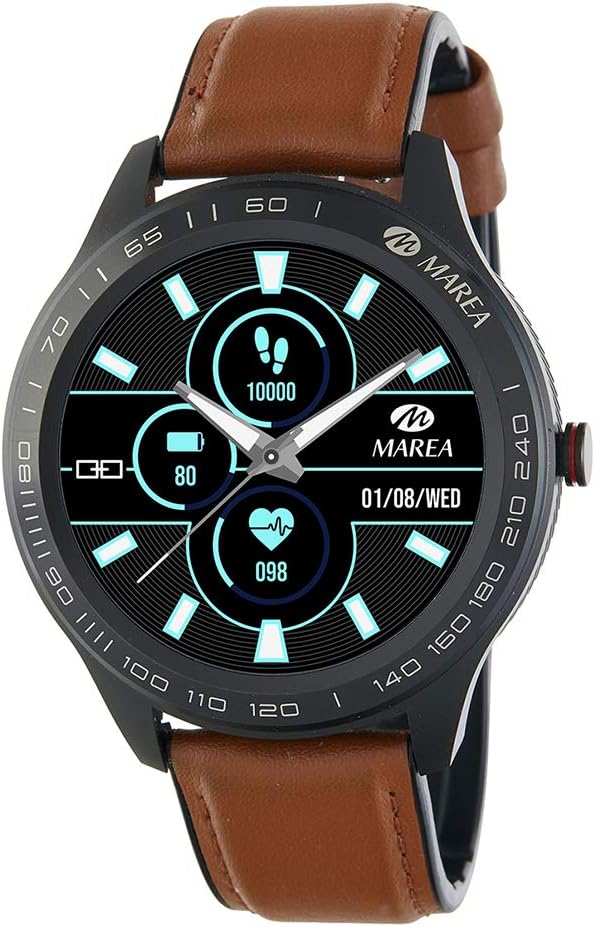
Image: Marea Smart Watch B60001/5. This image shows the watch face displaying steps (10000), battery level (80%), heart rate (098), and date (01/08/WED). The watch has a black casing and a brown leather strap.
2. Initial Setup
2.1 Charging the Watch
Before first use, fully charge your Marea Smart Watch. Connect the charging cable to the charging port on the back of the watch and plug the USB end into a power adapter (not included) or a computer's USB port. The watch display will indicate charging status.
- A full charge typically takes approximately 2 hours.
- Battery life is approximately 5 to 7 days, depending on usage.
2.2 App Installation and Pairing
To unlock the full potential of your Marea Smart Watch, you need to install the dedicated application on your smartphone and pair the devices.
- Download the App: Search for the "Marea Smart" app in your smartphone's app store (Google Play Store for Android or Apple App Store for iOS).
- Install the App: Follow the on-screen instructions to install the application.
- Enable Bluetooth: Ensure Bluetooth is enabled on your smartphone.
- Open the App: Launch the Marea Smart app and follow the prompts to create an account or log in.
- Pair the Watch: Within the app, navigate to the device pairing section. The app will search for available devices. Select "Marea B60001/5" from the list to initiate pairing. Confirm the pairing request on both your watch and smartphone if prompted.
System Requirements: iOS 8.0 or higher / Android 5.1 or higher.
3. Operating Instructions
3.1 Basic Navigation
The Marea Smart Watch features a 1.39-inch touchscreen display. Swipe left, right, up, or down to navigate through different menus and functions. Tap to select an option or confirm an action. The side button typically serves as a power button or a back button, depending on the context.
3.2 Health Monitoring Features
Your watch is equipped with various sensors to monitor your health metrics:
- Heart Rate: Continuously monitors your heart rate.
- Blood Pressure: Provides estimated blood pressure readings.
- Electrocardiogram (ECG): Records ECG data.
- Blood Oxygen: Measures your blood oxygen saturation (SpO2).
- Sleep Monitoring: Tracks your sleep patterns and quality.
- Water Reminder: Reminds you to drink water at set intervals.
Note: Health monitoring data is for reference only and should not be used for medical diagnosis or treatment. Consult a medical professional for health concerns.
3.3 Activity Tracking Features
Track your daily activities and fitness goals:
- Steps: Counts the number of steps taken throughout the day.
- Distance: Estimates the distance covered based on your steps.
- Calories Consumed: Calculates calories burned during activities.
- Step Goal: Allows you to set and track daily step targets.
- Sedentary Reminder: Alerts you when you have been inactive for too long.
- Chronograph: A stopwatch function for timing activities.
3.4 Notifications
Once paired with your smartphone, your Marea Smart Watch can display notifications:
- Call Notifications: Receive alerts for incoming calls.
- Message Notifications: View incoming text messages.
- Social Media Notifications: Get alerts from your connected social media applications.
Ensure app permissions are granted on your smartphone for notifications to function correctly.
3.5 Other Functions
- Alarms: Set multiple alarms through the app.
- Music Remote Control: Control music playback on your smartphone directly from the watch.
- Camera Remote Control: Use your watch as a remote shutter for your smartphone camera.
- Find Watch: Use the app to locate your watch if it's within Bluetooth range.
- Find Phone: Use your watch to make your phone ring if it's within Bluetooth range.
4. Maintenance and Care
To ensure the longevity and proper functioning of your Marea Smart Watch, follow these care guidelines:
- Cleaning: Wipe the watch and strap regularly with a soft, dry cloth. If necessary, use a slightly damp cloth, then dry thoroughly. Avoid harsh chemicals or abrasive materials.
- Water Resistance: The watch has an IP67 protection rating, meaning it is resistant to dust and can withstand immersion in water up to 1 meter for 30 minutes. It is suitable for daily use and light splashes, but not recommended for swimming, diving, or hot showers.
- Temperature: Avoid exposing the watch to extreme temperatures (hot or cold) or direct sunlight for extended periods.
- Storage: When not in use for a long time, store the watch in a cool, dry place.
5. Troubleshooting
If you encounter issues with your Marea Smart Watch, refer to the following common solutions:
- Watch not turning on: Ensure the watch is fully charged. Connect it to the charger for at least 30 minutes.
- Cannot pair with smartphone:
- Ensure Bluetooth is enabled on your smartphone.
- Make sure the watch is within Bluetooth range (typically 10 meters).
- Restart both your watch and smartphone.
- Check if the Marea Smart app is updated to the latest version.
- Forget the device in your phone's Bluetooth settings and try pairing again through the app.
- Notifications not received:
- Verify that notifications are enabled in the Marea Smart app.
- Check your smartphone's settings to ensure the app has permission to send notifications.
- Ensure the watch is connected via Bluetooth.
- Inaccurate health data: Ensure the watch is worn snugly on your wrist, about one finger's width above the wrist bone. Avoid excessive movement during measurements.
- Short battery life: Reduce screen brightness, disable continuous heart rate monitoring if not needed, and limit the number of notifications.
If the problem persists, please contact customer support.
6. Specifications
| Brand | Marea |
| Model Number | B60001 |
| Display Size | 1.39 Inches |
| Operating System | iOS and Android (iOS 8.0+, Android 5.1+) |
| Connectivity Technology | Bluetooth |
| Special Features | Chronograph, Alarm, Health Monitoring (HR, BP, ECG, SpO2, Sleep), Activity Tracking |
| Compatible Devices | Smartphone |
| Battery Capacity | 160 mAh |
| Battery Life | 5 to 7 days |
| Water Protection Rating | IP67 |
| Color | Brown |
| GPS | No GPS |
7. Warranty and Support
For warranty information, please refer to the documentation provided at the time of purchase or contact your retailer. If you require technical assistance or have questions not covered in this manual, please visit the official Marea website or contact their customer support service.
Keep your proof of purchase for warranty claims.


