
Auriol 2-LD5039-4
Auriol Men's Analog Wristwatch User Manual
Model: 2-LD5039-4
Introduction
Thank you for choosing the Auriol Men's Analog Wristwatch, Model 2-LD5039-4. This manual provides essential information for the proper setup, operation, and maintenance of your new timepiece. Please read it carefully to ensure optimal performance and longevity of your watch.

Figure 1: Front view of the Auriol Men's Analog Wristwatch. The watch features a silver-tone case, a dark dial with rose gold hour markers and hands, and a brown leather strap. The dial displays hours, minutes, and seconds.
Setup
Setting the Time
- Pull out the crown: Locate the crown on the right side of the watch case. Gently pull it out to the first position.
- Adjust the time: Turn the crown clockwise or counter-clockwise to move the hour and minute hands to the correct time.
- Push in the crown: Once the time is set, push the crown back into its original position. This will start the watch movement.
Changing the Watch Strap
Your Auriol wristwatch comes with an interchangeable strap feature, allowing you to customize its look. To change the strap:
- Locate the spring bars: On the underside of the strap, where it connects to the watch case, you will find small spring bars.
- Compress the spring bar: Using a spring bar tool (not included) or a small, pointed object, gently push the spring bar inwards from one end.
- Remove the strap: While compressing the spring bar, carefully pull the strap away from the watch case. Repeat for the other side of the strap.
- Attach the new strap: Insert one end of the new strap's spring bar into the lug hole on the watch case. Compress the other end of the spring bar and guide it into the opposite lug hole. Ensure the strap is securely fastened.

Figure 2: Example of an interchangeable watch strap. This black leather strap features white contrast stitching and a silver-tone buckle, designed for easy replacement on compatible Auriol watches.
Operating Instructions
Reading the Time
The Auriol Analog Wristwatch displays time using three hands:
- Hour Hand: The shortest hand, indicating the hour.
- Minute Hand: The longer hand, indicating the minutes.
- Second Hand: The thin, sweeping hand, indicating the seconds.
Read the position of each hand against the corresponding markers on the dial to determine the current time.
Maintenance and Care
General Care
- Cleaning: Wipe the watch case and crystal with a soft, dry cloth. For the strap, follow specific cleaning instructions based on its material (e.g., leather cleaner for leather straps).
- Avoid Extreme Temperatures: Do not expose the watch to extreme hot or cold temperatures, as this can affect its accuracy and battery life.
- Avoid Chemicals: Keep the watch away from solvents, detergents, perfumes, and cosmetics, as they can damage the case, strap, or internal components.
- Magnetic Fields: Avoid exposing the watch to strong magnetic fields, which can interfere with the quartz movement.
Water Resistance
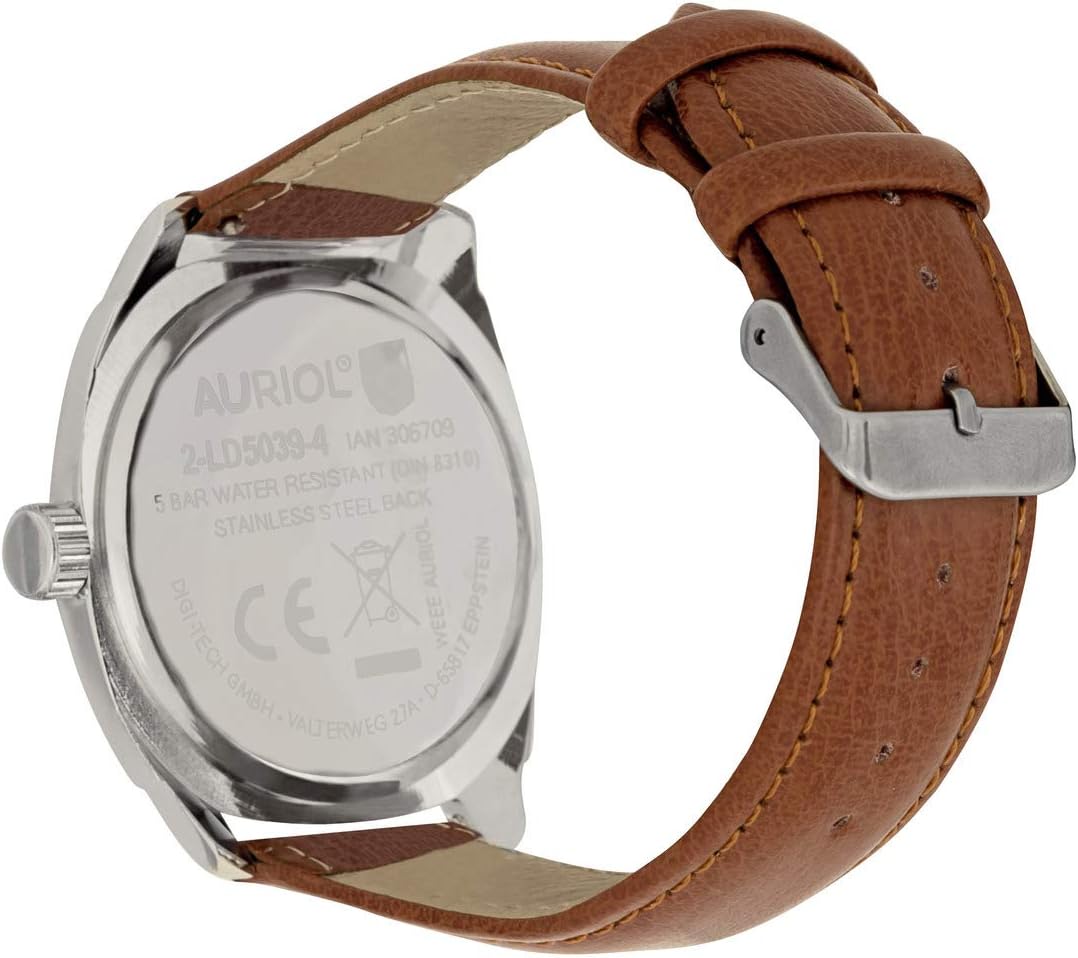
Figure 3: Back view of the Auriol Men's Analog Wristwatch. The stainless steel case back is engraved with "AURIOL", "2-LD5039-4", "5 BAR WATER RESISTANT (DIN 8310)", and "STAINLESS STEEL BACK", along with manufacturer details.
This watch is rated as 5 BAR Water Resistant (DIN 8310). This means it is suitable for everyday use and can withstand splashes, rain, and brief immersion in water, such as during hand washing. However, it is not suitable for showering, swimming, diving, or any water sports where it might be subjected to high water pressure or prolonged immersion.
- Do not operate the crown or pushers when the watch is wet.
- If the watch comes into contact with saltwater, rinse it with fresh water and dry it thoroughly.
Battery Replacement
The watch is powered by a quartz movement and requires a battery. When the watch stops or the second hand begins to jump erratically (indicating low battery), it is time for a battery replacement. It is recommended to have the battery replaced by a qualified watch technician to ensure proper sealing and maintain water resistance.
Troubleshooting
| Problem | Possible Cause | Solution |
|---|---|---|
| Watch is not running. | Battery is depleted. | Replace the battery. |
| Time is inaccurate. | Watch exposed to strong magnetic fields. | Demagnetize the watch (seek professional service). |
| Time is inaccurate. | Crown is not fully pushed in. | Push the crown fully into its normal position. |
| Condensation inside the crystal. | Exposure to extreme temperature changes or water ingress. | Consult a watch technician immediately to prevent damage. |
Specifications
- Model: 2-LD5039-4
- Movement: Quartz
- Display: Analog
- Case Material: Stainless Steel Back (as per engraving)
- Water Resistance: 5 BAR (DIN 8310)
- Manufacturer: digi-tech gmbh
- ASIN: B084C56R14
Warranty and Support
For information regarding warranty coverage and customer support, please refer to the documentation provided at the time of purchase or contact the retailer where the watch was acquired. Keep your proof of purchase for any warranty claims.
For technical assistance or service, it is recommended to contact an authorized service center or a qualified watch repair professional.
Ask a question about this manual
Ask about setup, troubleshooting, compatibility, parts, safety, or missing instructions. Manuals+ will review the question and use this page’s manual context to help answer it.