
Introduction
Thank you for choosing the Kaidi KD903 Wireless Bluetooth Earphones. This manual provides essential information for the safe and optimal use of your device. Please read it carefully before use and retain it for future reference.
What's in the Box:
- 1 x Kaidi KD903 Wireless Earphones
- 2 x Pairs of Comfortable Ear Tips (different sizes)
- 1 x USB Charging Cable
- 1 x User Manual

Image: Kaidi KD903 Wireless Earphones with included accessories, such as the charging cable and additional ear tips.
Product Overview
The Kaidi KD903 earphones are designed for active lifestyles, offering a secure fit and resistance to sweat. They feature Bluetooth 4.1 for stable connectivity and clear audio.
Key Features:
- Bluetooth 4.1: Ensures stable and efficient wireless connection.
- Sweat Resistance: Ideal for sports and workouts.
- CVC Intelligent Noise Reduction: Minimizes wind noise for clearer calls.
- Multipoint Connection: Connects to two devices simultaneously.
- Voice Reminder: Provides audio prompts for status updates.
- IOS Power Display: Shows battery level on iOS devices.
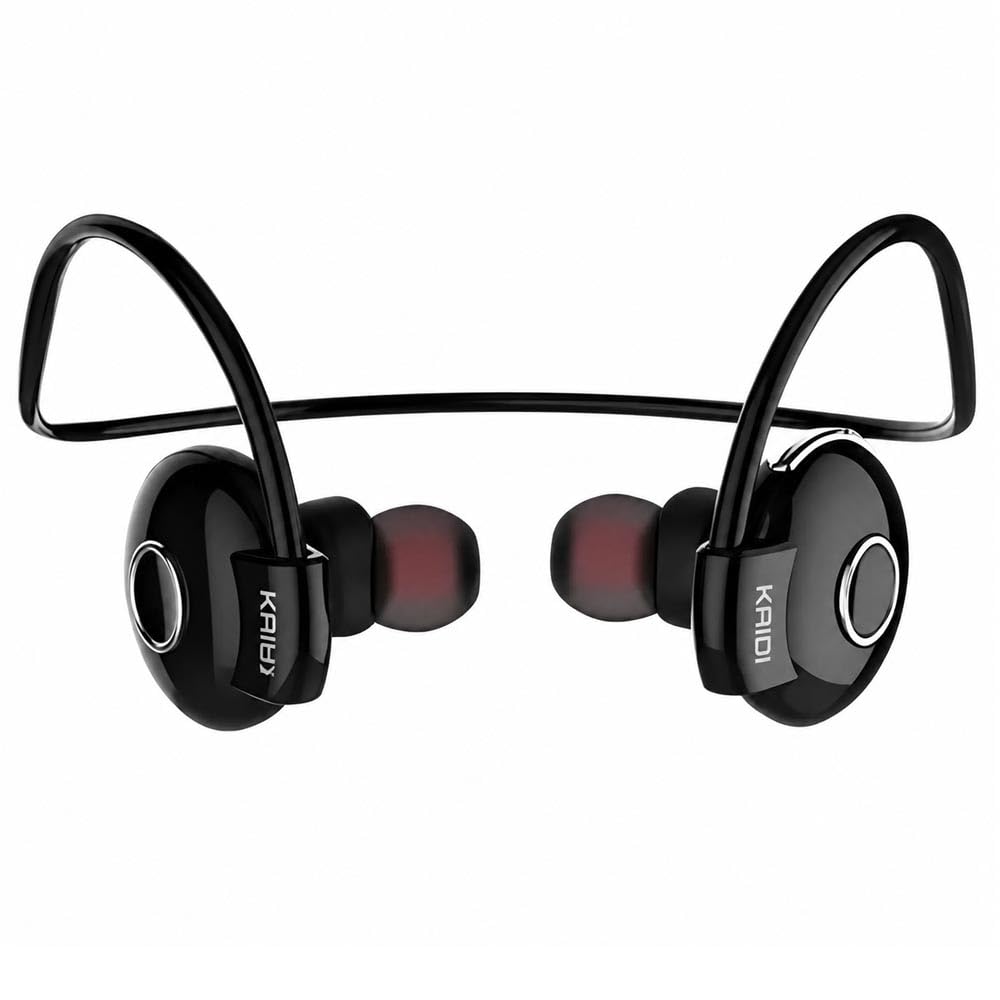
Image: An exploded view illustrating the internal components and design of the Kaidi KD903 earphone.
Setup
1. Charging the Earphones
- Connect the USB charging cable to the charging port on the earphones.
- Plug the other end of the USB cable into a compatible USB power source (e.g., computer, wall adapter).
- The indicator light will illuminate to show charging status. A full charge typically takes approximately 2.5 hours.
- Once fully charged, the indicator light will change or turn off. Disconnect the charging cable.
2. Pairing with a Bluetooth Device
- Ensure the earphones are powered off.
- Press and hold the multi-function button (usually the main button on the earphone) for approximately 5-7 seconds until the indicator light flashes red and blue alternately. This indicates the earphones are in pairing mode.
- On your smartphone or other Bluetooth-enabled device, enable Bluetooth and search for available devices.
- Select 'KD903' from the list of found devices.
- Once connected, a voice prompt will confirm successful pairing, and the indicator light will typically flash blue slowly.

Image: A person wearing the Kaidi KD903 wireless earphones, highlighting their suitability for sports and active use.
Operating Instructions
Power On/Off
- Power On: Press and hold the multi-function button for approximately 3 seconds until the blue indicator light flashes and a voice prompt says "Power On".
- Power Off: Press and hold the multi-function button for approximately 3 seconds until the red indicator light flashes and a voice prompt says "Power Off".
Music Playback
- Play/Pause: Press the multi-function button once.
- Next Track: Press and hold the Volume + button.
- Previous Track: Press and hold the Volume - button.
- Volume Up: Short press the Volume + button.
- Volume Down: Short press the Volume - button.
Call Management
- Answer/End Call: Press the multi-function button once.
- Reject Call: Press and hold the multi-function button for approximately 2 seconds.
- Redial Last Number: Double-press the multi-function button.
Multipoint Connection (Connecting to Two Devices)
- Pair the earphones with the first device as described in the "Pairing" section.
- After successful pairing, disable Bluetooth on the first device.
- Put the earphones back into pairing mode (red and blue flashing light).
- Pair the earphones with the second device.
- Once the second device is paired, re-enable Bluetooth on the first device. The earphones should now be connected to both devices simultaneously.
Maintenance
Proper maintenance ensures the longevity and performance of your Kaidi KD903 earphones.
- Cleaning: Regularly clean the earphones with a soft, dry, lint-free cloth. Do not use abrasive cleaners, solvents, or harsh chemicals.
- Sweat Resistance: While the earphones are sweat-resistant, avoid submerging them in water or exposing them to heavy rain. After intense workouts, wipe them dry.
- Storage: When not in use, store the earphones in a cool, dry place, away from direct sunlight and extreme temperatures.
- Charging: Charge the earphones using only the provided USB cable or a certified equivalent. Avoid overcharging.
Troubleshooting
If you encounter issues with your earphones, refer to the following common problems and solutions:
- Earphones do not power on:
Ensure the earphones are fully charged. Connect them to a power source and allow them to charge for at least 30 minutes before attempting to power on again. - No sound or low volume:
Check the volume levels on both the earphones and your connected device. Ensure the earphones are properly paired and connected to your device. Try re-pairing the earphones. - Cannot pair with a device:
Ensure the earphones are in pairing mode (red and blue indicator light flashing). Make sure Bluetooth is enabled on your device and it is within the 8-meter transmission range. Try restarting both the earphones and your device. - Connection is unstable or drops frequently:
Ensure there are no obstacles between the earphones and your device. Move closer to your device. Avoid environments with strong Wi-Fi or other wireless interference. - Charging issue:
Verify that the charging cable is securely connected to both the earphones and the power source. Try using a different USB port or charging adapter.
Specifications
| Feature | Specification |
|---|---|
| Bluetooth Version | 4.1 |
| Profile Support | HSP/HFP/A2DP/AVRCP |
| Standby Time | 200 hours |
| Talk Time | 10 hours |
| Music Playback Time | 6 hours |
| Charging Time | 2.5 hours |
| Frequency Range | RF 2.40 GHz (2.402 G – 2.480 G) |
| Ambient Temperature | -20°C to +60°C |
| Transmission Distance | Up to 8 meters |
| Battery Capacity | 100mAh rechargeable |
| Dimensions (L x W x H) | 12.2 x 10.3 x 4.4 cm |
| Connector Type | USB Type-C |
| Color | Black |
Warranty and Support
Warranty Information
This Kaidi KD903 product comes with a 30-day warranty from the date of purchase. This warranty covers manufacturing defects. Please retain your proof of purchase (receipt or invoice) as it is required for any warranty claims.
The warranty does not cover damage caused by misuse, accidents, unauthorized modifications, or normal wear and tear.
Customer Support
For technical assistance, troubleshooting not covered in this manual, or warranty inquiries, please contact the retailer from whom you purchased the product. You may also visit the official Kaidi website for additional support resources.