
Important Safety Instructions
Please read all instructions carefully before using the Sharper Image SI-380 Canister Steam Cleaner. Failure to follow these instructions may result in electric shock, fire, or serious injury.
- Always unplug the appliance from the electrical outlet when not in use and before cleaning.
- Do not immerse the appliance in water or any other liquid.
- Use only as described in this manual. Use only manufacturer's recommended attachments.
- Do not use with a damaged cord or plug. If the appliance is not working as it should, has been dropped, damaged, left outdoors, or dropped into water, return it to a service center.
- Do not pull or carry by cord, use cord as a handle, close a door on cord, or pull cord around sharp edges or corners. Keep cord away from heated surfaces.
- Do not allow children to operate the steam cleaner. Close supervision is necessary when any appliance is used by or near children.
- This item is built to meet U.S. voltage requirements and may not function properly when used in conjunction with external devices that alter or convert voltage or frequency of electricity. Improper use or shipping the product outside the U.S. will void all warranties.
- Proposition 65 Warning: This product may contain chemicals known to the State of California to cause cancer and birth defects or other reproductive harm.
Product Overview
The Sharper Image SI-380 Canister Steam Cleaner is designed for chemical-free, multi-use cleaning throughout your home. It features professional steam power and a versatile array of attachments to tackle various cleaning tasks.
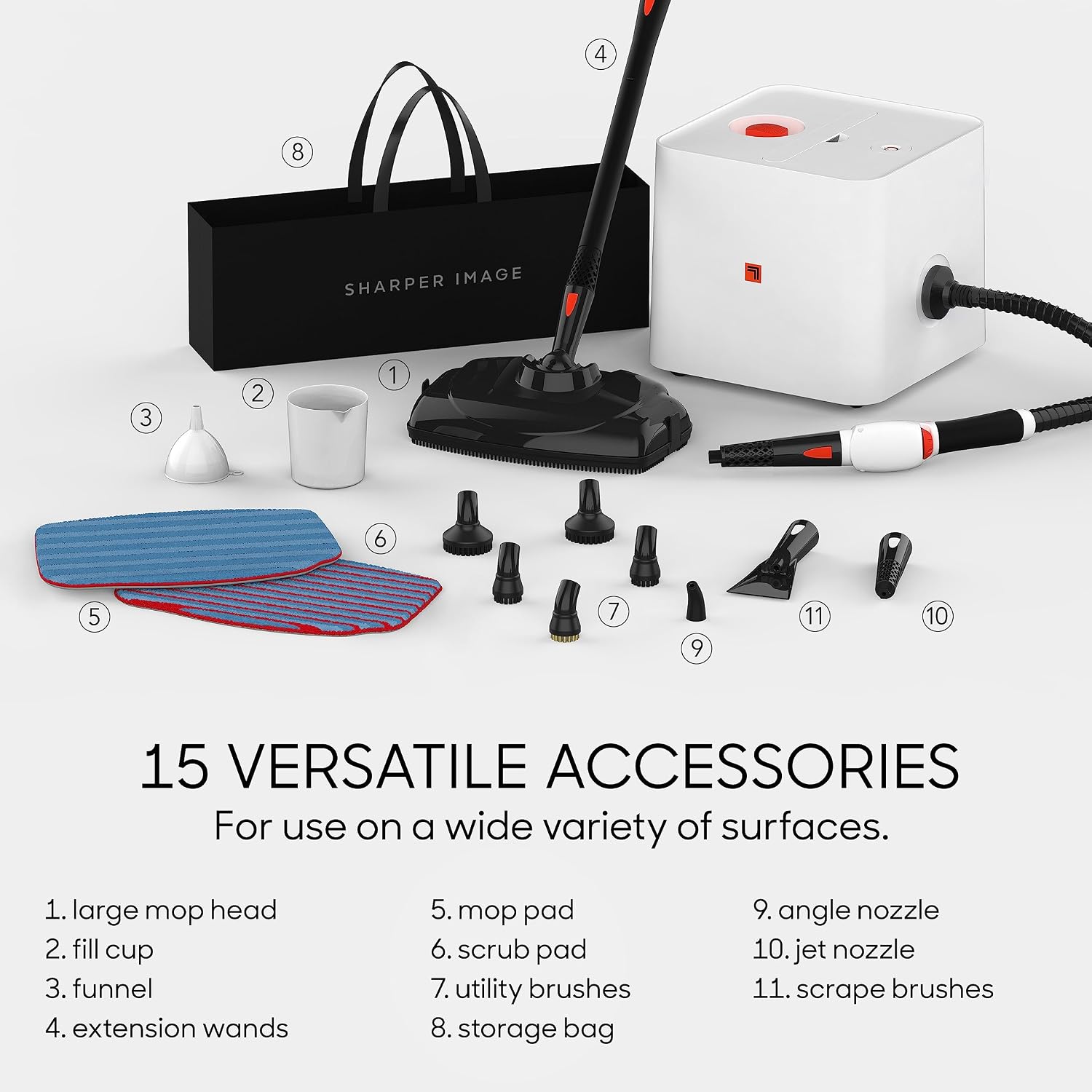
Figure 1: Sharper Image SI-380 Steam Cleaner with its 15 versatile accessories, including the large mop head, fill cup, funnel, extension wands, mop pad, scrub pad, utility brushes, storage bag, angle nozzle, jet nozzle, and scrape brushes.
Included Components:
- SI-380 Steam Cleaner Unit
- Large Mop Head
- 2 x Mop Pads
- Funnel
- Extension Wands
- Scrub Pad
- Utility Brushes
- Angle Nozzle
- Jet Nozzle
- Scrape Brushes
- Storage Bag
Setup
- Prepare the Unit: Place the SI-380 steam cleaner on a stable, flat surface.
- Fill Water Tank: Using the provided funnel and fill cup, carefully add clean water to the water tank. The tank has a capacity of 54 ounces (approximately 1.6 liters). Do not overfill.
- Attach Accessories: Select the appropriate accessory for your cleaning task (e.g., mop head for floors, jet nozzle for grout) and securely attach it to the steam hose or extension wands.
- Connect Power: Plug the 18-foot power cord into a standard U.S. electrical outlet. The unit operates at 1500 watts.
- Heat Up: Allow approximately 7 minutes for the unit to heat up and produce steam. The indicator light will change when ready.

Figure 2: The SI-380 steam cleaner unit, highlighting its 7-minute heat-up time, 43-minute continuous steam time, and 54-ounce tank capacity.

Figure 3: The SI-380 steam cleaner unit, showing its generous 18-foot power cord and 11-foot insulated hose for extended reach.
Operating Instructions
Once the unit is heated and ready, you can begin cleaning. The SI-380 provides up to 43 minutes of continuous steam on a full tank.
- Steam Activation: Press the steam trigger on the handle to release steam. Release the trigger to stop steam flow.
- Surface Cleaning: For floors, attach the mop head with a mop pad. Glide the mop head slowly over the surface to allow the steam to penetrate and loosen dirt.
- Targeted Cleaning: Use the jet nozzle or utility brushes for concentrated steam on stubborn spots, grout lines, or hard-to-reach areas. The angle nozzle is useful for corners and tight spaces.
- Chemical-Free Cleaning: The SI-380 uses only water to create steam, providing a natural and chemical-free way to clean and sanitize various surfaces.

Figure 4: Demonstrating the use of the steam cleaner to sanitize and clean a bathroom faucet and sink area.

Figure 5: The SI-380 steam cleaner in action on a floor, emphasizing its chemical-free cleaning capability using only steam.
Maintenance
- Empty Water Tank: After each use, ensure the unit has cooled down, then carefully empty any remaining water from the tank.
- Clean Accessories: Remove and clean all used accessories. Mop pads can typically be machine washed. Other attachments should be hand wiped clean.
- Wipe Down Unit: Wipe the exterior of the steam cleaner unit with a damp cloth. Do not use abrasive cleaners.
- Storage: Store the steam cleaner and its accessories in a cool, dry place, preferably in the provided storage bag.
Troubleshooting
| Problem | Possible Cause | Solution |
|---|---|---|
| No steam or low steam output. | Water tank is empty or low. Unit not heated sufficiently. | Refill water tank. Allow unit to heat up for the full 7 minutes. |
| Water spitting instead of steam. | Unit not fully heated. | Allow additional time for the unit to heat up completely before use. |
| Extension poles separating. | Not securely connected. | Ensure extension wands are firmly clicked into place. |
Specifications
| Feature | Detail |
|---|---|
| Brand | Sharper Image |
| Model Name | SI-380 |
| Wattage | 1500 watts |
| Power Source | Corded (U.S. voltage requirements) |
| Item Weight | 3.38 pounds (54 Ounces) |
| Product Dimensions | 8.6 x 8.6 x 10.5 inches |
| Capacity | 54 Ounces (water tank) |
| Heat-up Time | Approx. 7 minutes |
| Continuous Steam Time | Approx. 43 minutes |
| Power Cord Length | 18 feet |
| Insulated Hose Length | 11 feet |
| Surface Recommendation | Floor |
| Care Instructions | Hand Wipe Clean |
| Assembly Required | Yes |
| UPC | 047171380005 |
Warranty Information
The Sharper Image SI-380 Canister Steam Cleaner comes with a 1 Year Manufacturer Warranty. Please retain your proof of purchase for warranty claims. This warranty is valid only for products used within U.S. voltage requirements.
Support
For further assistance, troubleshooting, or to inquire about replacement parts, please contact Sharper Image Customer Support.
- Official User Guide (PDF): You can download the official user guide here.
- Online Support: Visit the official Sharper Image website for support resources.
- Customer Service: Refer to your product packaging or the Sharper Image website for direct contact information.


