
Introduction
This manual provides essential instructions for the safe and efficient operation of your Xiaomi AI Bluetooth Speaker Mini (Model MDZ-28-DE). Please read this manual thoroughly before using the product and retain it for future reference.
Product Overview
The Xiaomi AI Bluetooth Speaker Mini is a compact, portable wireless speaker designed for high-definition audio playback and hands-free calling. Its small size and lightweight design make it ideal for on-the-go use.

Figure 1: Front view of the Xiaomi AI Bluetooth Speaker Mini. This image displays the speaker's cylindrical shape and the perforated grille on top, which houses the speaker driver.
Key Features:
- Compact and Portable: Lightweight design for easy carrying.
- Bluetooth 4.2 Connectivity: Stable wireless connection to smartphones and other devices.
- Hands-free Calling: Integrated microphone for clear voice calls.
- AI Integration: Supports voice assistant functions when connected to a compatible smartphone.
- USB Port: For charging the device.
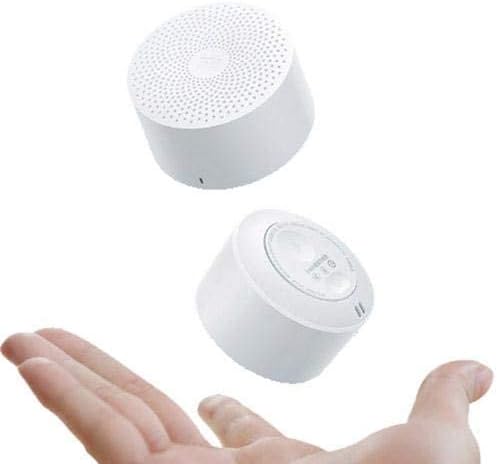
Figure 2: The Xiaomi AI Bluetooth Speaker Mini held in a hand, illustrating its compact and portable size. The speaker's small form factor is evident, making it easy to carry.
Setup
1. Charging the Speaker
Before initial use, fully charge the speaker. Connect the provided USB charging cable to the speaker's USB port and the other end to a standard USB power adapter (not included) or a computer's USB port. The charging indicator light will illuminate during charging and turn off when fully charged.
2. Power On/Off
- To Power On: Press and hold the power button (usually located on the bottom or side) for approximately 2-3 seconds until you hear an audible prompt or see an indicator light.
- To Power Off: Press and hold the power button again for approximately 2-3 seconds until you hear an audible prompt or the indicator light turns off.

Figure 3: Top view of the speaker, showing the perforated grille and the Xiaomi logo at its center. This is where the sound emanates from.
3. Bluetooth Pairing
- Ensure the speaker is powered on and in pairing mode. The indicator light will typically flash blue rapidly.
- On your smartphone or Bluetooth-enabled device, navigate to the Bluetooth settings.
- Search for available devices. The speaker should appear as "Xiaomi AI Bluetooth Speaker Mini" or a similar name.
- Select the speaker from the list to initiate pairing.
- Once successfully paired, you will hear a confirmation tone, and the indicator light will typically turn solid blue or flash slowly.
- If prompted for a password, enter "0000".
Operating Instructions
Music Playback
After successful pairing, you can play audio from your connected device. Use your device's controls to manage playback (play, pause, skip tracks) and volume. The speaker's volume can also be adjusted via its physical buttons, if present, or through the connected device.
Hands-free Calling
When connected to a smartphone, the speaker can be used for hands-free calls.
- Answering a Call: Press the multi-function button (often the power button or a dedicated call button) once to answer an incoming call.
- Ending a Call: Press the multi-function button once during a call to end it.
- Rejecting a Call: Press and hold the multi-function button for approximately 2 seconds to reject an incoming call.
AI Voice Assistant
The speaker supports AI voice assistant functionality through your connected smartphone. To activate, ensure your phone's voice assistant (e.g., Google Assistant, Siri) is enabled. Press the multi-function button twice quickly to activate the voice assistant. You can then speak commands through the speaker's microphone.
Maintenance
- Cleaning: Use a soft, dry cloth to clean the speaker's exterior. Do not use liquid cleaners or abrasive materials.
- Storage: Store the speaker in a cool, dry place away from direct sunlight and extreme temperatures.
- Water Resistance: This speaker is not waterproof. Avoid exposure to water or high humidity.
- Battery Care: To prolong battery life, avoid fully discharging the speaker frequently. Charge it regularly, even if not in use for extended periods.
Troubleshooting
| Problem | Possible Cause | Solution |
|---|---|---|
| Speaker does not power on. | Low battery. | Charge the speaker fully. |
| Cannot pair with device. | Bluetooth not enabled on device; speaker not in pairing mode; too far from device. | Ensure Bluetooth is on; put speaker in pairing mode; move device closer (within 10 meters). |
| No sound during playback. | Volume too low; device not connected; incorrect audio output selected on device. | Increase volume on speaker and device; re-pair the device; check audio output settings on your device. |
| Poor call quality. | Weak signal; microphone obstruction. | Move to an area with better signal; ensure microphone is not covered. |
Specifications

Figure 4: Side view of the Xiaomi AI Bluetooth Speaker Mini, showcasing its compact design. Note: The dimensions shown in this image are illustrative and may not reflect the exact product measurements. Refer to the specifications below for accurate details.
- Model Number: MDZ-28-DE
- Speaker Type: Bluetooth Speaker
- Connectivity: Wireless (Bluetooth 4.2)
- Nominal Output: Less than 5 Watt (Max 5 Watts)
- Audio Output Mode: Stereo
- Port Type: USB
- Material: Plastic
- Product Weight: 0.107 kg
- Approximate Dimensions (Package): 8.8 x 7.2 x 3.4 cm
- Compatible with: Smartphones, Tablets, Computers
- Special Features: Bluetooth, Portable, Wireless, Hands-free Call, AI Voice Assistant support.
Warranty and Support
For warranty information, technical support, or service inquiries, please refer to the warranty card included with your product or visit the official Xiaomi support website. Keep your purchase receipt as proof of purchase.
Manufacturer: Xiaomi
Date First Available: 6 February 2020


