
Baseus Encok W07
Baseus W07 TWS Wireless Bluetooth Earphones User Manual
Model: Encok W07
Introduction
Thank you for choosing the Baseus W07 TWS Wireless Bluetooth Earphones. This manual provides detailed instructions on how to set up, operate, and maintain your earphones to ensure optimal performance and longevity. Please read this manual thoroughly before using the product.
Safety Information
- Do not expose the earphones or charging case to extreme temperatures, humidity, or liquids.
- Avoid dropping, impacting, or disassembling the device.
- Keep out of reach of children and pets.
- Use only the provided or certified charging cables and adapters.
- Prolonged exposure to loud sounds may cause hearing damage. Adjust volume to a safe level.
Package Contents
Please check the package for the following items:
- Baseus W07 TWS Wireless Earphones (Left and Right)
- Charging Case
- USB Type-C Charging Cable
- User Manual
Product Overview
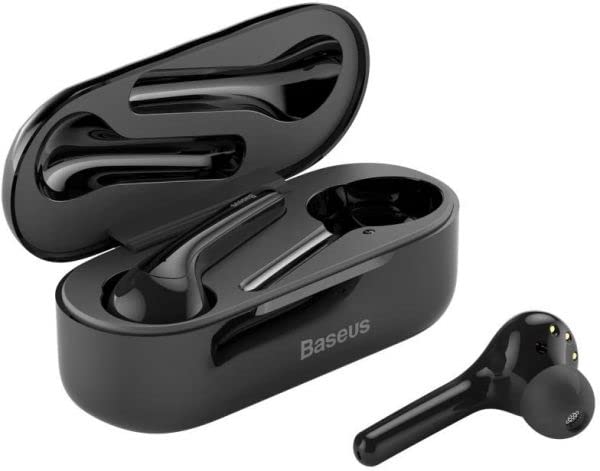
Image: The Baseus W07 TWS Wireless Earphones are shown with their charging case. The case is open, revealing the two earphones nestled inside. One earphone is also shown outside the case, highlighting its design and ear tip.
The Baseus W07 earphones feature an in-ear design for a secure fit and optimal sound delivery. The compact charging case not only protects the earphones but also provides additional battery life on the go. Each earphone is equipped with a microphone for clear calls and supports automatic wear detection.
Setup
1. Charging the Earphones and Case
- Charging Case: Connect the USB Type-C cable to the charging port on the case and a power source. The charging time for the case is approximately 3 hours.
- Earphones: Place the earphones into the charging case. Ensure they are correctly seated. The earphones will begin charging automatically. The charging time for the earphones is approximately 1.5 hours.
- The charging case has a capacity of approximately 500mAh, and each earphone has a capacity of 30mAh.
2. Bluetooth Pairing
- Initial Pairing: Open the charging case cover. The earphones will automatically enter pairing mode.
- On your device (smartphone, tablet, etc.), enable Bluetooth and search for available devices.
- Select "Baseus Encok W07" from the list of found devices to connect.
- Once connected, a voice prompt will confirm successful pairing.
- Automatic Connection: After initial pairing, the earphones will automatically connect to the last paired device when the charging case cover is opened, provided Bluetooth is enabled on the device.
Operating Instructions
Music Playback
- Play/Pause: Tap the touch sensor on either earphone once.
- Next Track: Double-tap the touch sensor on the right earphone.
- Previous Track: Double-tap the touch sensor on the left earphone.
Call Management
- Answer/End Call: Tap the touch sensor on either earphone once.
- Reject Call: Press and hold the touch sensor on either earphone for 2 seconds.
Automatic Wear Detection
The Baseus W07 earphones feature automatic wear detection. Music playback will automatically pause when an earphone is removed from your ear and resume when it is placed back in.
Maintenance
- Cleaning: Use a soft, dry, lint-free cloth to clean the earphones and charging case. Do not use harsh chemicals or abrasive materials.
- Storage: When not in use, store the earphones in their charging case to protect them and keep them charged. Store in a cool, dry place away from direct sunlight.
- Battery Care: To prolong battery life, avoid fully discharging the earphones and charging case frequently. Charge them regularly, even if not in constant use.
Troubleshooting
| Problem | Possible Solution |
|---|---|
| Earphones do not turn on. | Ensure the earphones and charging case are fully charged. |
| Cannot pair with device. |
|
| No sound from one earphone. |
|
| Earphones disconnect frequently. |
|
Specifications
- Model: Encok W07
- Connectivity: Wireless Bluetooth
- Earphone Battery Capacity: Approximately 30mAh (each)
- Charging Case Battery Capacity: Approximately 500mAh
- Earphone Charging Time: Approximately 1.5 hours
- Charging Case Charging Time: Approximately 3 hours
- Music Playback Time: 3-4 hours
- Standby Time: 120 hours
- Microphone: Included (Dual Noise Reduction Mic)
- Features: Automatic Wear Detection, Impressive Bass, Automatic Connection
- Material: Plastic
- Weight: Approximately 5g (per earphone)
- Connectors: Type-C
Warranty and Support
Baseus products are manufactured to the highest quality standards. For warranty information and technical support, please refer to the warranty card included with your purchase or visit the official Baseus website. Keep your proof of purchase for warranty claims.
Ask a question about this manual
Ask about setup, troubleshooting, compatibility, parts, safety, or missing instructions. Manuals+ will review the question and use this page’s manual context to help answer it.