
Utilitech MQTL1115-LED12K9027
Utilitech 4-inch CCT Selectable Hi-Lumen Retrofit LED Downlight User Manual
Model: MQTL1115-LED12K9027
Brand: Utilitech
1. Introduction
Thank you for choosing the Utilitech 4-inch CCT Selectable Hi-Lumen Retrofit LED Downlight. This product is designed for easy installation into existing 4-inch recessed lighting housings, providing high-quality, energy-efficient illumination. Featuring Color Correlated Temperature (CCT) selection, this downlight allows you to choose from a range of white light temperatures to suit your preference and environment. It is dimmable and suitable for both indoor and outdoor (wet-rated) applications, as well as IC-rated for direct contact with insulation.
2. Safety Information
Please read and understand all instructions before beginning installation. Failure to follow these instructions may result in electric shock, fire, or other hazards that could cause personal injury or property damage.
- WARNING: Risk of electric shock. Disconnect power at the fuse or circuit breaker before installing or servicing.
- This product operates on 120 Volts AC. Ensure the power supply matches this requirement.
- Consult a qualified electrician if you are unsure about the installation process.
- Do not make or alter any open holes in an enclosure of wiring or electrical components during kit installation.
- This fixture is suitable for wet locations, making it ideal for bathrooms, kitchens, and outdoor covered areas.
- This fixture is IC-rated, meaning it is suitable for direct contact with insulation.
3. Package Contents
Verify that all components are present before installation:
- 1 x Utilitech 4-inch Retrofit LED Downlight
- 1 x E26 Screw-in Adapter
- 1 x Remote Control (as per specifications)
4. Setup and Installation
Follow these steps for proper installation:
- Turn off Power: Before starting, ensure the power to the recessed lighting fixture is turned off at the circuit breaker or fuse box.
- Remove Existing Components: Carefully remove the existing bulb and trim from the recessed housing.
- Connect E26 Adapter: Screw the provided E26 screw-in adapter into the existing E26 socket within the recessed housing.
- Select Color Temperature (CCT): Locate the CCT selection switch on the side of the LED downlight fixture. Before installation, slide the switch to your desired color temperature (e.g., 2700K Warm White, 3000K Soft White, 4000K Cool White, 5000K Daylight, 6500K Bright Daylight). This setting cannot be changed easily once installed.
- Connect Fixture: Connect the male connector from the LED downlight to the female connector of the E26 screw-in adapter. Ensure a secure connection.
- Install Fixture: Gently push the LED downlight into the recessed housing. The spring-loaded tension clips on the sides of the fixture will secure it in place. Ensure the fixture is flush with the ceiling.
- Restore Power: Turn the power back on at the circuit breaker or fuse box.
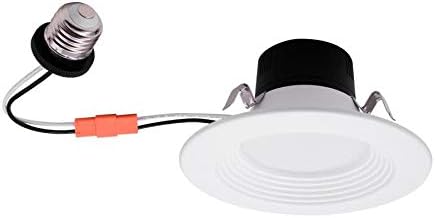
Image 1: The Utilitech 4-inch LED retrofit downlight showing the E26 screw-in adapter for easy installation into existing recessed cans.

Image 2: Product packaging highlighting key features such as 2700K-6500K CCT selection, dimmable, wet-rated, IC-rated, and 25,000 hours lifespan.
5. Operating Instructions
Once installed, operating your Utilitech LED downlight is straightforward:
- Power On/Off: Use your standard wall light switch to turn the downlight on or off.
- Dimming: If connected to a compatible dimmer switch (sold separately), you can adjust the brightness of the downlight by using the dimmer control. Ensure your dimmer is LED-compatible for optimal performance.
- Color Temperature Adjustment (via Remote): As per product specifications, this model includes a remote control. Use the remote to cycle through or select different color temperatures (2700K to 6500K) after installation, providing flexibility to change the ambiance of your space without removing the fixture. Refer to the remote control's specific instructions for detailed operation.
6. Maintenance
The Utilitech LED downlight is designed for long-lasting, maintenance-free operation. Follow these simple guidelines:
- Cleaning: To clean the fixture, ensure power is off. Wipe the surface with a soft, dry, or slightly damp cloth. Do not use abrasive cleaners or solvents, as they may damage the finish or electrical components.
- No User-Serviceable Parts: The LED light source is integrated and not user-replaceable. Do not attempt to open or repair the fixture.
- Lifespan: This LED downlight has an estimated lifespan of 25,000 hours, significantly reducing the need for frequent bulb replacements.
7. Troubleshooting
If you encounter issues with your downlight, refer to the following common problems and solutions:
| Problem | Possible Cause | Solution |
|---|---|---|
| Light does not turn on. | No power to the fixture; loose connection; faulty fixture. | Check circuit breaker/fuse. Ensure all connections (E26 adapter, fixture connector) are secure. If problem persists, contact customer support. |
| Light flickers or dims inconsistently. | Incompatible dimmer switch; loose wiring. | Ensure your dimmer switch is LED-compatible. Check all electrical connections for tightness. |
| Incorrect color temperature. | CCT switch set incorrectly; remote control issue. | If using the CCT switch on the fixture, ensure it was set to the desired temperature before installation. If using the remote, refer to remote instructions or check its battery. |
8. Specifications
| Feature | Specification |
|---|---|
| Brand | Utilitech |
| Model Number | MQTL1115-LED12K9027 |
| Voltage | 120 Volts |
| Light Source Type | LED |
| Installation Type | Flush Mount (Retrofit) |
| Special Features | Dimmable, CCT Selectable (2700K-6500K), Remote Control |
| Control Method | Remote |
| Indoor/Outdoor Usage | Indoor, Outdoor (Wet Rated) |
| Material | Glass (Shade) |
| Estimated Lifespan | 25,000 hours |
| Certifications | ETL, IC Rated, Wet Rated |
| Item Weight | 8 ounces |
| Package Dimensions | 6.22 x 6.1 x 3.15 inches |
| UPC | 822985525237 |
9. Warranty and Support
For warranty information or technical support, please contact Utilitech customer service. Keep your purchase receipt as proof of purchase. Specific warranty details may vary and are typically provided with the product packaging or on the manufacturer's official website.
For further assistance, please visit the official Utilitech website or contact their customer support line.
Related documentsMQTL1115-LED12K9027


Ask a question about this manual
Ask about setup, troubleshooting, compatibility, parts, safety, or missing instructions. Manuals+ will review the question and use this page’s manual context to help answer it.