
Introduction
This manual provides detailed instructions for the safe installation, operation, and maintenance of your Utilitech UT 5/6 inch CCT Select RETROFIT LED Recessed Downlight. Please read this manual thoroughly before installation and retain it for future reference.
Safety Information
- Disconnect power at the circuit breaker before installation, removal, or servicing.
- Installation should be performed by a qualified electrician if you are unsure about electrical procedures.
- This fixture is suitable for wet locations, making it versatile for various indoor and outdoor applications.
- Do not modify the fixture in any way, as this may void the warranty and create safety hazards.
- Ensure all electrical connections are secure and comply with local electrical codes.
- Wear appropriate safety gear, such as safety glasses and gloves, during installation.
Package Contents
- 1 x Utilitech UT 5/6 in CCT Select RETROFIT LED Recessed Downlight
- 1 x Instruction Manual (this document)
Setup and Installation
The Utilitech UT 5/6 in CCT Select RETROFIT LED Recessed Downlight is designed for easy installation into existing 5-inch or 6-inch recessed housings.
- Prepare the Housing: Ensure the power to the existing recessed fixture is turned off at the circuit breaker. Remove the existing bulb and any old trim from the recessed housing.
- Connect the Adapter: Screw the E27 adapter (provided with the downlight) into the existing socket of the recessed housing.
- Select Color Temperature (CCT): Before pushing the downlight into the housing, locate the CCT selection switch on the back of the downlight. Choose your desired color temperature (2700K, 3000K, 4000K, 5000K, or 6500K) by sliding the switch to the appropriate setting.
- Connect the Downlight: Plug the connector cable from the downlight into the adapter that is screwed into the housing's socket.
- Secure the Downlight: Gently push the downlight into the recessed housing. The spring clips on the sides of the downlight will retract and then expand to secure the fixture firmly in place.
- Restore Power: Once the downlight is securely installed, turn the power back on at the circuit breaker.
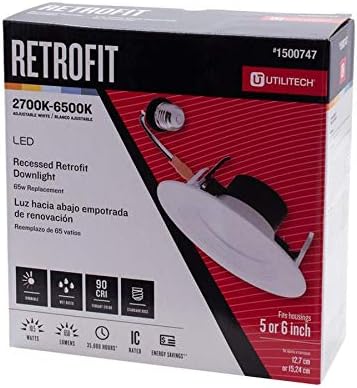
Image: The Utilitech UT 5/6 in CCT Select RETROFIT LED Recessed Downlight shown in its retail packaging, highlighting its features and compatibility with 5 or 6 inch housings. The packaging indicates selectable color temperatures from 2700K to 6500K, LED technology, and a 90 CRI rating.
Operating Instructions
Once installed, the downlight operates like any standard light fixture.
- Power On/Off: Control the light using your existing wall switch.
- Dimming: This fixture is fully dimmable from 10% to 100%. For optimal performance and to avoid flickering, use a compatible LED dimmer switch.
- Color Temperature Adjustment: The color temperature is set via a physical switch on the fixture itself prior to installation. It cannot be changed dynamically after installation without removing the fixture.
Maintenance
The Utilitech LED Recessed Downlight requires minimal maintenance due to its durable design and long-lasting LED technology.
- Cleaning: Ensure power is off before cleaning. Wipe the fixture with a soft, dry, or slightly damp cloth. Do not use abrasive cleaners, solvents, or harsh chemicals, as these can damage the finish or electrical components.
- Bulb Replacement: This fixture uses integrated LED technology and does not require bulb replacement. It is designed for 35,000 hours of maintenance-free operation.
Troubleshooting
- Light does not turn on:
- Check power supply: Ensure the circuit breaker is on and the wall switch is in the ON position.
- Check connections: Verify that the downlight is properly connected to the housing's socket adapter and that the adapter is securely screwed into the socket.
- Light flickers or dims improperly:
- Dimmer compatibility: Ensure you are using an LED-compatible dimmer switch. Incompatible dimmers can cause flickering or poor dimming performance.
- Wiring: Check for any loose wiring connections within the housing or at the switch.
- Incorrect color temperature:
- CCT Switch: The color temperature is set by a switch on the fixture itself. If you need to change it, power off the fixture at the circuit breaker, carefully remove the downlight, adjust the CCT selection switch to your desired setting, and then reinstall the fixture.
Specifications
| Feature | Specification |
|---|---|
| Model | UT 5/6 in CCT Select RETROFIT |
| Brand | Utilitech |
| Compatibility | 5-inch or 6-inch recessed housings |
| Light Source | Integrated LED |
| Brightness | 650 lumens |
| Power Consumption | 10.5 watts |
| Color Temperatures (CCT) | 2700K, 3000K, 4000K, 5000K, 6500K (Selectable) |
| Dimmability | Fully dimmable (10% to 100%) |
| Rated Lifetime | 35,000 hours |
| CRI (Color Rendering Index) | 90 |
| Location Rating | ETL listed, Wet location rated (Indoor/Outdoor) |
| Material | Metal (Alloy Steel) |
| Finish | White metal trim with frosted diffuser |
| Bulb Base | E27 (for adapter connection) |
Warranty Information
This Utilitech product comes with a 5-Year Limited Warranty. For details regarding warranty claims or service, please refer to the original purchase documentation or contact Utilitech customer support. The warranty covers defects in materials and workmanship under normal use.
Customer Support
For technical assistance, missing parts, or any questions regarding your Utilitech UT 5/6 in CCT Select RETROFIT LED Recessed Downlight, please contact Utilitech customer service.
Please note: Contact information may vary by region. Refer to the product packaging or Utilitech's official website for the most current support details.


