
1. Introduction
This manual provides detailed instructions for the proper installation, operation, and maintenance of your Wet Sounds WS420-SQ Billet In-Dash Mount. Please read this manual thoroughly before installation to ensure correct setup and optimal performance. This universal mounting kit is designed for the WS-420SQ equalizer, offering both in-dash and under-dash mounting options.
2. Safety Information
- Always disconnect the vehicle's battery before beginning any electrical installation to prevent short circuits and electrical hazards.
- Ensure all mounting hardware is securely fastened to prevent vibration or detachment during vehicle operation.
- Verify that the chosen mounting location does not interfere with vehicle safety systems, airbags, or essential controls.
- Wear appropriate personal protective equipment, such as safety glasses, during installation.
- If you are unsure about any part of the installation process, consult a qualified professional installer.
3. Product Overview
The Wet Sounds WS420-SQ Billet In-Dash Mount is a precision-engineered accessory designed to securely house your WS-420SQ equalizer. Constructed from CNC'd Billet Aluminum with a durable black powder coating, it provides a robust and aesthetically pleasing integration into your vehicle's dashboard or under-dash area.
Components:
- WS420-SQ Billet In-Dash Mount (Black)
- Mounting Hardware (screws, washers, nuts - quantity may vary by kit)


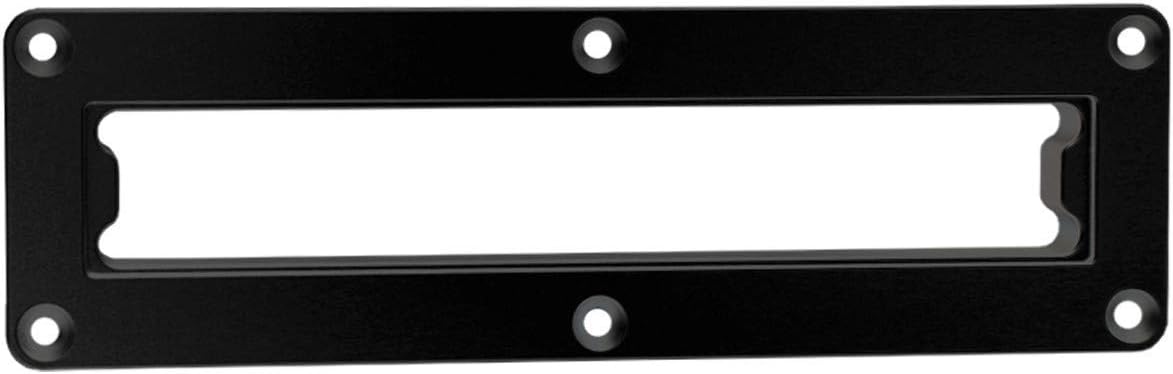
4. Setup and Installation
The WS420-SQ Billet In-Dash Mount offers flexible installation options, either directly into the dashboard or under the dash. The under-dash mount option is compatible with the WW-BT VC Bluetooth Volume Control (sold separately).
Installation Steps:
- Select Mounting Location: Choose a suitable location in your vehicle's dashboard or under-dash area that provides adequate space and does not obstruct vehicle operation or safety features.
- Prepare Opening: Carefully measure and mark the area for the mount. Cut the opening to the specifications provided in your WS-420SQ equalizer kit. Ensure the cut is clean and precise for a proper fit.
- Insert Equalizer: Gently slide your WS-420SQ equalizer into the opening of the billet mount. Ensure it sits flush and securely within the mount.
- Secure Mount: Position the assembled mount and equalizer into the prepared opening in your vehicle. Use the provided mounting hardware (screws, washers, nuts) to bolt the mount firmly in place. Tighten all fasteners evenly to prevent stress on the mount and dashboard.
- Final Check: Verify that the mount is stable and the equalizer is securely held. Ensure no wires are pinched and all connections are properly made (refer to your WS-420SQ equalizer manual for wiring instructions).
5. Operating Instructions
The Wet Sounds WS420-SQ Billet In-Dash Mount is a passive component designed to securely hold your WS-420SQ equalizer. Once properly installed, the mount requires no direct operation. The functionality and operation of your audio system will be controlled via the mounted WS-420SQ equalizer and other connected components.
6. Maintenance
- Cleaning: To clean the billet mount, use a soft, damp cloth. Avoid abrasive cleaners or solvents, as these can damage the powder-coated finish.
- Inspection: Periodically check all mounting screws and fasteners to ensure they remain tight. Vibrations from vehicle operation can sometimes loosen hardware over time.
- Environmental Care: While the billet aluminum is durable, prolonged exposure to harsh chemicals or extreme temperatures should be avoided to maintain its finish and integrity.
7. Troubleshooting
- Mount feels loose: Re-tighten all mounting screws and bolts. Ensure the opening cut in the dash is not excessively large, which could prevent a snug fit.
- Equalizer does not fit: Verify that the equalizer model is indeed the WS-420SQ. Double-check the dimensions of your cut opening against the specifications provided with your equalizer kit.
- Vibration or rattling: Ensure all components are securely fastened. Add rubber washers or dampening material if necessary to reduce direct contact between hard surfaces.
8. Specifications
| Specification | Detail |
|---|---|
| Model Number | WS-EQIDM-B |
| Part Number | WS-EQIDM-B |
| Material | CNC'd Billet Aluminum |
| Finish | Powder Coated (Black) |
| Mounting Type | In-Dash / Under-Dash |
| Item Weight | 1 Pound |
| Package Dimensions | 17 x 15.25 x 9.75 inches |
| UPC | 841992143319 |
9. Warranty and Support
This Wet Sounds WS420-SQ Billet In-Dash Mount comes with a 90-day limited warranty from the date of purchase. This warranty covers manufacturing defects under normal use. It does not cover damage resulting from improper installation, accident, misuse, abuse, neglect, or unauthorized modification.
For technical support or warranty claims, please contact your authorized Wet Sounds dealer or visit the official Wet Sounds website for contact information.