
Introduction
This manual provides detailed instructions for the proper use and care of your Citizen AT9039-51L Eco-Drive Analog Blue Dial Men's Watch. Please read this manual thoroughly to ensure optimal performance and longevity of your timepiece. This watch features Citizen's Eco-Drive technology, a perpetual calendar, and atomic timekeeping for precise accuracy, synchronizing with an atomic clock for an accuracy of +/- 1 second per 100,000 years.
Setup and Initial Charging
Your Citizen Eco-Drive watch is powered by light and does not require conventional battery replacement. It contains a rechargeable lithium-ion cell. Before initial use, ensure the watch is sufficiently charged.
1. Initial Charging
Place the watch in direct sunlight or under bright artificial light. The charging time varies depending on the light source. For a full charge from a completely discharged state, approximately 11 hours of direct sunlight or 40 hours under a fluorescent lamp (30W, 20cm distance) are recommended. Avoid placing the watch too close to incandescent lamps as high temperatures can damage the movement.
2. Time Signal Reception (Atomic Timekeeping)
The AT9039-51L automatically receives time signals from atomic clocks to maintain precise time. This watch is designed to receive signals in specific regions. Ensure you are in a reception area for optimal accuracy.
- For best reception, place the watch near a window at night.
- Avoid placing the watch near electronic devices that emit radio waves.
- Manual reception can also be initiated if automatic reception is unsuccessful. Refer to the "Operating" section for manual reception instructions.

Image: Front view of the Citizen AT9039-51L watch, highlighting the blue dial, sub-dials, and time markers.
Operating Instructions
1. Setting the Time and Date
While the watch is designed for automatic time synchronization, manual adjustments may be necessary if you travel outside a reception area or for initial setup.
- Pull the crown out to position 2: The second hand will move to the 0-second position.
- Rotate the crown: The hour and minute hands will move. Set the time.
- Push the crown back to position 0: The watch will resume normal operation.
For perpetual calendar adjustment, refer to the detailed instructions in the full user manual available on the Citizen website. The watch automatically adjusts for leap years and varying month lengths once correctly set.
2. Using the Chronograph
This model features chronograph functions for measuring elapsed time. The sub-dials indicate minutes, seconds, and 24-hour time. Specific operation details for starting, stopping, and resetting the chronograph can be found in the comprehensive manual.
3. World Time Function
The watch allows for easy switching between different time zones. Rotate the crown or use the pushers (depending on the specific mechanism) to select your desired city/time zone. The hands will automatically adjust to display the local time for that region.

Image: Detailed view of the watch dial, showing the city codes for world time zones around the outer edge.
Maintenance and Care
1. Cleaning
Wipe the watch case and band with a soft, dry cloth. For stainless steel bands, a slightly damp cloth can be used, followed by a dry cloth. Avoid using chemical cleaners or solvents, which can damage the finish.
2. Water Resistance
Refer to the water resistance rating engraved on the case back of your watch. Avoid operating the crown or pushers when the watch is wet to prevent water ingress, even if it is water-resistant.
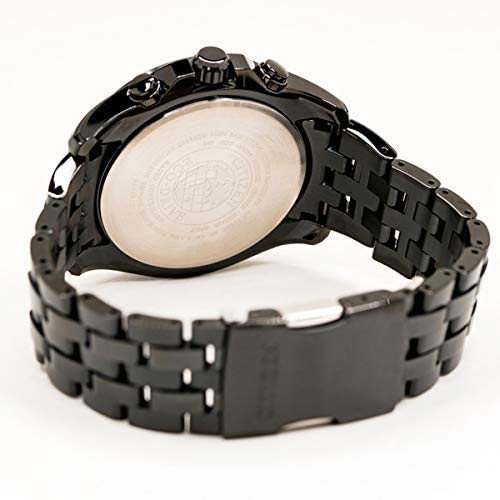
Image: Rear view of the watch, displaying the case back with "Eco-Drive" and "Citizen" engravings, along with other product information.
3. Power Reserve Indicator
Some Eco-Drive models include a power reserve indicator. Monitor this to ensure your watch receives adequate light exposure. If the power reserve is low, indicated by the second hand moving in 2-second intervals, expose the watch to light immediately.
Troubleshooting
- Watch not running: Ensure the watch is sufficiently charged by exposing it to bright light for several hours.
- Incorrect time/date: Check if the watch is receiving time signals. If not, try manual time setting or place it in an optimal reception area.
- Second hand moves in 2-second intervals: This indicates a low power reserve. Charge the watch immediately by exposing it to light.
- Hands not aligning: If the hands do not align correctly after time setting or signal reception, perform an "all reset" and "zero position correction" procedure. Refer to the full manual for specific steps.
Specifications
| Feature | Detail |
|---|---|
| Model Number | AT9039-51L |
| Movement Type | Eco-Drive (Light-Powered) |
| Dial Color | Blue |
| Dial Material | Stainless Steel |
| Strap Material | Stainless Steel |
| Strap Color | Black |
| Case Diameter | 44 mm |
| Calendar Type | Perpetual Calendar |
| Special Features | Atomic Timekeeping, World Time, Chronograph |
| Item Weight | 184 g |
| Product Dimensions | 9 x 12 x 9 cm |
Warranty Information
Your Citizen AT9039-51L watch comes with a comprehensive warranty:
- International Warranty: 1 Year
- India Warranty: 3 Years, 3 Months, 3 Days
Please retain your purchase receipt as proof of purchase for warranty claims. The warranty covers manufacturing defects under normal use. It does not cover damage resulting from improper handling, accidents, or unauthorized repairs.

Image: Example of a Citizen warranty card, indicating the extended warranty period for India.
Customer Support
For further assistance, service, or detailed inquiries regarding your Citizen watch, please contact:
- Manufacturer: CITIZEN WATCH CO., LTD.
- Importer (India): Citizen Watches India Pvt Ltd
- Address: #299, 6th Main, HAL 2nd Stage, Indiranagar, Bangalore 560038, India
- Contact Number: +918043473777
- Email: enquire@citizenwatches.co.in
- Official Website: Visit the Citizen Global Website or your regional Citizen website for full manuals and support.


