
BELLA MD-TD50D5
Bella 5-Quart Programmable Slow Cooker User Manual
Model: MD-TD50D5
Important Safety Instructions
When using electrical appliances, basic safety precautions should always be followed, including the following:
- Read all instructions before operating.
- Do not touch hot surfaces. Use handles or knobs.
- To protect against electrical shock, do not immerse cord, plugs, or heating base in water or other liquid.
- Close supervision is necessary when any appliance is used by or near children.
- Unplug from outlet when not in use and before cleaning. Allow to cool before putting on or taking off parts.
- Do not operate any appliance with a damaged cord or plug, or after the appliance malfunctions or has been damaged in any manner.
- The use of accessory attachments not recommended by the appliance manufacturer may cause injuries.
- Do not use outdoors.
- Do not let cord hang over edge of table or counter, or touch hot surfaces.
- Do not place on or near a hot gas or electric burner, or in a heated oven.
- Extreme caution must be used when moving an appliance containing hot oil or other hot liquids.
- Always attach plug to appliance first, then plug cord into the wall outlet. To disconnect, turn any control to "off", then remove plug from wall outlet.
- Do not use appliance for other than intended use.
- Avoid sudden temperature changes, such as adding refrigerated foods into a heated pot.
- This appliance has a polarized plug (one blade is wider than the other). To reduce the risk of electric shock, this plug is intended to fit into a polarized outlet only one way. If the plug does not fit fully into the outlet, reverse the plug. If it still does not fit, contact a qualified electrician. Do not attempt to modify the plug in any way.
Product Overview
The Bella 5-Quart Programmable Slow Cooker is designed for convenient and efficient slow cooking. It features a durable stainless steel exterior, a removable ceramic pot, and an intuitive digital control panel.
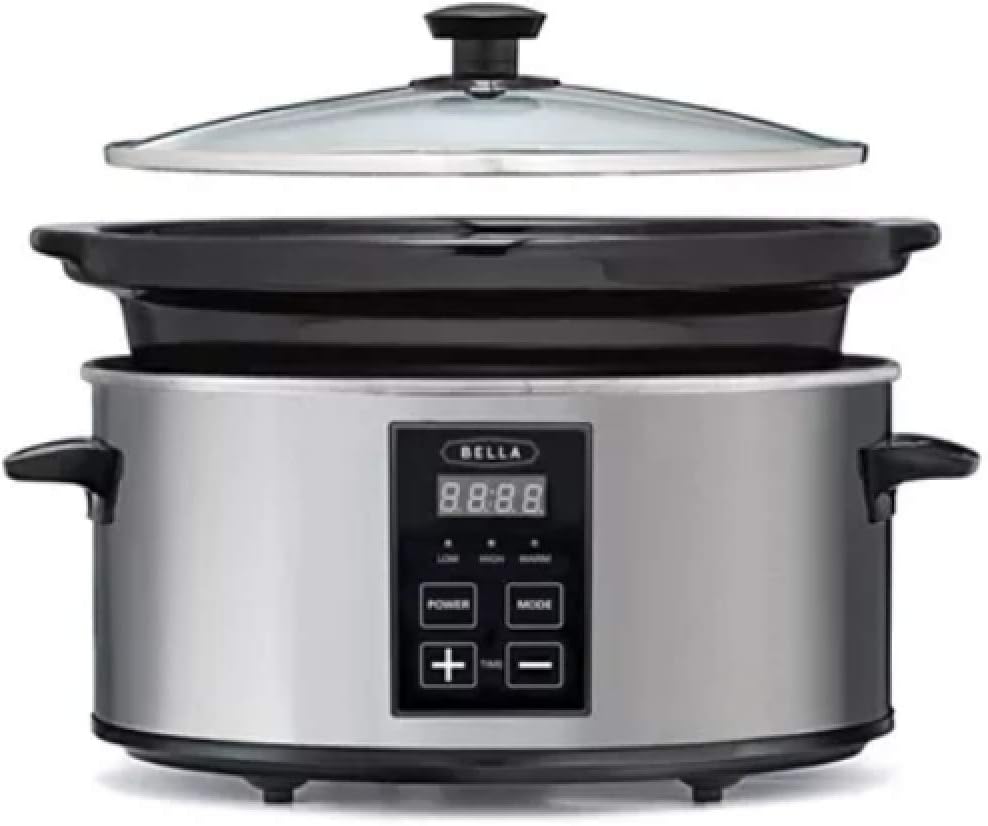
Figure 1: Bella 5-Quart Programmable Slow Cooker. The image displays the slow cooker with its stainless steel outer casing, black handles, and a digital control panel. The removable black ceramic pot is visible inside the base, and the clear glass lid with a black knob is positioned above it.
Components:
- Glass Lid: Transparent lid allows monitoring of cooking progress.
- Ceramic Pot: Removable, non-stick cooking pot for easy cleaning.
- Heating Base: Stainless steel exterior housing the heating element and control panel.
- Control Panel: Digital display and buttons for setting cooking modes and time.
- Handles: Integrated handles on the heating base for safe transport.
Setup
- Unpacking: Carefully remove all packaging materials and any promotional labels from the slow cooker. Retain packaging for future storage or transport if needed.
- First-Time Cleaning: Before first use, wash the ceramic pot and glass lid in warm, soapy water. Rinse thoroughly and dry completely. Wipe the exterior of the heating base with a damp cloth. Do not immerse the heating base in water.
- Placement: Place the slow cooker on a flat, stable, heat-resistant surface, away from walls or cabinets to allow for proper ventilation. Ensure there is sufficient space around the appliance.
- Insert Pot: Place the clean, dry ceramic pot securely into the heating base.
Operating Instructions
Control Panel Functions:
- POWER Button: Turns the slow cooker on or off.
- MODE Button: Cycles through cooking modes: LOW, HIGH, WARM.
- + / - Buttons: Adjusts cooking time in increments.
- Digital Display: Shows remaining cooking time or current mode.
Cooking Process:
- Prepare Food: Place all ingredients into the ceramic pot. Do not overfill; ensure there is at least 1 inch of space from the rim.
- Secure Lid: Place the glass lid onto the ceramic pot.
- Plug In: Plug the slow cooker into a standard 220V electrical outlet. The digital display will illuminate.
- Turn On: Press the POWER button. The default mode (often LOW) and time will appear.
- Select Mode: Press the MODE button repeatedly to select your desired cooking setting:
- LOW: For slow, gentle cooking over a longer period.
- HIGH: For faster cooking.
- WARM: Automatically activates after cooking is complete to keep food warm. Can also be selected manually for warming.
- Set Time: Use the + and - buttons to adjust the cooking time. The time will typically adjust in 30-minute increments. Refer to your recipe for recommended cooking times.
- Start Cooking: Once the mode and time are set, the slow cooker will automatically begin the cooking process after a few seconds. The display will count down the remaining time.
- Monitor: Avoid lifting the lid frequently during cooking, as this releases heat and can extend cooking time.
- Keep Warm: After the set cooking time expires, the slow cooker will automatically switch to the WARM setting (if not already in WARM mode) and maintain the food at a serving temperature for a specified period (e.g., 4 hours) before turning off.
- Turn Off: To turn off the slow cooker at any time, press the POWER button.
- Serve: Carefully remove the lid, using oven mitts as steam will be hot. Serve food directly from the ceramic pot or transfer to a serving dish.
Cleaning and Maintenance
Proper cleaning and maintenance will ensure the longevity and optimal performance of your slow cooker.
- Before Cleaning: Always unplug the slow cooker from the electrical outlet and allow it to cool completely before cleaning.
- Ceramic Pot and Glass Lid:
- The ceramic pot and glass lid are generally dishwasher safe. However, hand washing with warm, soapy water is recommended to preserve the finish and extend their lifespan.
- For stubborn food residue, soak the pot in warm, soapy water for a period before scrubbing with a non-abrasive sponge or cloth.
- Rinse thoroughly and dry completely before storing.
- Heating Base:
- Never immerse the heating base in water or any other liquid.
- Wipe the exterior of the heating base with a soft, damp cloth. For tougher stains, a mild non-abrasive cleaner can be used.
- Ensure the heating base is completely dry before plugging it in or storing.
- Storage: Store the slow cooker in a clean, dry place. You can store the ceramic pot inside the heating base with the lid inverted for compact storage.
Troubleshooting
| Problem | Possible Cause | Solution |
|---|---|---|
| Slow cooker does not turn on. | Not plugged in; power outlet malfunction; appliance malfunction. | Ensure the power cord is securely plugged into a working outlet. Test the outlet with another appliance. If still not working, contact customer support. |
| Food is not cooking properly or taking too long. | Lid not sealed properly; incorrect temperature setting; too much liquid; frequent lid lifting. | Ensure the lid is seated firmly on the pot. Verify the correct cooking mode (LOW/HIGH) is selected. Reduce liquid if recipe allows. Avoid lifting the lid unnecessarily. |
| Food is burning on the bottom. | Too little liquid; cooking on HIGH for too long; pot not centered. | Add more liquid as per recipe. Consider using the LOW setting for longer cooking times. Ensure the ceramic pot is properly seated in the heating base. |
| Digital display is not working. | Power issue; internal malfunction. | Check power connection. Unplug and plug back in. If the issue persists, contact customer support. |
Specifications
- Model Number: MD-TD50D5
- Capacity: 5 Quarts
- Material: Stainless Steel (exterior), Ceramic (pot)
- Color: Stainless Steel and Black
- Voltage: 220 Volts
- Control Method: Touch
- Control Type: Programmable
- Package Dimensions: 13.7 x 13.7 x 10.5 inches
- Item Weight: 12.98 pounds
- UPC: 829486147944
Warranty and Support
This Bella product is covered by a limited warranty. For detailed warranty information, please refer to the warranty card included with your purchase or visit the official BELLA website. If you experience any issues or have questions regarding your slow cooker, please contact BELLA customer support.
Customer Support: Please refer to the contact information provided in your product packaging or visit the BELLA official website for the most up-to-date support details.
Related documentsMD-TD50D5


Ask a question about this manual
Ask about setup, troubleshooting, compatibility, parts, safety, or missing instructions. Manuals+ will review the question and use this page’s manual context to help answer it.