
Introduction
The Fender Mustang LT50 is a versatile 50-watt guitar amplifier designed for both practice and performance. It features a high-quality 12-inch speaker, a user-friendly interface with a full-color display, and a comprehensive collection of presets and effects. This amplifier is equipped with a USB audio interface for recording and can be managed with the free Fender TONE 3.0 software.
Key Features
- 50 Watts of Power: Provides ample volume for home practice, rehearsals, and small to medium-sized gigs.
- 12-inch Speaker: Delivers clear and full sound across various volume levels.
- User-Friendly Interface: Features a full-color display for easy navigation and control.
- 30 Preloaded Presets: Offers a wide range of electric guitar tones suitable for various music genres.
- 25 Onboard Effects: Includes multiple distortion, overdrive, compression, modulation, reverb, delay, and octave effects.
- USB Audio Interface: Enables direct recording to a computer and integration with Fender TONE 3.0 software for editing and managing presets.
- Auxiliary Input: Allows connection of external audio devices for playing along with music.
- Headphone Output: For silent practice.
Setup
- Unpacking: Carefully remove the amplifier from its packaging. Ensure all components are present and undamaged.
- Power Connection: Connect the power cord to the amplifier's input and then to a grounded electrical outlet.
- Guitar Connection: Plug your guitar into the INPUT jack on the amplifier's control panel using a standard 1/4-inch instrument cable.
- Auxiliary Devices (Optional): For playing along with external audio, connect your device to the AUX input using a 1/8-inch stereo cable.
- Headphones (Optional): For silent practice, plug headphones into the HEADPHONE jack.
- USB Connection (Optional): Connect the amplifier to your computer via the USB port for recording or using Fender TONE 3.0 software.
Before powering on, ensure all connections are secure and volume knobs are set to a low level.
Operating Instructions
Controls Overview

This image displays the top control panel of the Fender Mustang LT50, highlighting the various knobs and buttons for sound shaping and navigation.
- INPUT: 1/4-inch jack for connecting your guitar.
- AUX: 1/8-inch stereo input for external audio sources.
- HEADPHONE: 1/8-inch stereo output for headphones.
- GAIN: Adjusts the input sensitivity and amount of overdrive/distortion.
- VOLUME: Controls the overall output volume of the selected preset.
- TREBLE, MIDDLE, BASS: Tone controls to shape the high, mid, and low frequencies.
- MASTER: Controls the overall output volume of the amplifier.
- DATA WHEEL: Used to scroll through presets, adjust parameters, and navigate menus. Press to confirm selections.
- BACK: Returns to the previous menu or screen.
- SAVE: Saves current amplifier settings as a preset.
- MENU: Accesses the main menu for advanced settings and options.
- TAP/TUNER: Tap to set delay/tremolo tempo; hold to activate the built-in tuner.
- ON/OFF SWITCH: Powers the amplifier on or off.
- USB: Connects to a computer for recording and software control.
Selecting and Saving Presets
The Mustang LT50 comes with 30 preloaded presets and offers 30 user-programmable slots. To select a preset, rotate the DATA WHEEL. The display will show the preset number and name. To save your customized settings as a new preset or overwrite an existing one, press the SAVE button and follow the on-screen prompts.
Using Onboard Effects
The amplifier includes 25 different effects. These effects are integrated into the presets. You can edit the effects within a preset by navigating through the menu using the MENU button and DATA WHEEL. Adjust individual effect parameters to customize your sound.
USB Audio Interface and Fender TONE 3.0
The integrated USB audio interface allows you to connect the amplifier directly to your computer for recording your guitar. Additionally, you can download the free Fender TONE 3.0 software for Mac or PC. This software provides an intuitive platform to edit, store, and manage your amplifier's presets, and access a community of user-created tones.
Maintenance
- Cleaning: Use a soft, dry cloth to clean the exterior of the amplifier. Avoid abrasive cleaners or solvents.
- Storage: Store the amplifier in a dry environment, away from extreme temperatures and direct sunlight.
- Ventilation: Ensure proper ventilation around the amplifier to prevent overheating. Do not block air vents.
- Cable Care: Regularly inspect all cables for damage. Replace frayed or damaged cables immediately.
- Speaker Protection: Avoid placing heavy objects on the speaker grille.
Troubleshooting
| Problem | Possible Cause | Solution |
|---|---|---|
| No Sound | Power not connected, amplifier off, volume low, guitar cable faulty, incorrect input selected. | Check power connection, turn on amplifier, increase volume (Gain, Volume, Master), test guitar cable, ensure guitar is plugged into INPUT. |
| Distorted Sound | Gain too high, faulty cable, speaker damage. | Reduce GAIN setting, test with a different cable, contact support if speaker damage is suspected. |
| Controls Unresponsive | Temporary software glitch. | Turn the amplifier off, wait 10 seconds, then turn it back on. |
If you encounter issues not covered here, or if solutions do not resolve the problem, please contact Fender customer support for assistance.
Specifications
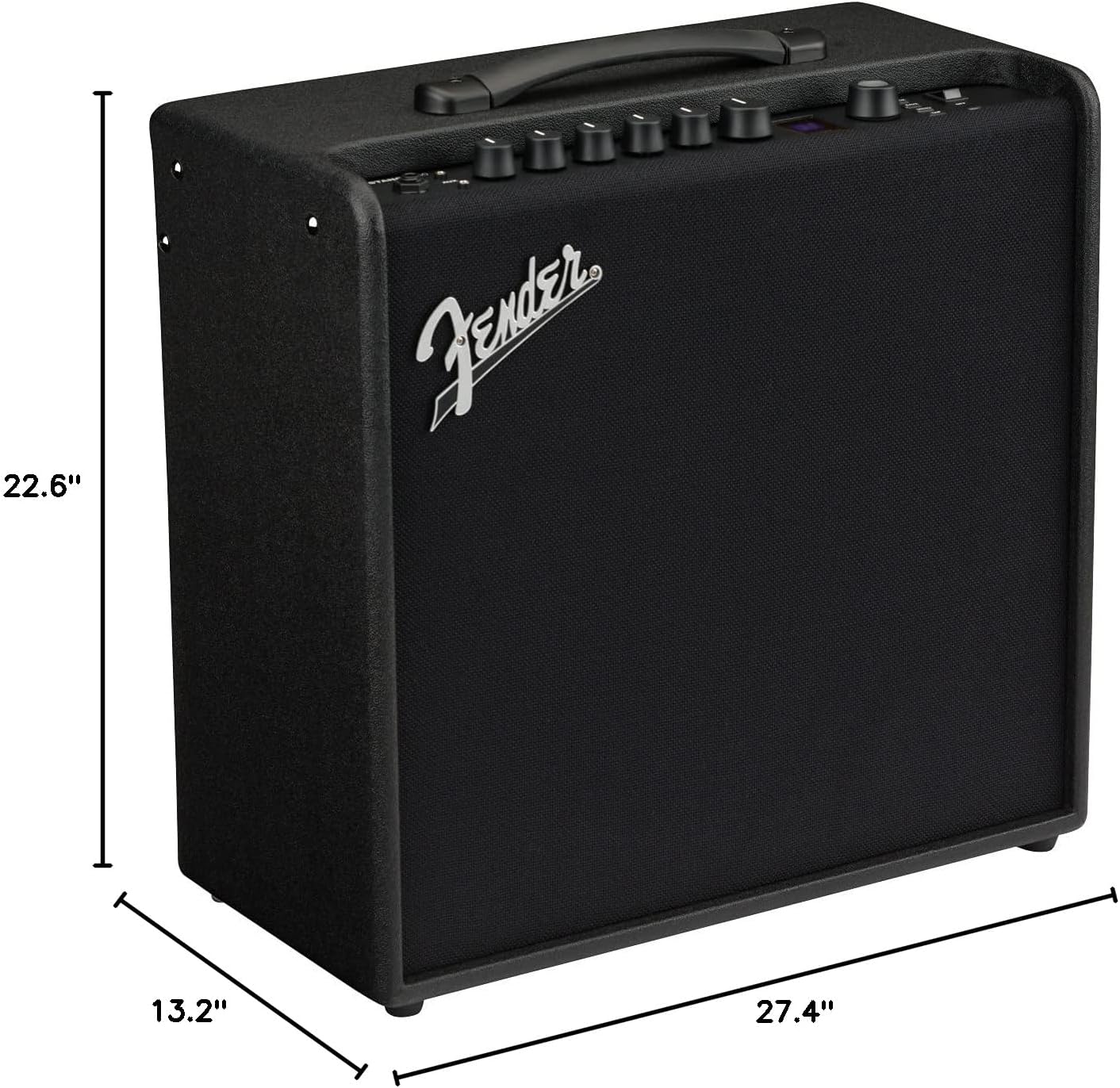
This image illustrates the physical dimensions of the Fender Mustang LT50 amplifier.
- Model Number: 2311200000
- Output Wattage: 50 Watts
- Speaker Size: 12 inches
- Item Weight: 23.5 pounds
- Product Dimensions: 27.4 x 22.6 x 13.2 inches (Width x Height x Depth)
- Material Type: Wood
- Connector Types: 6.35 mm jack (Input), USB, 1/8-inch Aux, 1/8-inch Headphone
- Power Source: Corded Electric
Warranty and Support
The Fender Mustang LT50 Guitar Amplifier comes with a 2-Year Limited Warranty. This warranty covers defects in materials and workmanship from the original purchase date. For detailed warranty terms, service, or technical support, please visit the official Fender website or contact Fender customer service directly.
For additional resources and community support, consider exploring the Fender TONE community online.


