
1. Introduction
This manual provides essential information for the safe and efficient operation, setup, and maintenance of your Einhell TE-CC 250 UF Table Saw. Please read these instructions carefully before using the machine for the first time. Keep this manual in a safe place for future reference.
The Einhell TE-CC 250 UF table saw is designed for precise cutting and trimming of various workpieces. It features a durable aluminum table, a precision tungsten carbide saw blade, and a powerful 2000 W motor with soft start functionality. Its design includes features for enhanced safety, precision, and mobility.
2. General Safety Instructions
WARNING: Read all safety warnings, instructions, illustrations, and specifications provided with this power tool. Failure to follow all instructions listed below may result in electric shock, fire, and/or serious injury.
- Work Area Safety: Keep the work area clean and well-lit. Cluttered or dark areas invite accidents. Do not operate power tools in explosive atmospheres, such as in the presence of flammable liquids, gases, or dust.
- Electrical Safety: Power tool plugs must match the outlet. Never modify the plug in any way. Avoid body contact with earthed or grounded surfaces.
- Personal Safety: Always wear eye protection, hearing protection, and a dust mask when operating the saw. Do not overreach. Keep proper footing and balance at all times. Dress properly; avoid loose clothing or jewelry.
- Power Tool Use and Care: Do not force the power tool. Use the correct power tool for your application. Disconnect the plug from the power source and/or remove the battery pack, if detachable, from the power tool before making any adjustments, changing accessories, or storing power tools.
- Specific Table Saw Safety: Always use the push stick when cutting small pieces. Ensure the saw blade guard is in place and functioning correctly. Never remove cut-off material while the blade is rotating.
3. Product Components and Features
Familiarize yourself with the key components and features of your Einhell TE-CC 250 UF Table Saw.


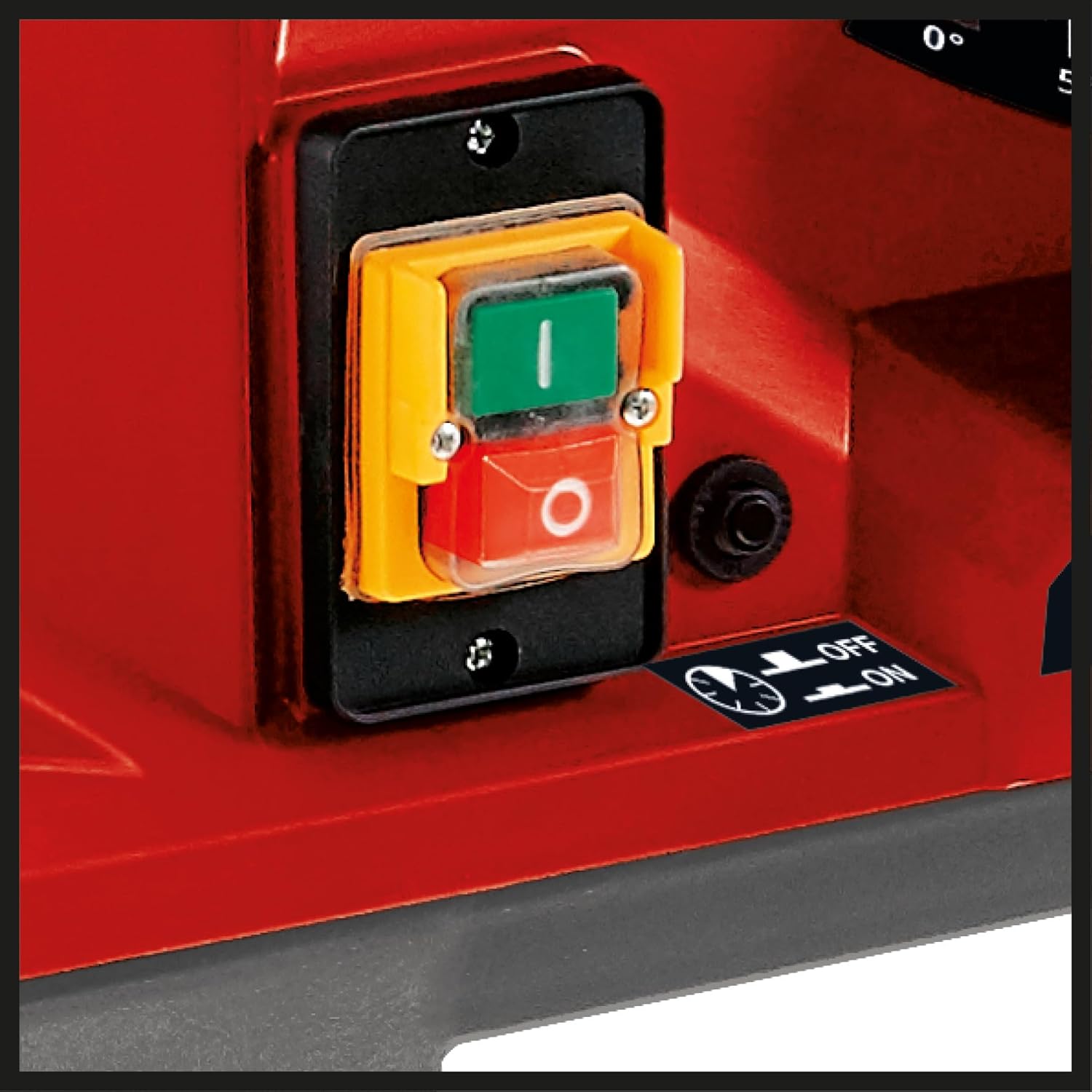

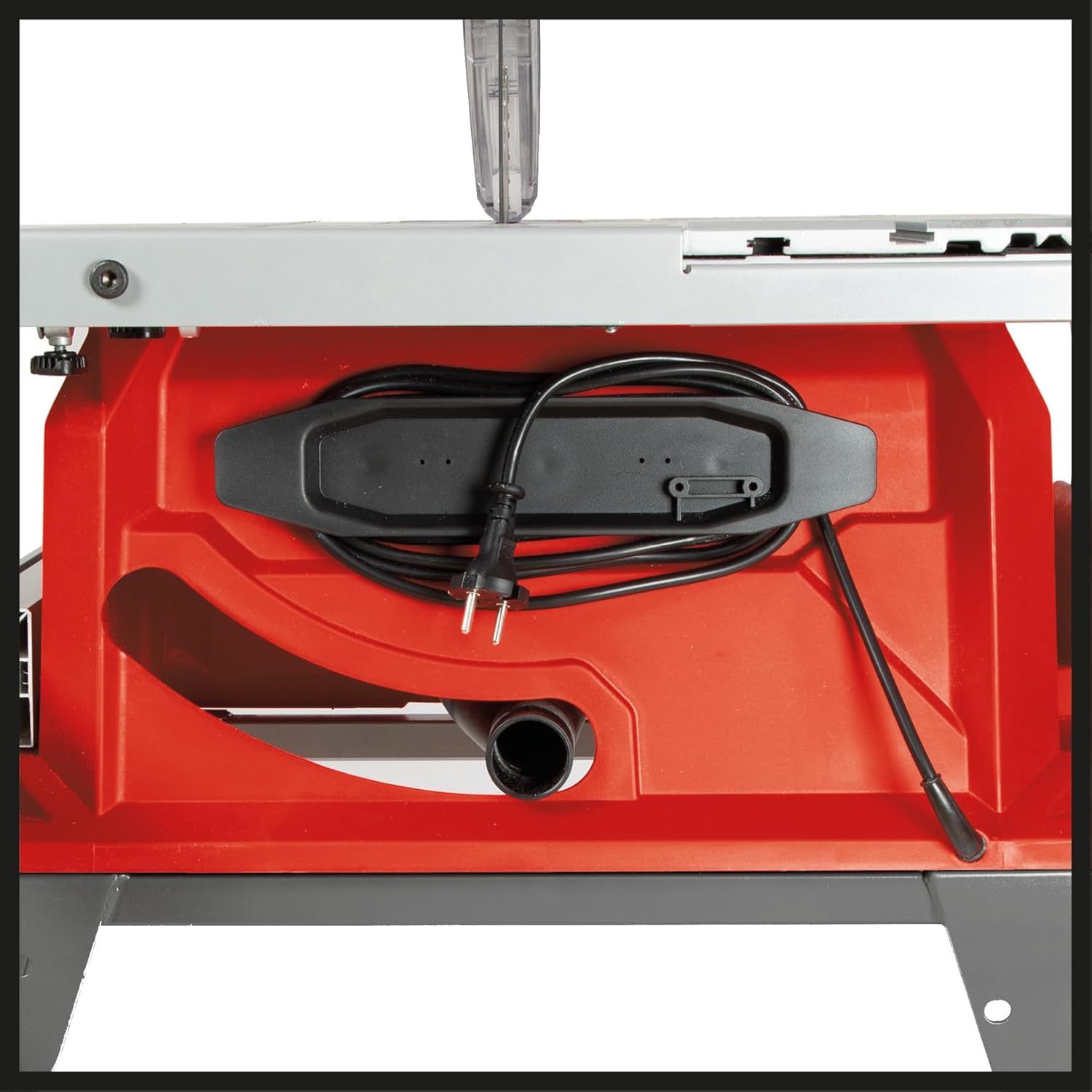


Key Features:
- Precision Tungsten Carbide Saw Blade: Ensures clean and accurate cuts.
- Aluminum Table: Flat and durable with excellent sliding properties for precise workpiece guidance.
- Table Extensions: Extendable to the rear and right side for processing wider workpieces.
- Sliding Carriage: Facilitates long and precise cuts.
- 2-in-1 Saw Blade Adjustment: Allows quick adjustment of saw blade height and inclination.
- Parallel Stop: Equipped with double-sided fastening for stable and precise parallel cuts.
- Cross Stop: Features an angle scale for accurate miter cuts.
- Transparent Saw Blade Guard: Improves visibility of the cutting process while maintaining safety.
- Chip Extraction Connection: For connecting a dust extractor to keep the workplace clean.
- Foldable Stand with Wheels (Trolley Function): Provides mobility and easy transport.
- Accessory Holder: For organized storage of tools.
- Overload Switch: Protects the motor from damage due to overvoltage.
- Integrated Soft Start: Protects the motor and electrical fuses during startup.
4. Setup Instructions
Before operating the table saw, ensure it is properly assembled and secured.
- Unpacking: Carefully remove all components from the packaging. Check for any damage during transit.
- Stand Assembly: Assemble the foldable stand according to the diagrams in the separate assembly guide. Ensure all locking mechanisms are securely engaged.
- Mounting the Saw Unit: Securely attach the saw unit to the assembled stand. Verify all bolts and fasteners are tightened.
- Table Extensions: Install the table extensions. The main aluminum table can be extended rearwards by 65 mm and to the right by 150 mm. Ensure they slide smoothly and lock into position.
- Parallel Stop Installation: Attach the parallel stop. It features double-sided fastening for stability. Calibrate the scale for accurate measurements.
- Cross Stop Installation: Install the cross stop. This stop includes an angle scale for miter cuts.
- Saw Blade Guard: Ensure the transparent saw blade guard is correctly installed and moves freely.
- Leveling: Use the adjustable feet on the stand to ensure the table saw is stable and level on your work surface.
- Dust Extraction: Connect a suitable dust extraction system to the chip extraction port for a cleaner and safer working environment.
5. Operating Instructions
Follow these steps for safe and effective operation of your table saw.
- Power Connection: Connect the saw to a suitable 230 Volt power supply. The integrated soft start feature will manage the initial power surge.
- Blade Height Adjustment: Use the 2-in-1 adjustment mechanism to set the saw blade height. The blade should extend slightly above the workpiece for optimal cutting.
- Blade Angle Adjustment: Adjust the saw blade inclination for miter cuts using the same 2-in-1 adjustment. The cross stop has an angle scale to guide you.
- Setting Stops: Position the parallel stop for rip cuts or the cross stop for cross-cuts and miter cuts. Ensure they are securely fastened and aligned with your desired measurement.
- Workpiece Placement: Place the workpiece firmly against the fence and the table. Ensure it is stable and will not shift during the cut.
- Using the Push Stick: Always use the provided push stick when cutting narrow or short workpieces to keep your hands safely away from the blade.
- Starting the Saw: Press the green 'ON' button (Figure 6) to start the saw. Allow the blade to reach full speed before beginning the cut.
- Making the Cut: Feed the workpiece slowly and steadily into the blade. Maintain firm pressure against the fence and the table.
- Stopping the Saw: After completing the cut, press the red 'OFF' button (Figure 6). Wait for the blade to come to a complete stop before removing the workpiece or any cut-off material.
- Overload Protection: If the motor experiences an overload, the overload switch will activate to protect the motor. If this occurs, turn off the saw, allow it to cool, and reduce the load before restarting.
6. Maintenance
Regular maintenance ensures the longevity and safe operation of your table saw.
- Cleaning: After each use, disconnect the power and clean the saw. Remove sawdust and debris from the table, blade guard, and motor housing. Use a brush or compressed air.
- Blade Inspection: Regularly inspect the saw blade for sharpness, damage, or missing teeth. Replace dull or damaged blades immediately.
- Lubrication: Periodically lubricate moving parts as indicated in the detailed product manual (not provided here).
- Fastener Check: Check all bolts, nuts, and screws regularly to ensure they are tight. Tighten any loose fasteners.
- Dust Extraction System: Ensure the dust extraction port and connected system are clear of blockages.
- Storage: When not in use, store the table saw in a dry, secure location. The foldable stand and trolley function (Figure 3) make it easier to move and store.
7. Troubleshooting
This section addresses common issues you might encounter.
| Problem | Possible Cause | Solution |
|---|---|---|
| Saw does not start | No power supply; Overload switch tripped; Faulty switch | Check power connection; Reset overload switch; Contact customer support |
| Poor cut quality (rough, splintering) | Dull or incorrect blade; Incorrect blade height; Workpiece not secured | Replace blade; Adjust blade height; Secure workpiece firmly |
| Motor overheats or stops | Overload; Insufficient ventilation; Dull blade | Reduce feed rate; Ensure clear ventilation; Replace blade |
| Excessive vibration | Loose blade; Unstable setup; Damaged blade | Check blade mounting; Ensure saw is level and stable; Replace blade |
8. Technical Specifications
| Specification | Value |
|---|---|
| Model Number | 4340539 |
| Power | 2000 Watts |
| Voltage | 230 Volts |
| Blade Length / Diameter | 250 Millimeters |
| Blade Material | Carbide |
| Number of Teeth | 48 |
| Speed | 6000 rpm |
| Max. Cutting Depth at 90° | 78 mm |
| Max. Cutting Depth at 45° | 53 mm |
| Product Dimensions (L x W x H) | 89 x 84 x 105 cm |
| Item Weight | 34.91 Kilograms |
| Handle/Lever Material | Aluminum |
| Special Features | Depth Adjustment, Soft Start, Trolley Function |
9. Warranty Information
Einhell products are designed for quality and durability. This product comes with a standard warranty. Additionally, Einhell offers extended warranty services for certain products, such as a 3-year warranty on Power X-Change batteries upon online registration.
To activate any extended warranty services, products must be registered on the official Einhell website within 30 days of purchase. Please refer to the official Einhell website or your purchase documentation for specific warranty terms and conditions applicable to your product.
10. Customer Support
For further assistance, spare parts, or service inquiries, please contact Einhell customer support or visit their official website.
You can find more information and contact details by visiting the Einhell Brand Store.


