
Introduction
This manual provides comprehensive instructions for setting up, operating, and maintaining your Véfaii 7-Inch Day Clock (Model TY701BLACK). This digital calendar clock is designed for clear readability, featuring a high-resolution 7-inch display that clearly spells out the full day of the week, month, and date, along with the time of day (Morning, Afternoon, Evening, Night, Midnight, Before Dawn). It includes multiple alarms, custom reminders, remote control, and an auto-dimming display, making it suitable for various users, including seniors with impaired vision.
Package Contents
Upon unboxing, please ensure all items are present:
- Véfaii 7-Inch Day Clock
- Power Adapter (Corded Electric)
- Remote Control (with pre-installed battery)
- Detachable Stand
- User Instruction Guide
Setup
- Attach the Stand: Locate the detachable stand and insert it into the designated slot on the back of the clock. Ensure it is securely fastened for stable placement on a tabletop. The clock can also be wall-mounted using the integrated hanging hole.
- Connect Power: Plug the provided power adapter into the DC IN port on the back of the clock, then plug the adapter into a standard electrical outlet. The clock will power on automatically.
- Initial Display: Upon first power-on, the clock should display the current time and date. The internal battery ensures settings are retained during power outages.
- Remote Control Activation: Remove the plastic tab from the remote control's battery compartment to activate it.

Image Description: A Véfaii 7-Inch Day Clock is shown on a wooden surface, displaying "WEDNESDAY AFTERNOON 2:15 P.M. 19 FEBRUARY 2025" in large, clear white text against a black background. A graphic indicating "+30% Higher Brightness" is next to it.
Operating Instructions
Using the Remote Control
The remote control allows easy navigation and adjustment of settings. Point the remote towards the clock's infrared sensor (located on the front bottom edge) to interact with the menu.
- Power Button: Turns the clock display on/off.
- Arrow Buttons (Up/Down/Left/Right): Navigate through menu options and adjust values.
- OK/Enter Button: Confirms selections.
- Exit/Setup Button: Accesses the main settings menu or exits current menu.

Image Description: A person is shown using the remote control to interact with the Véfaii 7-Inch Day Clock. The image also displays three different clock interfaces: one with "WEDNESDAY NOON 12:15 P.M. 21 OCTOBER 2023", another with a similar display but different colors, and a third with "WEDNESDAY 18:25 21 OCT. 2022" in a 24-hour format. Text highlights "Easier to Operate" and features like "Handy remote control", "Sun/Moon icons", "Automatic Daylight Saving Time (DST)", and "8+ eyes-friendly text colors Switch".
Setting Time and Date
The clock automatically adjusts for Daylight Saving Time. If manual adjustment is needed or to change display formats:
- Press the Exit/Setup button on the remote to enter the settings menu.
- Use the Up/Down arrows to navigate to "Set Time" or "Set Date".
- Use the Left/Right arrows to adjust the values (hours, minutes, AM/PM, month, day, year).
- Select "Time Mode" to switch between 12-Hour and 24-Hour formats.
- Select "Date Mode" to choose between Month-Day-Year or Day-Month-Year formats.
- Press OK/Enter to confirm changes and Exit/Setup to return to the main display.
Brightness and Display Colors
The clock features 10 levels of brightness and an auto-dimming function for night-time viewing.
- Auto-Dimming: The clock automatically dims from 8 PM to 6 AM to save energy and reduce eye strain.
- Manual Brightness: Adjust "Brightness-day" and "Brightness-night" settings in the menu using the remote.
- Text Colors: Choose from White, Yellow, Green, or Orange text colors in the settings menu. Note that Green and Orange may have lower contrast, especially at night.

Image Description: The top part of the image shows the Véfaii 7-Inch Day Clock on a nightstand, illustrating "AUTO NIGHT DIMMING" with the display showing "SUNDAY NIGHT 22:50 DECEMBER 20 2020" at a low brightness. The bottom part shows the clock with a child and adult, highlighting "MORE THEMES & COLORS" and a display with an analog clock face and digital date/time.
Alarms and Reminders
The clock supports up to 19 alarms and 20 custom reminders.
- Setting Alarms: Navigate to "Wake up" or "Medication Reminder" options in the settings menu. Set the desired time and turn the reminder "On".
- Alarm Volume & Duration: Adjust "Alarm Volume" (up to 60%) and "Alarm Duration" (from 15 seconds to 5 minutes) in the settings.
- Drink Water Reminders: A dedicated "Drink Water" reminder can be set.
- Custom Reminders: For personalized reminders, you can create audio files on a USB stick and insert it into the corresponding port on the clock. The clock will play the custom audio at the set time.
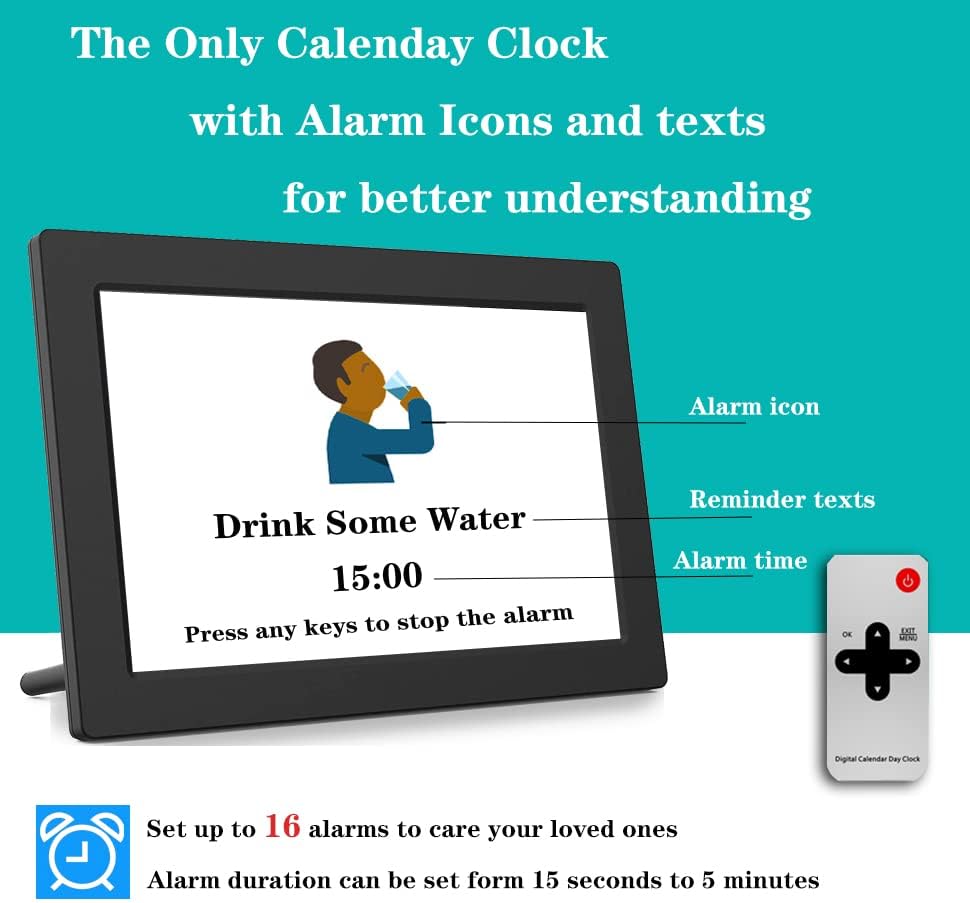
Image Description: The Véfaii 7-Inch Day Clock displays a "Drink Some Water" reminder with an alarm icon and the time "15:00". Text below instructs "Press any keys to stop the alarm". The remote control is also visible next to the clock.
Photo Frame Function
The clock can also function as a digital photo frame.
- Insert a USB drive or SD/MMC card containing your photos into the corresponding slot on the side of the clock.
- Navigate to the photo display mode using the remote or on-device buttons.
- The clock will cycle through your images.

Image Description: The Véfaii 7-Inch Day Clock is shown on a white surface, displaying a family photo. Text above reads "SHARE HAPPY MOMENTS WITH YOUR LOVED ONES (USB DRIVE REQUIRED)".
Nap Button
The clock includes a dedicated nap button for convenience. Pressing this button can activate a pre-set nap timer or put the clock into a temporary quiet mode.
Maintenance
- Cleaning: Use a soft, dry cloth to clean the screen and exterior of the clock. Avoid abrasive cleaners or solvents.
- Power: Always use the provided power adapter. Disconnect power during electrical storms or when not in use for extended periods.
- Placement: Place the clock on a stable surface or mount it securely on a wall. Avoid extreme temperatures or direct sunlight.
Troubleshooting
- Clock does not power on:
- Ensure the power adapter is securely connected to both the clock and a working electrical outlet.
- Remote control is not working:
- Check if the plastic tab has been removed from the battery compartment. Ensure there are no obstructions between the remote and the clock's infrared sensor. Replace the battery if necessary.
- Time or date is incorrect:
- Access the settings menu using the remote control and manually adjust the time and date. Verify Daylight Saving Time settings if applicable.
- Alarms are not sounding:
- Check the alarm settings in the menu to ensure they are enabled and the volume is set appropriately.
Specifications
| Feature | Detail |
|---|---|
| Brand | Véfaii |
| Model Number | TY701BLACK |
| Display Type | Digital |
| Screen Size | 7 Inch |
| Color | Black |
| Product Dimensions | 8.03"W x 6"H |
| Power Source | Corded Electric, internal battery for auto time reset |
| Special Features | Alarm, Auto Dimmable, Remote Control, Custom Reminders, Photo Frame Function |
| Mounting Type | Tabletop, Wall Mount |
| Frame Material | Acrylonitrile Butadiene Styrene |
| Supported Languages | English, Spanish, French, German, Italian |
| Item Weight | 16 ounces (1 pound) |
Warranty and Support
Véfaii offers a 12-month guarantee on this product. For any support inquiries or warranty claims, please refer to the contact information provided in your product packaging or visit the official Véfaii store on Amazon: Véfaii Store.