
1. Introduction
About Your Samvix Glasba 8 MP3 Player
The Samvix Glasba 8 is a compact and portable MP3 player designed for music playback. It features a color display, built-in memory, and a durable design suitable for various activities. This manual provides comprehensive instructions to help you get the most out of your device.
What's in the Box
- Samvix Glasba 8 MP3 Player
- USB-A to USB-C Charging Cable
- Wired Earbuds
- Clip

Figure 1: The front of the Samvix Glasba 8 MP3 Player, showing its black casing, display screen, and navigation buttons for playback and menu access.
2. Key Features
- 8GB Memory Capacity: Store a variety of music files directly on the device.
- Expandable Memory: Supports Micro SD cards for additional storage.
- Long Battery Life: Built-in lithium-ion battery provides up to 40 hours of playback on a full charge.
- Bright Color Display: Easily visible screen even in strong sunlight.
- Built-In Clip: Designed for sports and active use, allowing secure attachment.
- Bluetooth Connectivity: Connect to wireless headphones or speakers.
- FM Radio: Listen to your favorite radio stations.
- Voice Recorder: Capture audio recordings.
- Pedometer & Stopwatch: Integrated tools for fitness tracking.
3. Setup Guide
3.1 Charging the Device
Before initial use, fully charge your Samvix Glasba 8 MP3 Player. Connect the included USB-C cable to the charging port on the device and the USB-A end to a power source (e.g., computer USB port, wall adapter). The device features a built-in lithium battery providing up to 40 hours of battery life.

Figure 2: The black USB charging cable, featuring a USB-A connector on one end and a USB-C connector on the other, used for charging and data transfer.
3.2 Inserting a Micro SD Card
The device comes with 8GB of internal memory, but you can expand its storage capacity using a Micro SD card. Locate the Micro SD card slot on the side of the player. Gently insert the Micro SD card until it clicks into place.
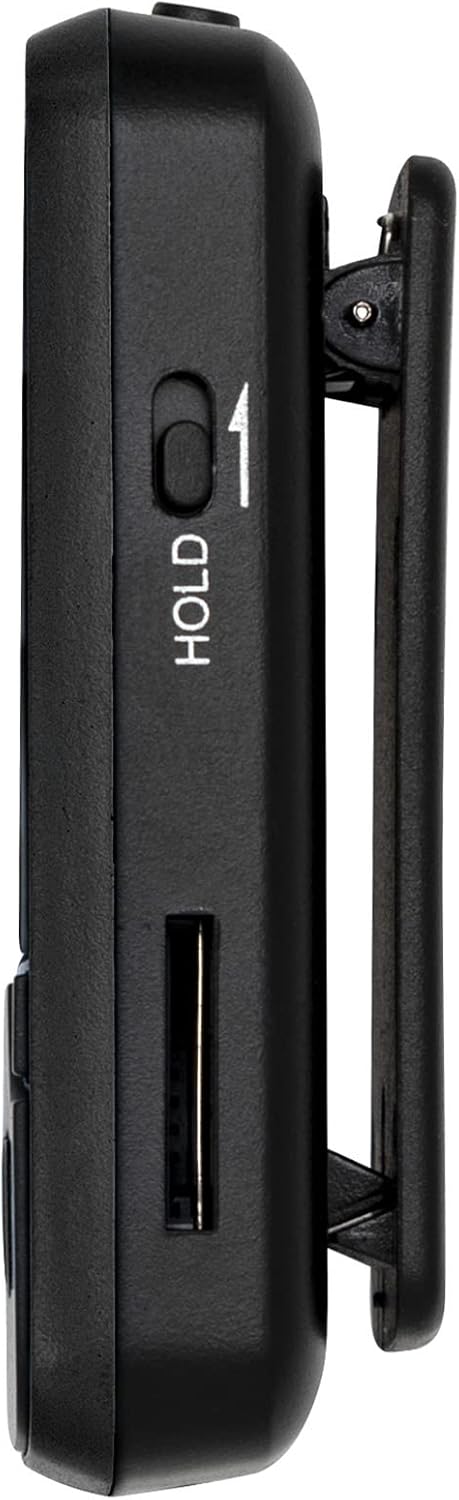
Figure 3: A side profile of the MP3 player, highlighting the 'HOLD' switch to prevent accidental button presses and the slot for a Micro SD card to expand storage.
Video 1: This video provides a visual overview of the MP3 player's size and highlights the location of the Micro SD card slot, which is essential for expanding storage.
3.3 Transferring Music Files
To transfer music files to your MP3 player, connect it to your computer using the provided USB-C cable. The device should appear as a removable drive. You can then drag and drop your music files into the appropriate folders on the device's internal storage or Micro SD card.
Video 2: A step-by-step video guide on how to connect your MP3 player to a MacBook computer to transfer music and other files, ensuring proper connection and file management.
4. Operating Instructions
4.1 Power On/Off
- To Power On: Press and hold the Power button located on the side of the device until the screen illuminates.
- To Power Off: Press and hold the Power button until the power-off options appear, then select 'Power Off'.
4.2 Basic Navigation
Use the physical buttons below the screen to navigate through menus and control playback:
- Play/Pause Button: Starts or pauses playback.
- Left/Right Arrow Buttons: Navigate through menu options or skip tracks during playback.
- Up/Down Arrow Buttons: Scroll through lists or adjust settings.
- Menu Button: Access options within the current screen.
- Back Button: Return to the previous screen.
4.3 Music Playback
From the main menu, select 'Music' to access your audio library. You can browse by artist, album, genre, or view all songs. Use the navigation buttons to select and play your desired track.
Video 3: This video illustrates the process of activating the shuffle play feature on the MP3 player, allowing for random playback of your music library.
4.4 Volume Control
Adjust the volume using the dedicated volume buttons located on the side of the device.
4.5 Bluetooth Connectivity
To connect to Bluetooth headphones or speakers, navigate to the 'Bluetooth' option in the main menu. Enable Bluetooth and search for available devices. Select your desired device to pair.
4.6 FM Radio
Select 'FM Radio' from the main menu. Ensure wired headphones are connected as they often act as the antenna for better reception. Scan for stations and save your favorites.
4.7 Voice Recorder
Access the 'Recorder' function from the main menu to start, pause, and save voice recordings.
4.8 Pedometer & Stopwatch
The device includes a pedometer for step tracking and a stopwatch for timing activities. Access these features from the main menu.
4.9 Viewing Pictures & Files
Select 'Pictures' to view images stored on your device. The 'Folder' option allows you to browse all files and folders on the internal memory and Micro SD card.
5. Maintenance
To ensure the longevity and optimal performance of your Samvix Glasba 8 MP3 Player, follow these maintenance guidelines:
- Cleaning: Use a soft, dry cloth to clean the device. Avoid liquid cleaners or abrasive materials.
- Storage: Store the MP3 player in a cool, dry place away from direct sunlight and extreme temperatures.
- Avoid Drops: Protect the device from drops and impacts, which can damage internal components or the screen.
- Water Exposure: This device is not waterproof. Avoid exposure to water or high humidity.
6. Troubleshooting
If you encounter issues with your Samvix Glasba 8 MP3 Player, refer to the following common troubleshooting steps:
- Device Not Turning On: Ensure the battery is charged. Connect the device to a power source and try again.
- Cannot Transfer Files: Verify the USB cable is securely connected to both the device and the computer. Ensure the device is in 'File Transfer' mode if prompted.
- No Sound: Check the volume level. Ensure headphones are properly connected or Bluetooth headphones are paired and connected.
- Screen Frozen: Press and hold the Power button for about 10-15 seconds to force a restart.
- Bluetooth Not Connecting: Ensure the MP3 player's Bluetooth is enabled and discoverable. Check that the other Bluetooth device is also in pairing mode.
7. Specifications
| Feature | Detail |
|---|---|
| Brand | SAMVIX |
| Model Name | Glasba 8 |
| Memory Storage Capacity | 8 GB |
| Connectivity Technology | Bluetooth, Wi-Fi |
| Screen Size | 1.5 Inches |
| Color | Black |
| Special Feature | Built-In Clip |
| Compatible Devices | Headphone, Earphone |
| Media Type | Micro SD |
| Product Dimensions | 7.8 x 3.9 x 1.2 inches |
| Item Weight | 4 ounces |
| Manufacturer | Samvix |
8. Warranty and Support
The Samvix Glasba 8 MP3 Player comes with a 12-month warranty from the manufacturer. For technical support, warranty claims, or any inquiries, please contact Samvix customer service at support.mp@yoton.co. Please provide your model name (Glasba 8) and purchase details when contacting support.
