
1. Safety Information
Please read all safety instructions before operating the SUPVAN TP80E Tube Printer to ensure safe and proper use. Keep this manual for future reference.
- Do not expose the printer to water or excessive moisture.
- Avoid placing the printer in direct sunlight or near heat sources.
- Use only the power adapter supplied with the printer.
- Do not attempt to disassemble or repair the printer yourself. Contact qualified service personnel.
- Keep out of reach of children.
2. Product Overview
The SUPVAN TP80E is a high-speed tube printer designed for efficient label printing. It features a built-in keyboard and display for standalone operation, and USB connectivity for computer integration.
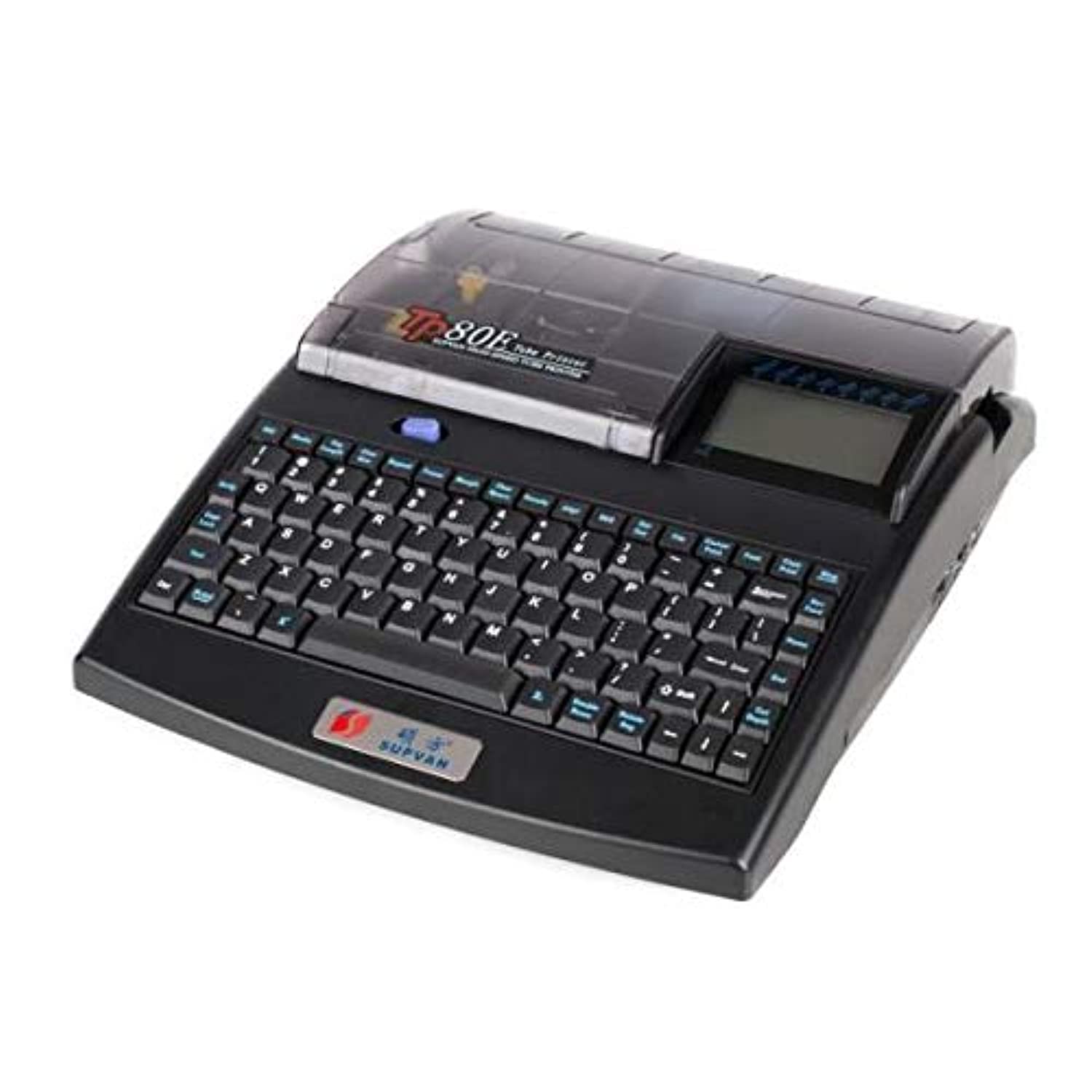
Image 1: Front view of the SUPVAN TP80E Tube Printer, showing the integrated keyboard, display, and tube feeding mechanism.
3. Setup
3.1 Unpacking and Initial Inspection
- Carefully remove the printer and all accessories from the packaging.
- Verify that all included components are present: power cable, manual, and initial label/paper roll.
- Inspect the printer for any signs of damage. If damaged, do not use and contact customer support.
3.2 Connecting Power
- Connect the power cable to the power input port on the printer.
- Plug the other end of the power cable into a suitable electrical outlet.
- Press the power button to turn on the printer.
3.3 Loading Labels/Tubes
- Open the top cover of the printer.
- Insert the label roll or tube material into the designated slot, ensuring it is properly aligned.
- Feed the leading edge of the label/tube material through the print mechanism until it is visible at the output.
- Close the top cover securely.
3.4 USB Connection and Driver Installation
- Connect the printer to your computer using a USB cable.
- If prompted, install the necessary drivers. Drivers can typically be found on the manufacturer's website or an included CD.
4. Operating Instructions
4.1 Basic Printing from the Device
- Ensure the printer is powered on and labels/tubes are loaded.
- Use the integrated keyboard to type the desired text on the display.
- Utilize function keys such as Seg Length, Char Size, Margin, Char Space, and Density to adjust label properties.
- Press the Print button to start printing.
4.2 Key Functions Overview
| Key | Function |
|---|---|
| ESC | Escape / Cancel operation |
| Media | Select media type |
| Seg Length | Adjust segment length |
| Char Size | Change character size |
| Repeat | Set number of repetitions for printing |
| Frame | Add a frame around text |
| Margin | Adjust print margins |
| Char Space | Adjust spacing between characters |
| Density | Adjust print density (darkness) |
| Align | Set text alignment |
| SEQ | Sequential numbering function |
| Set Cut | Configure automatic cutting settings |
| File | Access file management (save/load) |
| Initiate printing | |
| Copy Print | Print multiple copies |
| Stop | Stop current printing operation |
| Backspace | Delete character to the left |
| Rev Feed | Reverse feed media |
| Home / End | Navigate to start/end of line |
| Enter | Confirm selection or move to next line |
| Shift | Access uppercase characters and symbols |
| Cut Depth | Adjust cutting depth |
| Double Rows | Enable double row printing |
| Delete Seg | Delete a segment of text |
5. Maintenance
5.1 Cleaning the Print Head
Regular cleaning of the print head ensures optimal print quality and extends the life of your printer.
- Turn off the printer and disconnect the power cable.
- Open the print head cover.
- Gently wipe the print head with a lint-free cloth dampened with isopropyl alcohol.
- Allow the print head to dry completely before closing the cover and reconnecting power.
5.2 Replacing Label Rolls/Tubes
When the label roll or tube material runs out, replace it with a new one following the loading instructions in Section 3.3.
6. Troubleshooting
If you encounter issues with your SUPVAN TP80E Tube Printer, refer to the following common problems and solutions:
| Problem | Possible Cause | Solution |
|---|---|---|
| Printer does not power on | Power cable disconnected; Power outlet fault | Check power cable connection; Try a different outlet |
| No print output | No labels loaded; Print head dirty; Incorrect settings | Load labels; Clean print head (Section 5.1); Verify print settings |
| Poor print quality | Print head dirty; Low print density; Incorrect media | Clean print head; Adjust print density; Ensure correct label type is used |
| Labels not feeding correctly | Labels improperly loaded; Media jam | Re-load labels correctly; Clear any obstructions in the media path |
If the problem persists, please contact SUPVAN customer support.
7. Specifications
| Feature | Detail |
|---|---|
| Brand | SUPVAN |
| Model Name | TP80E |
| Model Number | TP80E |
| Connectivity Technology | USB |
| Printing Technology | Thermal |
| Printer Output | Monochrome (Black and White) |
| Max Monochrome Print Speed | Up to 25 labels per minute |
| Max Media Size | 25 labels |
| Paper Size | 10 Centimeters (width) |
| Print Media | Labels |
| Ink Color | Black |
| Additional Printer Functions | Print only |
| Duplex Printing | No |
| Color Depth | 1 bpp |
| Total USB Ports | 1 |
| Included Components | Power cable, manual, paper, labels |
| Specific Product Uses | Label printing |
8. Warranty and Support
For detailed warranty information, please refer to the warranty card included with your product or visit the official SUPVAN website. For technical support, service, or inquiries, please contact SUPVAN customer service through their official channels.


