
TWS i17
i17 Dual Earbuds User Manual
Model: i17 | Brand: TWS
1. Introduction
Thank you for purchasing the TWS i17 Dual Earbuds. This manual provides essential information for setting up, operating, and maintaining your new wireless earbuds. Please read this manual thoroughly before use to ensure optimal performance and longevity of your device.
2. Safety Information
To prevent damage to your earbuds or injury to yourself or others, please observe the following precautions:
- Do not expose the earbuds or charging case to extreme temperatures, humidity, or liquids.
- Avoid dropping, impacting, or disassembling the device.
- Do not use abrasive cleaners or solvents. Clean with a soft, dry cloth.
- Listen at moderate volume levels to prevent hearing damage.
- Keep out of reach of children.
- This product is not water resistant. Avoid exposure to water or excessive moisture.
3. Package Contents
Verify that all items are present in your package:
- TWS i17 Dual Earbuds (Left and Right)
- Charging Case
- USB Charging Cable
- User Manual

Image: The TWS i17 Dual Earbuds, with one earbud partially removed from its charging case, showcasing the sleek black design.
4. Setup
4.1 Charging the Earbuds and Case
Before first use, fully charge the earbuds and the charging case.
- Place both earbuds into the charging case. Ensure they are properly seated.
- Connect the USB charging cable to the charging port on the bottom of the case and the other end to a USB power source (e.g., computer, wall adapter).
- The indicator light on the case will show charging status. It will turn off or change color when fully charged.
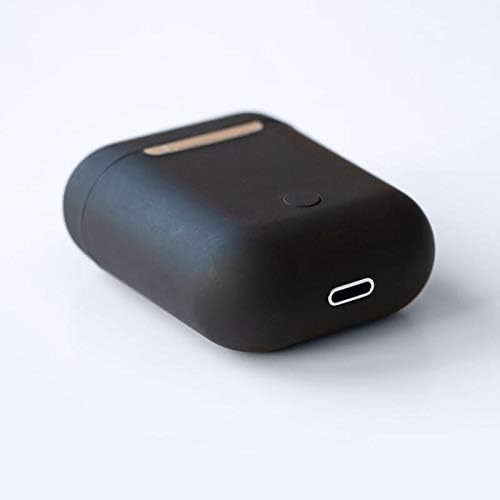
Image: A close-up view of the bottom of the TWS i17 charging case, highlighting the USB charging port and a small button.
4.2 Pairing with Your Device
The i17 earbuds use Bluetooth for wireless connection.
- Ensure the earbuds are charged.
- Open the charging case. The earbuds will automatically enter pairing mode (indicator lights will flash).
- On your mobile phone or Bluetooth-enabled device, go to Bluetooth settings and turn Bluetooth on.
- Search for available devices. Select "i17" from the list.
- Once connected, the indicator lights on the earbuds will stop flashing. You are now ready to use your earbuds.

Image: The TWS i17 Dual Earbuds resting inside their open charging case, ready for pairing or use.
5. Operating Instructions
5.1 Power On/Off
- Power On: Take the earbuds out of the charging case. They will automatically power on and connect to the last paired device.
- Power Off: Place the earbuds back into the charging case. They will automatically power off and begin charging.
5.2 Music Playback
- Play/Pause: Tap either earbud once.
- Next Track: Double-tap the right earbud.
- Previous Track: Double-tap the left earbud.
5.3 Call Management
- Answer/End Call: Tap either earbud once.
- Reject Call: Press and hold either earbud for 2 seconds.
5.4 Voice Assistant
- Activate Voice Assistant (Siri/Google Assistant): Triple-tap either earbud.
6. Maintenance
Proper maintenance ensures the longevity of your earbuds:
- Cleaning: Use a soft, dry, lint-free cloth to clean the earbuds and charging case. Do not use liquids or sprays.
- Storage: When not in use, store the earbuds in their charging case to protect them and keep them charged. Store in a cool, dry place.
- Battery Care: To prolong battery life, avoid fully discharging the earbuds frequently. Charge them regularly.

Image: The TWS i17 Dual Earbuds securely stored within their closed charging case, ready for transport or charging.
7. Troubleshooting
| Problem | Possible Cause | Solution |
|---|---|---|
| Earbuds not pairing | Low battery; Out of range; Not in pairing mode; Bluetooth off on device. | Charge earbuds; Move closer to device; Ensure case is open for pairing; Turn on Bluetooth on device. |
| Only one earbud working | One earbud not charged; Earbuds not properly synced. | Ensure both earbuds are charged; Place both earbuds back in case, close, then reopen to re-sync. |
| No sound | Volume too low; Not connected; Media paused. | Increase volume on device; Reconnect earbuds; Check media playback status. |
| Charging case not charging | Faulty cable/adapter; Loose connection. | Try a different USB cable or power adapter; Ensure cable is securely plugged in. |
8. Specifications
| Feature | Detail |
|---|---|
| Model Number | i17 |
| Brand | TWS |
| Connectivity Technology | Wireless (Bluetooth) |
| Headphones Form Factor | In-Ear |
| Microphone Included | Yes |
| Noise Cancelling | No |
| Compatible With | Mobile Phones |
| Color | Black |
| Material | Plastic |
| Cable Feature | Cable-free |
| Water Resistance Level | Not Water Resistant |
| Shipping Dimensions | 12.6 x 8.8 x 3.6 cm |
| Weight | 96 grams |
| First Available Date | January 15, 2020 |
9. Warranty and Support
For warranty information and customer support, please refer to the contact details provided on the product packaging or the official TWS website. Keep your proof of purchase for warranty claims.
For further assistance, please contact TWS customer service.
Related documentsi17

Ask a question about this manual
Ask about setup, troubleshooting, compatibility, parts, safety, or missing instructions. Manuals+ will review the question and use this page’s manual context to help answer it.