
1. Introduction and Overview
Thank you for choosing the Comix S3508D Desktop Micro-Cut Paper Shredder. This manual provides essential information for the safe and efficient operation, maintenance, and troubleshooting of your new shredder. Please read it thoroughly before use and retain it for future reference.
The Comix S3508D is designed for personal and home office use, offering secure destruction of sensitive documents, CDs/DVDs, and credit cards with its micro-cut technology. Key features include:
- Continuous shredding for up to 30 minutes.
- Separate waste bin design for CD/DVD fragments, allowing for easy waste separation.
- Energy-saving technology that automatically shuts off the device after 30 minutes of inactivity.
2. Important Safety Instructions
To reduce the risk of injury or damage, please observe the following safety precautions:
- Keep out of reach of children and pets. The shredder has sharp blades and moving parts.
- Avoid loose clothing, jewelry, and long hair near the paper entry slot.
- Do not insert fingers or hands into the paper entry slot.
- Do not spray any flammable products onto the shredder or use it near flammable materials.
- Unplug the shredder before moving, cleaning, or emptying the waste bin.
- Do not shred metal objects, wet paper, or adhesive labels as this can damage the blades.
- Operate the shredder on a flat, stable surface.
- Do not overload the shredder. Refer to the maximum sheet capacity in the specifications.
- Do not open the shredder housing. There are no user-serviceable parts inside.
3. Product Components
Familiarize yourself with the main parts of your Comix S3508D shredder:
- Shredder Head: Contains the cutting mechanism and control panel.
- Paper Entry Slot: For inserting documents.
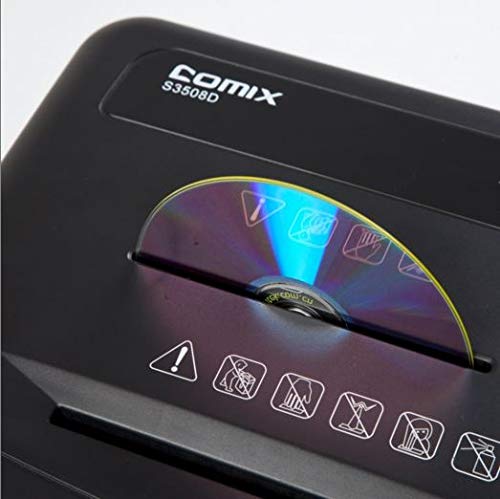
- CD/DVD Entry Slot: A separate slot for optical media.
- Control Switch: For selecting ON/OFF, Auto, Forward, and Reverse modes.
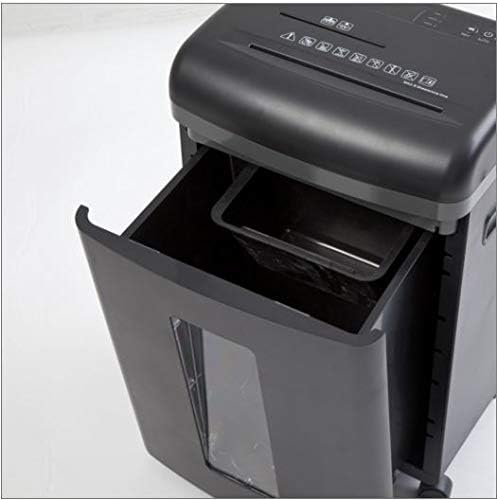
- Waste Bin: Collects shredded paper and media.
- CD/DVD Waste Compartment: A smaller, separate compartment within the main bin for shredded optical media.
- Casters: Wheels for easy mobility.
4. Setup
- Unpack: Carefully remove the shredder from its packaging. Retain packaging for future transport or storage.
- Position: Place the shredder on a level and stable surface. Ensure there is enough space around the unit for proper ventilation and access to the power outlet.
- Connect Power: Plug the power cord into a standard electrical outlet.
- Check Bin: Ensure the waste bin is correctly inserted into the shredder body. The shredder will not operate if the bin is not properly seated.
5. Operating Instructions
Control Switch Functions:
- OFF: The shredder is powered off.
- AUTO: The shredder is in standby mode. It will automatically start when paper is inserted and stop when shredding is complete. This is the recommended setting for normal operation.
- FORWARD: Manually runs the shredder forward. Use this for continuous shredding if needed, but be mindful of the duty cycle.
- REVERSE: Manually runs the shredder in reverse. Use this to clear paper jams.
Shredding Documents:
- Set the control switch to AUTO.
- Insert up to 8 sheets of A4 (70gsm) paper straight into the paper entry slot. The shredder will automatically start and stop.
- Do not exceed the maximum sheet capacity to prevent jams and damage.
Shredding CDs/DVDs and Credit Cards:
- Set the control switch to AUTO.
- Insert one CD/DVD or credit card at a time into the dedicated CD/DVD entry slot.
- The shredded media will fall into the separate CD/DVD waste compartment within the main bin.
Duty Cycle:
The Comix S3508D is designed for a continuous run time of 30 minutes ON, followed by a 40 minutes OFF cool-down period. Exceeding the duty cycle may cause the shredder to overheat and activate its thermal protection, temporarily shutting down the unit. Allow it to cool down before resuming operation.
6. Maintenance
Emptying the Waste Bin:
- Always set the control switch to OFF and unplug the shredder before emptying the bin.
- Pull out the waste bin from the front of the shredder.
- Dispose of the shredded waste. Remember to empty the separate CD/DVD compartment as well.
- Slide the waste bin back into place until it clicks securely.
Shredder Oiling:
Regular oiling is recommended to maintain optimal performance and extend the life of your shredder, especially after emptying the waste bin 2-3 times or after heavy use. Use shredder oil (vegetable oil is not recommended).
- Set the control switch to OFF.
- Apply a thin line of shredder oil across the paper entry slot.
- Set the control switch to FORWARD for 2-3 seconds to distribute the oil, then switch back to OFF.
Cleaning:
Wipe the exterior of the shredder with a soft, dry cloth. Do not use abrasive cleaners or solvents.
7. Troubleshooting
| Problem | Possible Cause | Solution |
|---|---|---|
| Shredder does not operate. | 1. Power cord not plugged in.
2. Waste bin not properly inserted. 3. Overheating. |
1. Ensure power cord is securely plugged into an outlet.
2. Push the waste bin firmly into place. 3. Allow the shredder to cool down for 40 minutes. |
| Paper jam. | 1. Too much paper inserted.
2. Paper inserted incorrectly. |
1. Set switch to REVERSE to clear paper. Remove excess paper.
2. If jam persists, unplug, carefully remove paper, then plug in and try REVERSE again. |
| Shredder runs continuously in AUTO mode. | Sensor is blocked or dirty. | Unplug the shredder and clean the paper entry sensor (usually a small clear window) with a soft cloth. |
8. Specifications
| Feature | Detail |
|---|---|
| Brand | Comix |
| Model | S3508D |
| Shred Type | Micro-cut |
| Shred Size | 2 x 12 mm |
| Standard Sheet Capacity (70gsm) | 8 sheets |
| CD/DVD/Card Capacity | 1 at a time |
| Entry Width | 220 mm |
| Shred Speed | 2.3 meters/minute |
| Duty Cycle | 30 minutes ON / 40 minutes OFF |
| Special Feature | Energy Saving Mode |
| Item Weight | 2.2 pounds |
| ASIN | B083XFNHQH |
9. Warranty and Support
Comix products are manufactured to high-quality standards. For warranty information, please refer to the warranty card included with your purchase or contact your retailer. For technical support or service inquiries, please contact Comix customer service through the contact information provided on the official Comix website or your purchase documentation.