
Introduction
The Julia is a fully analog, feature-rich chorus/vibrato pedal designed to produce a wide array of tonal landscapes. Updated for 2020, this V2 version features top-mounted jacks, soft switch bypassing, and updated artwork. The pedal is capable of producing mild, smooth chorus effects, seasick vibrato, and everything in between. Controls such as Lag, Dry-Chorus-Vibrato Blend, and selectable analog LFO wave shapes allow for dialing in both classic and unique modulation sounds.

Figure 1: Front view of the Walrus Audio Julia V2 Pedal, showcasing its controls and artwork.
Setup
Power Requirements
The Walrus Audio Julia V2 pedal requires a standard 9V DC power supply (center-negative). Ensure your power supply provides at least 100mA. Using an incorrect power supply may damage the unit and void the warranty.
Connections
Connect your instrument to the INPUT jack and your amplifier or next pedal in the signal chain to the OUTPUT jack. Both jacks are top-mounted for efficient pedalboard layout.
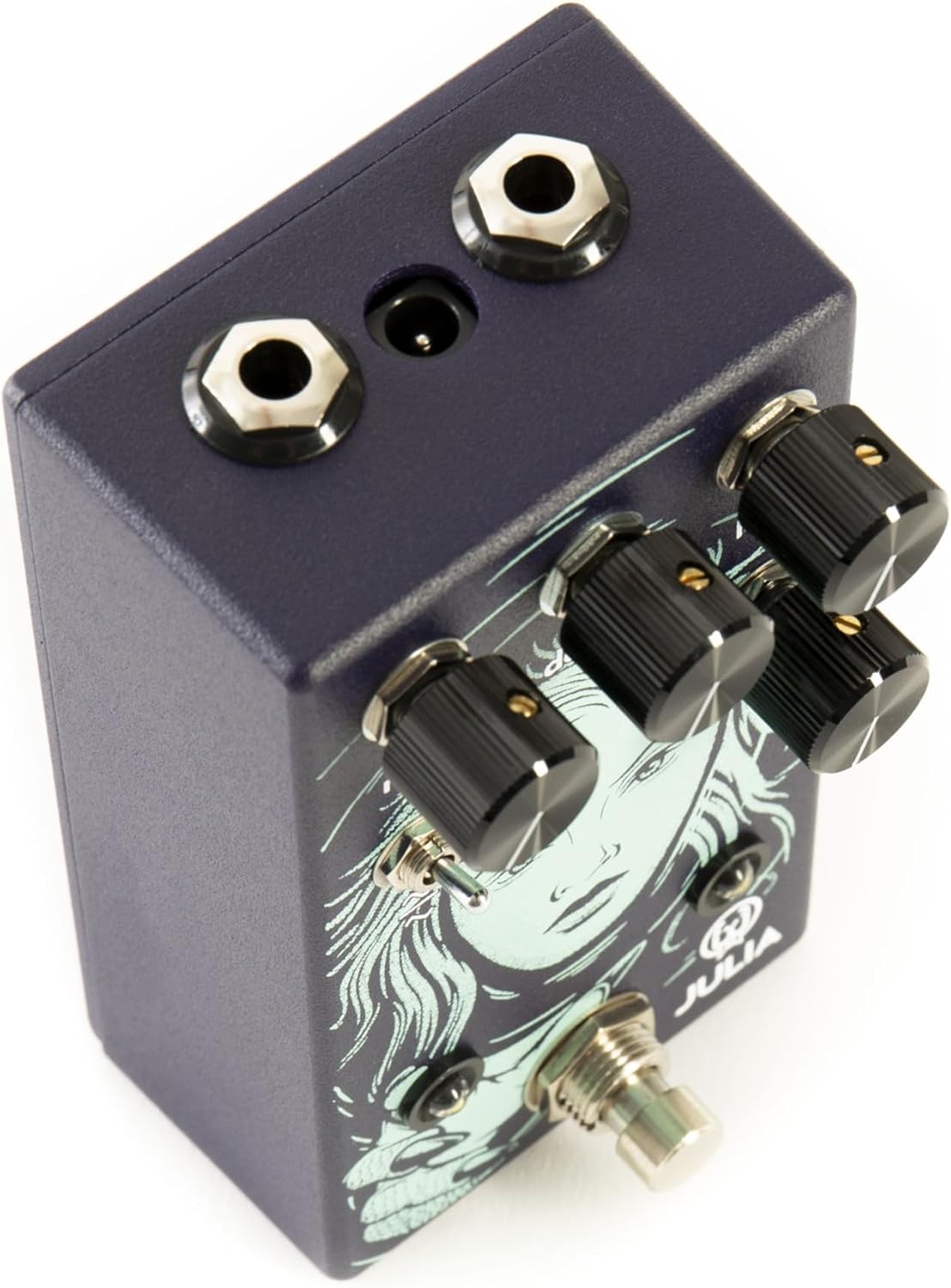
Figure 2: Top view of the pedal, illustrating the input and output jack placement.
Placement in Signal Chain
Place the Julia V2 pedal in your signal chain where modulation effects are desired, typically after drive pedals and before time-based effects like delay or reverb.
Operating Instructions
The Julia V2 features several controls to shape your chorus and vibrato sounds:
- RATE: Controls the speed of the LFO (Low-Frequency Oscillator) sweep. Turn clockwise for faster modulation, counter-clockwise for slower modulation.
- DEPTH: Adjusts the amplitude or intensity of the LFO. Turn clockwise for deeper, more pronounced modulation, counter-clockwise for subtle effects.
- LAG: This unique control sets the center delay time around which the LFO modulates. Lower settings provide smooth, tight modulation, while maximum settings introduce warbling detune effects.
- D-C-V BLEND: (Dry-Chorus-Vibrato Blend) This knob mixes the dry signal with the wet (modulated) signal. At minimum, only the dry signal is heard. At noon, it provides a traditional chorus sound (equal dry/wet mix). At maximum, it delivers a 100% wet vibrato effect.
- WAVE SWITCH: A toggle switch to select between sine and triangle LFO waveforms. The triangle wave generally suits chorus effects with sharper corners, while the sine wave's rounder shape is often preferred for vibrato.
Soft Switch Bypassing
The Julia V2 features soft switch bypassing for silent and smooth engagement/disengagement of the effect.
Demonstration Videos
Video 1: A Joyful Noise Music Studio demonstrates the Walrus Audio Julia Chorus V2, showcasing various tones and sounds achievable with the pedal's controls.
Video 2: Jessa Swearingen Reviews provides a demo of the Walrus Audio Julia Analog Chorus, highlighting its versatile modulation capabilities.
Video 3: Andrew S. discusses the features of the Julia V2, including aspects he likes and dislikes, offering practical insights into its use.
Maintenance
Keep the pedal clean and free from dust. Use a soft, dry cloth for cleaning. Avoid exposing it to extreme temperatures, moisture, or direct sunlight. Disconnect power when not in use for extended periods to prolong component life.
Troubleshooting
If the pedal is not functioning correctly, first check all cable connections (instrument, amplifier, and power supply) and ensure the power supply meets the specified 9V DC, 100mA (center-negative) requirements. If issues persist, consult the Walrus Audio support website or contact customer service for further assistance.
Specifications
| Feature | Detail |
|---|---|
| Item Weight | 13.1 ounces |
| Product Dimensions | 6 x 4 x 3 inches |
| Item Model Number | 900-1011V2 |
| Signal Format | Analog |
| Power Source | Corded Electric |
| Voltage | 9 Volts |
Warranty
This product is covered by the manufacturer's limited warranty. Please refer to the official Walrus Audio website for detailed warranty information and registration procedures.
Support
For technical assistance, product inquiries, or warranty claims, please visit the official Walrus Audio website or contact their customer support team directly through the contact information provided on their site.


