
1. Introduction
Thank you for choosing the BIG Sound Wireless Bluetooth Speaker KTS-1118A. This portable speaker offers versatile audio playback options, including Bluetooth wireless connectivity, wired input, USB/SD card support, and FM radio. This manual provides essential information for setting up, operating, and maintaining your speaker to ensure optimal performance.
2. Package Contents
- 1 x KTS-1118A Wireless Bluetooth Speaker
- 1 x USB Charging Cable

Image: The KTS-1118A speaker shown alongside its retail packaging, highlighting its compact design and integrated handle.
3. Product Features
- Wireless Bluetooth Connectivity: Seamlessly connect to compatible devices.
- Wired Connectivity: Supports RCA and other multi-port connections.
- Subwoofer Speaker Type: Delivers enhanced bass audio.
- Multi-Device Compatibility: Works with smartphones, tablets, laptops, and music players.
- USB/SD Card Playback: Direct audio playback from external storage.
- FM Radio Function: Built-in radio tuner for local broadcasts.
- Portable Design: Integrated handle for easy transport.
- Durable Construction: Made from plastic material.
4. Controls and Ports Overview

Image: Close-up view of the speaker's top control panel, displaying various buttons and input ports.
Familiarize yourself with the speaker's control panel and ports:
- USB Port: For connecting USB flash drives for audio playback.
- SD Card Slot: For inserting SD memory cards for audio playback.
- AUX Input: 3.5mm jack for wired audio connection from external devices.
- DC 5V Charging Port: Micro USB port for charging the speaker's internal battery.
- MIC Input: 6.35mm jack for connecting a microphone.
- Power Switch: Toggles the speaker ON/OFF.
- Mode Button: Switches between Bluetooth, FM Radio, USB/SD, and AUX input modes.
- Play/Pause Button: Plays or pauses audio playback; initiates FM auto-scan.
- Previous/Volume Down Button: Skips to the previous track; decreases volume when held.
- Next/Volume Up Button: Skips to the next track; increases volume when held.
- LED Indicator: Displays charging status and operational mode.
5. Setup
5.1 Charging the Speaker
- Connect the supplied USB charging cable to the DC 5V port on the speaker.
- Connect the other end of the USB cable to a USB power adapter (not included) or a computer's USB port.
- The LED indicator will illuminate during charging and turn off or change color when fully charged.
5.2 Powering On/Off
- To power on the speaker, slide the Power Switch to the 'ON' position.
- To power off the speaker, slide the Power Switch to the 'OFF' position.
6. Operating Instructions
6.1 Bluetooth Mode
- Power on the speaker. It will automatically enter Bluetooth pairing mode, indicated by a flashing LED.
- Enable Bluetooth on your mobile device (smartphone, tablet, laptop).
- Search for available Bluetooth devices and select "KTS-1118A" from the list.
- Once paired, the speaker will emit a confirmation sound, and the LED indicator will stop flashing.
- You can now play audio from your device through the speaker.
6.2 FM Radio Mode
- Press the Mode button repeatedly until you hear the FM radio prompt.
- Press the Play/Pause button once to initiate an automatic scan for FM stations. The speaker will save all found stations.
- Use the Previous and Next buttons to navigate between saved stations.
6.3 USB/SD Card Playback
- Insert a USB flash drive or an SD card (pre-loaded with MP3 audio files) into the respective port.
- The speaker will automatically switch to USB/SD mode and begin playing audio.
- Use the Play/Pause, Previous, and Next buttons to control playback.
6.4 AUX Input Mode
- Connect one end of a 3.5mm audio cable (not included) to the AUX input port on the speaker.
- Connect the other end of the cable to the audio output jack of your external device.
- Press the Mode button until the speaker enters AUX mode.
- Control audio playback from your connected device.
6.5 Microphone Input
- Connect a microphone (not included) to the MIC input port.
- The microphone audio will be mixed with the current playback. Adjust the main volume as needed.
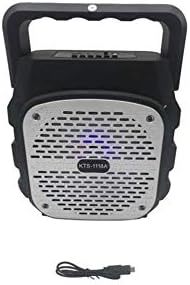
Image: Front view of the KTS-1118A speaker, showcasing its grille and the included USB charging cable.
7. Maintenance
- Cleaning: Use a soft, dry cloth to clean the speaker's exterior. Do not use abrasive cleaners or solvents.
- Storage: Store the speaker in a cool, dry place away from direct sunlight and extreme temperatures.
- Avoid Water: This speaker is not waterproof. Keep it away from water and moisture.
- Handle with Care: Avoid dropping the speaker or subjecting it to strong impacts.
8. Troubleshooting
| Problem | Possible Cause | Solution |
|---|---|---|
| Speaker does not power on. | Battery is depleted. Power switch is off. | Charge the speaker fully. Ensure the power switch is in the 'ON' position. |
| No sound from speaker. | Volume is too low. Incorrect mode selected. Audio source not playing. | Increase the speaker volume and device volume. Press the Mode button to select the correct input. Ensure your audio source is playing and connected properly. |
| Bluetooth pairing fails. | Speaker not in pairing mode. Device Bluetooth is off. Speaker connected to another device. | Ensure speaker is powered on and in Bluetooth mode (flashing LED). Turn on Bluetooth on your device. Disconnect from other devices or restart the speaker. |
| Poor FM radio reception. | Weak signal. | Reposition the speaker to improve signal reception. |
9. Specifications
- Model: KTS-1118A
- Connectivity Technology: Wired/Wireless (Bluetooth, RCA)
- Speaker Type: Subwoofer
- Material: Plastic
- Compatible Devices: Laptop, Smartphone, Tablet, Music Players
- Special Features: Bluetooth, Wireless
- Color: Silver (grille) / Black (body)
- Manufacturer: Other
- First Available Date: 15 January 2020
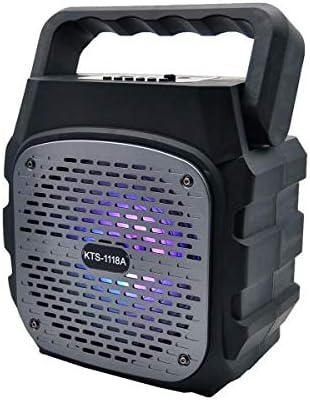
Image: The KTS-1118A speaker displaying its integrated LED lighting feature.
10. Warranty and Support
Specific warranty details for the BIG Sound Wireless Bluetooth Speaker KTS-1118A may vary depending on your region and point of purchase. Please refer to the documentation provided at the time of purchase or contact your retailer for warranty information.
For technical assistance or further inquiries, please contact the customer support of your retailer or the manufacturer.


