
1. Introduction
Thank you for choosing the JBL Aura Studio 3 Bluetooth Home Speaker. This manual provides essential information for setting up, operating, and maintaining your speaker to ensure optimal performance and longevity. The Aura Studio 3 combines iconic design with 360-degree sound and ambient light effects, creating a captivating audio-visual experience for your home.
2. What's in the Box
- JBL Aura Studio 3 Speaker
- Power Cable (Region specific)
- Quick Start Guide
- Safety Sheet
- Warranty Card
3. Product Overview
Familiarize yourself with the components and controls of your JBL Aura Studio 3 speaker.

Figure 3.1: Front view of the JBL Aura Studio 3 speaker, showcasing its transparent dome and fabric-covered base.

Figure 3.2: Rear view of the JBL Aura Studio 3, showing the power input and auxiliary port.

Figure 3.3: Top-down view of the speaker's control panel, including power, volume, Bluetooth, and light mode buttons.
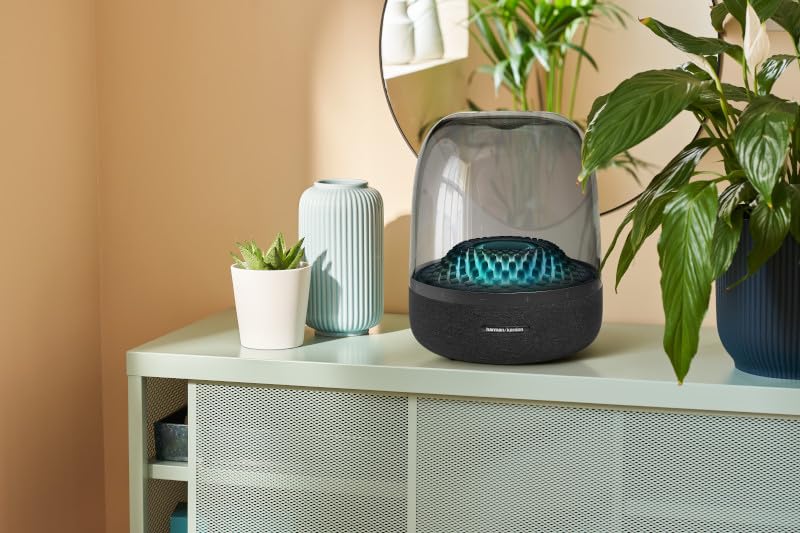
Figure 3.4: The JBL Aura Studio 3 speaker placed in a home environment, demonstrating its ambient lighting feature.
4. Setup
4.1 Placement
Place the JBL Aura Studio 3 on a stable, flat surface. For optimal 360-degree sound dispersion, avoid placing it in enclosed spaces or directly against walls. Ensure there is adequate ventilation around the speaker.
4.2 Power Connection
- Connect the power cable to the power input port on the rear of the speaker.
- Plug the other end of the power cable into a wall outlet.
4.3 Initial Power On
Press the Power button () located on the top panel of the speaker. The speaker will power on, and the ambient light will illuminate.
5. Operating Instructions
5.1 Bluetooth Pairing
- With the speaker powered on, press the Bluetooth button () on the top panel. The Bluetooth indicator light will begin to blink, indicating it is in pairing mode.
- On your mobile device (smartphone, tablet, etc.), enable Bluetooth and search for available devices.
- Select "JBL Aura Studio 3" from the list of devices.
- Once connected, the Bluetooth indicator light on the speaker will become solid, and you will hear an audible confirmation.
5.2 Audio Playback
- Volume Control: Use the + and - buttons on the top panel to adjust the volume. You can also control the volume from your connected Bluetooth device.
- Auxiliary Input: For devices without Bluetooth, connect an audio cable (not included) from your device's headphone jack to the AUX input port on the rear of the speaker. The speaker will automatically switch to AUX mode.
5.3 Ambient Lighting Control
The JBL Aura Studio 3 features dynamic ambient lighting. Press the Light button () on the top panel to cycle through different light modes and patterns. Hold the button to turn the light off or on.
6. Maintenance
6.1 Cleaning
To clean the speaker, gently wipe the surfaces with a soft, dry, lint-free cloth. Do not use abrasive cleaners, waxes, or solvents. Avoid spraying liquids directly onto the speaker.
6.2 Storage
If storing the speaker for an extended period, power it off and disconnect it from the power source. Store it in a cool, dry place, away from direct sunlight and extreme temperatures.
6.3 Safety Precautions
- Do not expose the speaker to water or excessive moisture.
- Do not place the speaker near heat sources such as radiators, heat registers, stoves, or other apparatus (including amplifiers) that produce heat.
- Do not block any ventilation openings.
- Only use attachments/accessories specified by the manufacturer.
7. Troubleshooting
| Problem | Possible Cause | Solution |
|---|---|---|
| No power | Power cable not connected or outlet not active. | Ensure power cable is securely connected to speaker and a working wall outlet. |
| No sound | Volume too low; Device not connected; Incorrect input source. | Increase volume on speaker and connected device. Re-pair Bluetooth device. Check if AUX cable is properly connected. |
| Bluetooth connection issues | Speaker not in pairing mode; Device too far; Interference. | Press Bluetooth button to enter pairing mode. Move device closer to speaker. Avoid obstacles and other wireless devices. |
| Ambient light not working | Light feature turned off. | Press the Light button to cycle through modes or hold to turn on/off. |
8. Specifications
| Feature | Detail |
|---|---|
| Model Name | HKAURAS3BLKEU |
| Speaker Type | Bluetooth Home Speaker |
| Connectivity Technology | Bluetooth |
| Speaker Maximum Output Power | 15 Watts |
| RMS Power Range - Amplifiers | 130 Watts |
| Signal-to-Noise Ratio (db) | 9 dB |
| Subwoofer Diameter | 12 Inches |
| Recommended Uses | For Music Players |
| Compatible Devices | Smartphone, Tablet |
| Mounting Type | Tabletop Mount |
| Item Weight | 400 g (0.4 Kilograms) |
| Product Dimensions (LxWxH) | 300 x 300 x 600 cm |
| Batteries | 1 Lithium Ion battery required (included) |
| Is Waterproof | True |
| Maximum Range | 60 metres |
9. Warranty and Support
Specific warranty details for the JBL Aura Studio 3 are typically provided with the product packaging or on the manufacturer's official website. Please refer to the included warranty card for terms and conditions.
For technical support, service, or further inquiries, please visit the official Harman Kardon support website or contact their customer service directly. Keep your proof of purchase for warranty claims.


