
1. Introduction
This manual provides essential instructions for the safe and effective use of your Otech DFB-0120 compatible battery. This battery is designed as a replacement for Doro DFB-0120 cell phone batteries, offering reliable power with a capacity of 850 mAh.
Please read this manual thoroughly before installation and use to ensure optimal performance and safety.
2. Safety Information
Observe the following safety precautions to prevent damage to the battery, device, or personal injury:
- Fire Hazard: The battery may explode if disposed of in fire. Do not expose the battery to high temperatures or direct flame.
- Charging: Use only the specified charger designed for your Doro device. Using an incompatible charger may damage the battery and pose a safety risk.
- Short Circuit: Do not short circuit the battery terminals. Avoid contact with metal objects that could bridge the positive and negative terminals.
- Disassembly: Do not attempt to disassemble, puncture, or modify the battery.
- Water Exposure: Keep the battery away from water and other liquids.
- Disposal: Dispose of used batteries according to local regulations. Do not dispose of with household waste.
Failure to follow these safety instructions can result in fire, explosion, or other hazards.
3. Product Overview
The Otech DFB-0120 compatible battery is a high-quality replacement power source for Doro mobile phones that utilize the DFB-0120 battery model. It features a capacity of 850 mAh and operates at 3.7V, providing 3.14Wh of power.
Key features include:
- Optimum Service Life: Equipped with high-quality cells for extended durability.
- Low Self-Discharge: Designed to retain charge longer when not in use.
- Individually Tested: Each battery undergoes load and capacity testing before shipment.

Figure 1: Front view of the Otech DFB-0120 compatible battery, showing the Otech brand, Li-ion DIV004 3.7V 850mAh 3.14Wh specifications, and safety warnings.
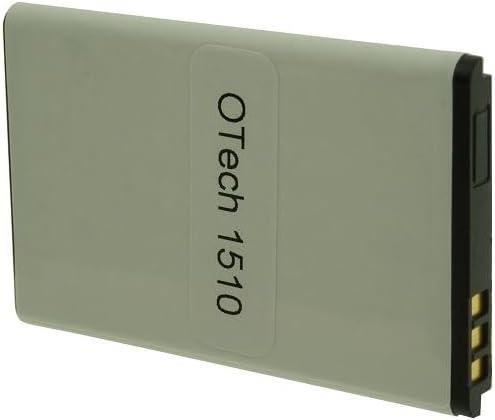
Figure 2: Back view of the Otech DFB-0120 compatible battery, displaying the "OTech 1510" label and battery terminals.
4. Setup and Installation
To install the Otech DFB-0120 compatible battery into your Doro mobile phone, follow these general steps. Refer to your specific Doro phone's user manual for detailed instructions on battery compartment access.
- Power Off Device: Ensure your Doro mobile phone is completely powered off before beginning the installation.
- Remove Back Cover: Carefully remove the back cover of your Doro phone. This usually involves sliding or prying it off.
- Remove Old Battery: If an old battery is present, gently lift it out of its compartment.
- Insert New Battery: Align the Otech DFB-0120 battery with the battery compartment, ensuring the gold contacts on the battery match the contacts in the phone. Gently press the battery into place.
- Replace Back Cover: Reattach the back cover of your phone, ensuring it clicks securely into place.
- Initial Charge: It is recommended to fully charge the new battery before its first use.
Exercise caution during installation to avoid damaging the phone or battery terminals.
5. Operating Instructions
Once installed, the Otech DFB-0120 battery operates like the original battery in your Doro phone.
- Charging: Connect your Doro phone to its original or a compatible charger. The phone's display will indicate charging status. Allow the battery to charge fully for optimal performance, especially during the first few cycles.
- Usage: Use your phone as normal. Battery life will vary depending on usage patterns, network conditions, and phone settings.
- Temperature: Avoid operating or charging the phone in extreme temperatures (below 0°C or above 45°C) as this can degrade battery performance and lifespan.
6. Maintenance
Proper maintenance can extend the life of your Otech DFB-0120 battery:
- Regular Charging: Avoid completely draining the battery frequently. Charge it regularly, even if not fully depleted.
- Storage: If storing the battery for an extended period, charge it to approximately 50% and store it in a cool, dry place. Recharge it every few months to prevent deep discharge.
- Cleaning: Keep the battery contacts clean. If necessary, gently wipe them with a dry, soft cloth.
- Avoid Physical Damage: Protect the battery from drops, impacts, and crushing.
7. Troubleshooting
If you encounter issues with your Otech DFB-0120 battery, consider the following:
| Problem | Possible Cause | Solution |
|---|---|---|
| Battery not charging | Loose connection, faulty charger, dirty contacts, battery issue. |
|
| Short battery life | High usage, background apps, poor signal, battery degradation. |
|
| Phone not turning on | Battery completely drained, incorrect installation, faulty phone. |
|
If troubleshooting steps do not resolve the issue, contact Otech customer support.
8. Specifications
| Feature | Detail |
|---|---|
| Brand | Otech |
| Model Name | DFB-0120 (Compatible) |
| Part Number | DIV004-13105256 |
| Battery Type | Li-ion |
| Voltage | 3.7 Volts |
| Capacity | 850 mAh |
| Energy Rating | 3.14 Wh |
| Product Dimensions | 5.3 x 3.3 x 0.5 cm |
| Weight | 100 g (approximate) |
9. Warranty and Support
Otech batteries are individually tested to ensure functionality and quality. For specific warranty information regarding your Otech DFB-0120 compatible battery, please refer to the purchase documentation or contact Otech customer support directly.
For technical assistance or inquiries, please visit the official Otech website or contact their customer service department through the contact information provided with your purchase.