
1. Safety Information
WARNING: To avoid eye injury, do not aim at eyes or face. Use only official NERF Hyper rounds. Other rounds may not meet safety standards. Do not modify rounds or blaster. Always wear the included eyewear when using this blaster.
Recommended for ages 14 and up.

Image: A user demonstrating the proper use of the Nerf Hyper Siege-50 blaster, including wearing the required safety eyewear.
2. What's in the Box
Your Nerf Hyper Siege-50 Blaster package includes:
- 1x Nerf Hyper Siege-50 Blaster
- 40x Nerf Hyper Rounds
- 1x Pair of Eyewear

Image: The complete contents of the Nerf Hyper Siege-50 Blaster package, including the blaster, 40 Hyper rounds, and safety eyewear.
3. Setup
3.1 Loading Rounds
The Nerf Hyper Siege-50 blaster features a large, easy-load hopper with a 50-round capacity. To load the rounds:
- Open the hopper door located on the top of the blaster.
- Carefully insert the Nerf Hyper rounds into the hopper. Ensure they are not jammed.
- Close the hopper door securely.
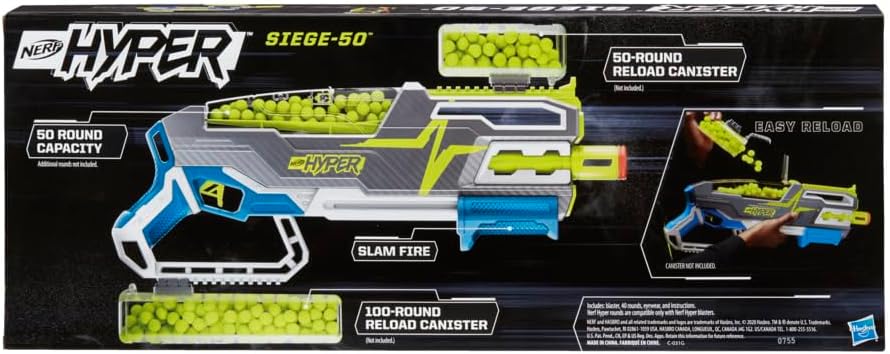
Image: A close-up view of the blaster's hopper, showing the yellow Hyper rounds being loaded into the transparent compartment.
3.2 Wearing Eyewear
Always wear the included safety eyewear when operating the Nerf Hyper Siege-50 blaster to protect your eyes from projectiles.
4. Operating Instructions
4.1 Priming the Blaster
The Siege-50 is a pump-action blaster. To prime it, firmly pull the priming slide located on the front of the blaster all the way back, then push it all the way forward. This action loads a round into the firing chamber.
4.2 Firing Modes
- Single Shot: After priming, press the trigger to fire one round.
- Slam-Fire: Hold down the trigger and continuously pump the priming slide back and forth to rapidly fire multiple rounds.
4.3 Trigger Lock
The blaster includes a trigger lock for safety. Engage the trigger lock when the blaster is not in use to prevent accidental firing. Disengage it before priming and firing.
Video: Official demonstration of the Nerf Hyper Siege-50 blaster's features and firing action.
Video: Overview of Nerf Hyper blasters, showcasing their design and functionality.
5. Maintenance
- Keep the blaster clean and free from dirt or debris. Use a dry cloth to wipe down surfaces.
- Store the blaster and rounds in a cool, dry place away from direct sunlight.
- Do not use water or harsh chemicals to clean the blaster.
6. Troubleshooting
Blaster Not Firing or Rounds Jamming:
- Ensure the hopper is properly loaded and the door is securely closed.
- Check if the priming slide is fully pulled back and pushed forward.
- Verify that the trigger lock is disengaged.
- Inspect the firing mechanism for any lodged rounds or debris. Clear any obstructions carefully.
- Use only official Nerf Hyper rounds for optimal performance and to prevent jamming.
7. Specifications
| Product Dimensions | 2.63 x 27 x 10.5 inches |
| Item Weight | 2.16 pounds |
| Item Model Number | F0532 |
| Manufacturer Recommended Age | 14 - 14 years |
| Release Date | October 1, 2020 |
| Manufacturer | Hasbro |
| Velocity | Up to 110 FPS |
| Round Capacity | 50 rounds |
8. Warranty and Support
For warranty information, product support, or to purchase additional Nerf Hyper rounds and accessories, please visit the official Nerf website or contact Hasbro customer service.
You can also visit the Nerf Store on Amazon for more products and information.

