
Introduction
This manual provides essential instructions for the safe and efficient operation, maintenance, and troubleshooting of your EuropAce EQQ 7931S 9-inch Trio Turbo Oscillating Fan. Please read this manual thoroughly before using the appliance and retain it for future reference.
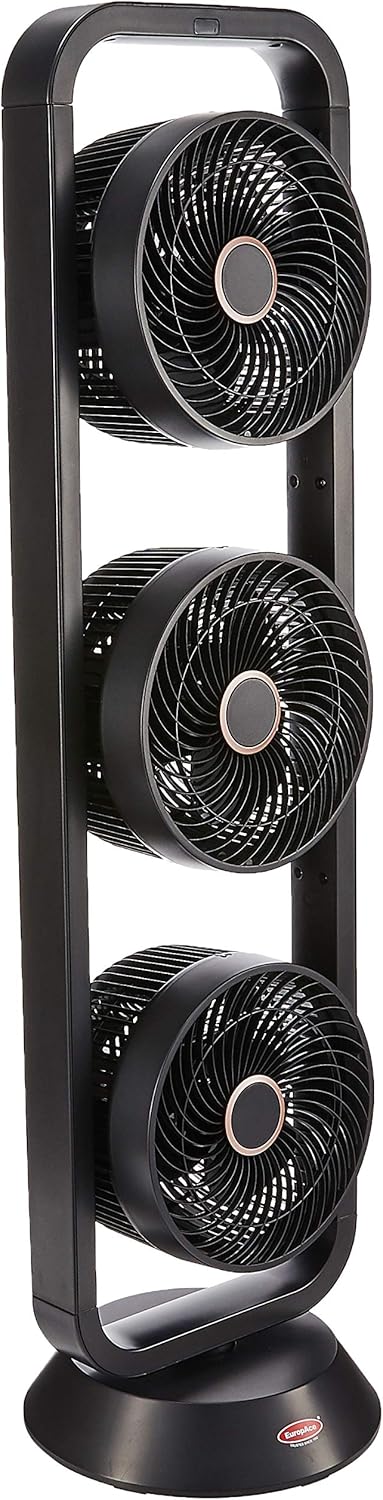
The EuropAce EQQ 7931S is designed to provide powerful and efficient air circulation with its unique trio turbo design. It features a detachable fan blade for easy maintenance, a sensor touch control panel, and a compact, space-saving base.
Important Safety Instructions
To reduce the risk of fire, electric shock, or injury, always follow these basic safety precautions:
- Read all instructions before using this fan.
- Ensure the power supply voltage matches the rating label on the fan.
- Do not operate any fan with a damaged cord or plug. Discard fan or return to an authorized service facility for examination and/or repair.
- Do not run cord under carpeting. Do not cover cord with throw rugs, runners, or similar coverings. Do not route cord under furniture or appliances. Arrange cord away from traffic area and where it will not be tripped over.
- Always unplug the fan from the power outlet when not in use, when moving the fan from one location to another, and before cleaning.
- Do not insert fingers or any other objects through the grille when the fan is operating.
- Do not use the fan in wet or damp locations such as bathrooms or laundry areas.
- This appliance is not intended for use by persons (including children) with reduced physical, sensory or mental capabilities, or lack of experience and knowledge, unless they have been given supervision or instruction concerning use of the appliance by a person responsible for their safety.
- Children should be supervised to ensure that they do not play with the appliance.
Package Contents
Carefully unpack your fan and check that all items are included:
- 1 x EuropAce EQQ 7931S Trio Turbo Oscillating Fan
- 1 x Remote Control
- 1 x User Manual (this document)
Product Features
- Trio Turbo Design: Three individual fan units for enhanced air circulation.
- Powerful Cooling: Generates wind speeds up to 7m/s for effective cooling.
- Detachable Fan Blades: Allows for easy cleaning and maintenance.
- Sensor Touch Control Panel: Intuitive and modern interface for operation.
- Oscillation Function: Distributes air evenly across the room.
- Compact Base: Space-saving design suitable for various room types.
- Modern Style: Sleek black finish.


Setup
The EuropAce EQQ 7931S fan requires no assembly and is ready for use directly out of the box. It is designed for floor mounting.
- Placement: Place the fan on a stable, flat surface, ensuring it is away from curtains or objects that could obstruct airflow.
- Power Connection: Plug the power cord into a standard electrical outlet. Ensure the outlet voltage matches the fan's requirements.

Operating Instructions
The fan can be operated using the sensor touch control panel located on the unit or via the included remote control.
Control Panel

The control panel features touch-sensitive buttons for various functions:
- ON/OFF: Powers the fan on or off.
- FAN 1, FAN 2, FAN 3: Controls the speed settings (Low, Medium, High) for each individual fan unit. Press repeatedly to cycle through speeds.
- TIMER: Sets the operating timer (e.g., 1H, 2H, 4H).
- MODE: Cycles through different fan modes (e.g., Normal, Natural, Sleep).
- OSC (Oscillation): Activates or deactivates the oscillation function, allowing the fan to rotate horizontally.
Remote Control

The remote control duplicates all functions available on the control panel for convenient operation from a distance. Ensure the battery tab is removed before first use.
- ON/OFF: Powers the fan on or off.
- MODE: Cycles through different fan modes.
- FAN 1, FAN 2, FAN 3: Adjusts the speed for each fan unit.
- TIMER: Sets the operating timer.
- OSC: Toggles the oscillation function.
Maintenance
Regular cleaning and maintenance will ensure optimal performance and extend the lifespan of your fan.
- Unplug Before Cleaning: Always ensure the fan is unplugged from the power outlet before attempting any cleaning or maintenance.
- Exterior Cleaning: Use a soft, damp cloth to wipe the exterior surfaces of the fan. Do not use abrasive cleaners or solvents.
- Detachable Fan Blades: The fan features detachable blades for easy cleaning. Carefully remove the front grilles and then the fan blades according to the instructions provided in the full product manual (if applicable, or by gently twisting/pulling). Clean the blades with a soft cloth and mild detergent if necessary. Ensure they are completely dry before reassembling.
- Storage: When not in use for extended periods, store the fan in a cool, dry place, preferably in its original packaging.
Troubleshooting
If you encounter issues with your fan, refer to the following common problems and solutions:
| Problem | Possible Cause | Solution |
|---|---|---|
| Fan does not turn on. | No power supply; Power cord not properly plugged in. | Check if the power cord is securely plugged into a working outlet. Ensure the power button is pressed. |
| Weak airflow. | Fan speed set too low; Obstruction in front or rear grille; Dirty fan blades. | Increase fan speed. Remove any obstructions. Clean fan blades as per maintenance instructions. |
| Fan is noisy. | Loose parts; Fan not on a level surface; Debris inside the fan. | Ensure the fan is on a stable, level surface. Check for any loose components. Unplug and inspect for debris. |
| Remote control not working. | Battery depleted; Obstruction between remote and fan; Remote not pointed correctly. | Replace the battery. Ensure there are no obstructions. Point the remote directly at the fan's receiver. |
If the problem persists after attempting these solutions, please contact customer support.
Specifications
| Feature | Detail |
|---|---|
| Brand | EuropAce |
| Model | EQQ 7931S |
| Form Factor | Tower |
| Colour | Black |
| Electric Fan Design | Floor Fan |
| Power Source | Corded Electric |
| Product Dimensions (D x W x H) | 26D x 27.5W x 99.1H centimetres |
| Special Features | Oscillating, Detachable Fan Blades, Sensor Touch Control Panel |
| Recommended Product Uses | Air Circulation |
| Assembly Required | No |
| Included Components | 1 x Circulation Fan |
Warranty and Support
The EuropAce EQQ 7931S fan comes with a limited guarantee. For specific details regarding the warranty period and terms, please refer to the warranty card included with your purchase or contact EuropAce customer service.
For technical support, service inquiries, or to report a problem, please contact EuropAce customer support through their official website or the contact information provided in your purchase documentation.
