
Introduction and Important Safety Information
Thank you for purchasing the Winia KOR-1N4HSDT 1.1 cu. ft. Microwave Oven. This manual provides essential instructions for the installation, operation, and maintenance of your appliance. Please read it thoroughly before use and keep it for future reference. Proper use and care will ensure efficient and safe operation.
General Safety Precautions:
- Read all instructions before using the appliance.
- Do not attempt to operate this oven with the door open as this can result in harmful exposure to microwave energy.
- Do not place any object between the oven front face and the door or allow soil or cleaner residue to accumulate on sealing surfaces.
- Do not operate the oven if it is damaged. It is particularly important that the oven door closes properly and that there is no damage to the: (1) door (bent), (2) hinges and latches (broken or loosened), (3) door seals and sealing surfaces.
- Only qualified service personnel should adjust or repair this oven.
- Always supervise children when the microwave is in use.
- Do not heat liquids or other foods in sealed containers as they are liable to explode.
- Use only microwave-safe cookware.
Product Overview
The Winia KOR-1N4HSDT is a 1.1 cubic foot countertop microwave oven designed for convenient heating and cooking. It features a sleek stainless steel and tempered glass design with a user-friendly button interface.

Figure 1: Front view of the Winia KOR-1N4HSDT microwave oven. This image shows the control panel on the right, the microwave door on the left, and the overall silver finish of the appliance.
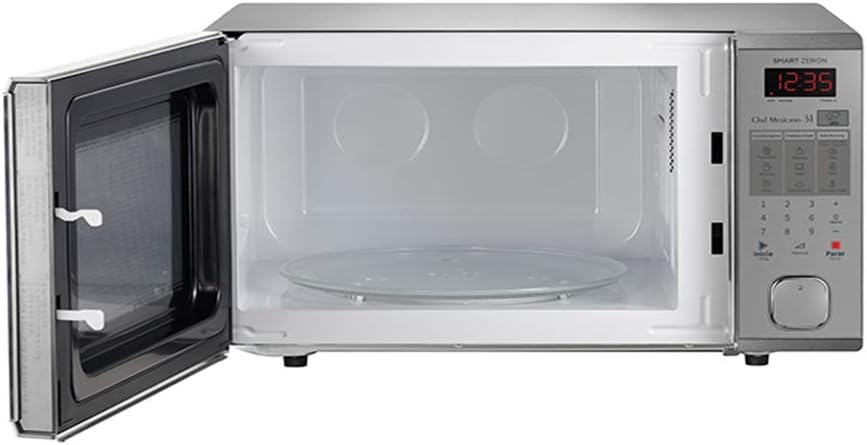
Figure 2: Interior view of the Winia KOR-1N4HSDT microwave oven with the door open. The glass turntable and interior cavity are visible, demonstrating the spacious 1.1 cubic foot capacity.
Components:
- Control Panel: Digital display and button interface for setting time, power, and functions.
- Oven Door: Features a viewing window and a secure latch mechanism.
- Turntable: Removable glass tray that rotates to ensure even cooking.
- Oven Cavity: Interior space where food is placed for heating.
Setup Instructions
1. Unpacking:
- Carefully remove the microwave oven from its packaging.
- Remove all packing materials, including any protective film or tape from the oven surfaces and accessories.
- Check the oven for any damage, such as dents or a misaligned door. Do not operate if damaged.
2. Placement:
- Place the microwave oven on a flat, stable surface that can support its weight.
- Ensure there is adequate ventilation around the oven. Leave a minimum of 4 inches (10 cm) of space on the top, back, and sides for proper airflow.
- Do not place the oven near heat sources such as a range or radiator.
- Keep the oven away from strong magnetic fields.
3. Electrical Connection:
- Plug the power cord into a grounded electrical outlet. Ensure the voltage matches the specifications listed on the appliance.
- Do not use extension cords or adapters.
4. Turntable Installation:
- Place the turntable ring inside the oven cavity.
- Position the glass turntable plate securely on top of the turntable ring, ensuring it sits correctly on the center hub.
Operating Instructions
1. Setting the Clock:
- When the oven is first plugged in, the display will show "0:00".
- Press the "Clock" button (if available, otherwise refer to specific model instructions for clock setting).
- Use the number pad to enter the current time.
- Press the "Clock" button again to confirm.
2. Basic Microwave Cooking:
- Place food in a microwave-safe container on the glass turntable.
- Close the oven door securely.
- Press the "Time Cook" or "Cook Time" button.
- Use the number pad to enter the desired cooking time.
- Press the "Power Level" button (if you wish to adjust from 100% power). Use the number pad to select a power level (e.g., 7 for 70%).
- Press the "Start" button to begin cooking.
3. Express Cooking:
- For quick heating, simply press the "Start" button to cook at 100% power for 30 seconds. Each subsequent press adds 30 seconds.
4. Defrosting:
- Press the "Defrost" button.
- Enter the weight of the food using the number pad.
- Press "Start". The oven will automatically calculate the defrosting time and power level.
5. Pre-set Menus (Chef Mexicano 31):
This model features a 'Chef Mexicano 31' function, which indicates a selection of pre-programmed cooking settings. Refer to the specific icons on your control panel for these functions. Typically, you would:
- Press the desired pre-set menu button (e.g., for popcorn, beverages, or specific dishes).
- Select the quantity or serving size if prompted.
- Press "Start".
Note: Specific pre-set menu options and their usage will be detailed on the control panel itself.
6. Stopping the Oven:
- To pause cooking, open the oven door or press the "Stop/Cancel" button once.
- To cancel cooking completely, press the "Stop/Cancel" button twice.
Maintenance and Cleaning
Regular cleaning and maintenance will prolong the life of your microwave oven and ensure optimal performance.
1. Cleaning the Oven Interior:
- Always unplug the oven before cleaning.
- Wipe the interior cavity with a damp cloth after each use to prevent food splatters from drying and hardening.
- For stubborn stains, place a bowl of water with a few lemon slices inside and microwave on high for 2-3 minutes. The steam will loosen the grime, making it easier to wipe away.
- Do not use abrasive cleaners or scouring pads, as they can damage the interior finish.
2. Cleaning the Oven Exterior:
- Wipe the exterior surfaces with a soft, damp cloth.
- For the control panel, use a soft, slightly damp cloth. Avoid excessive moisture.
3. Cleaning the Turntable and Ring:
- Remove the glass turntable and turntable ring.
- Wash them in warm, soapy water or in the dishwasher.
- Dry thoroughly before placing them back in the oven.
4. Door Seals:
- Keep the door seals and adjacent parts clean. Use a soft, damp cloth.
- Do not use harsh cleaners or abrasive materials on the door seals.
Troubleshooting
Before contacting customer service, please refer to the following common issues and solutions:
| Problem | Possible Cause | Solution |
|---|---|---|
| Oven does not start | Power cord not plugged in; Door not closed properly; Fuse blown or circuit breaker tripped. | Ensure power cord is securely plugged in; Close the door firmly; Check household fuse/circuit breaker. |
| Food not heating | Door not closed properly; Cooking time/power level set incorrectly; Food not microwave-safe. | Ensure door is closed; Verify cooking settings; Use microwave-safe cookware. |
| Turntable not rotating | Turntable not properly seated; Obstruction under turntable; Turntable motor malfunction. | Ensure turntable and ring are correctly positioned; Remove any obstructions; Contact service if problem persists. |
| Sparking inside oven | Metal or foil in oven; Damaged oven interior; Food splatters. | Remove all metal objects; Clean oven interior thoroughly; Do not use damaged cookware. |
| Oven light not working | Light bulb burned out. | Contact qualified service personnel for bulb replacement. |
Specifications
| Feature | Detail |
|---|---|
| Brand | Winia |
| Model | KOR-1N4HSDT |
| Capacity | 1.1 cubic feet |
| Installation Type | Countertop |
| Material | Stainless Steel, Tempered Glass |
| Interface Type | Buttons |
| Package Dimensions | 58.2 x 42.2 x 36 cm (22.9 x 16.6 x 14.2 inches) |
| Weight | 14.06 kg (31 lbs) |
Warranty and Customer Support
For warranty information, please refer to the warranty card included with your product or visit the official Winia website. Keep your purchase receipt as proof of purchase for any warranty claims.
If you encounter issues not covered in the troubleshooting section or require further assistance, please contact Winia customer support. Contact details can typically be found on the manufacturer's website or in your product documentation.
Winia Official Website: www.winia.com


