
Introduction
The ROOFULL 5 Port 4K HDMI Switch is designed to expand the HDMI input capabilities of your display, allowing up to five HDMI source devices to share a single HDMI input on your television or monitor. This device supports advanced video and audio technologies, including 4K@60Hz resolution, HDR10, Dolby Vision, Dolby Atmos, and HDCP 2.2, ensuring high-quality signal transmission. It offers convenient switching options via remote control, manual button, and intelligent auto-switching.
Package Contents
Verify that all items are present in the package:
- ROOFULL 5 Port 4K HDMI Switch Unit
- IR Remote Control
- US Power Supply (UL-certified power adapter)
- User Manual
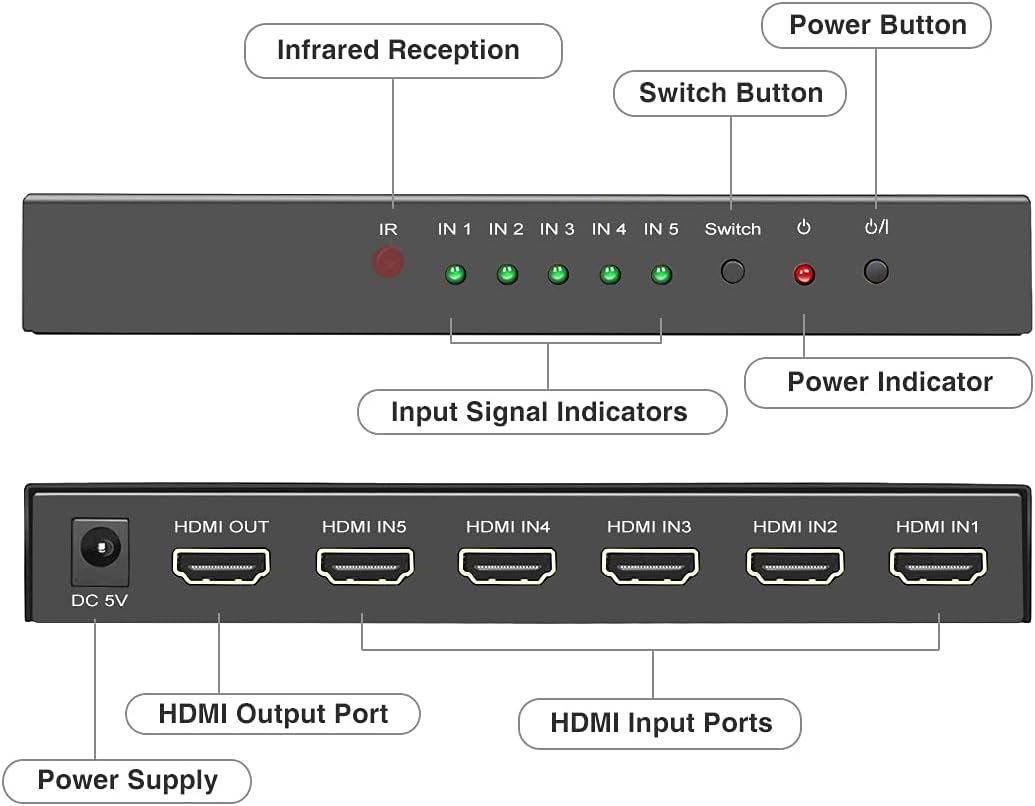
Figure 1: Contents of the ROOFULL 5 Port 4K HDMI Switch package, including the main unit, remote, power adapter, and manual.
Product Overview
Familiarize yourself with the components and ports of the HDMI switch.

Figure 2: Front and rear panel layout of the HDMI switch.
Front Panel Features:
- IR (Infrared Reception): Receives signals from the remote control.
- IN 1-5 (Input Signal Indicators): Green LEDs illuminate to indicate which HDMI input port is currently active.
- Switch Button: Press to manually cycle through the HDMI input sources.
- Power Indicator: Red LED illuminates when the device is powered on.
- Power Button: Press to turn the unit on or off.
Rear Panel Features:
- DC 5V (Power Supply): Connect the included 5V power adapter here.
- HDMI OUT (HDMI Output Port): Connect this port to the HDMI input of your TV, monitor, or projector.
- HDMI IN 1-5 (HDMI Input Ports): Connect your HDMI source devices (e.g., gaming consoles, Blu-ray players, streaming devices) to these ports.
Setup Instructions
Follow these steps to connect your ROOFULL HDMI Switch:
- Power Off Devices: Ensure all HDMI source devices and your display (TV/monitor) are powered off before making connections.
- Connect Source Devices: Connect up to five HDMI source devices (e.g., PS5, Xbox, Blu-ray player, PC) to the HDMI IN 1-5 ports on the rear of the ROOFULL HDMI Switch using high-quality HDMI 2.0/2.1 cables.
- Connect to Display: Connect the HDMI OUT port on the ROOFULL HDMI Switch to an HDMI input port on your TV, monitor, or projector using a high-quality HDMI 2.0/2.1 cable. For optimal performance with 4K@60Hz, ensure the total length of input and output HDMI cables is within 10 feet (approximately 3 meters).
- Connect Power: Plug the included 5V power adapter into the DC 5V port on the switch, then plug the adapter into a power outlet. The power indicator LED on the front panel will illuminate.
- Power On Devices: Power on your display and then your HDMI source devices.

Figure 3: Typical connection diagram for the HDMI switch.
Operating Instructions
The ROOFULL HDMI Switch offers multiple methods for selecting your desired input source:
1. Manual Switching:
Press the "Switch" button on the front panel of the unit to cycle through the connected HDMI input sources (IN 1, IN 2, IN 3, IN 4, IN 5). The corresponding green LED will light up to indicate the active input.
2. Remote Control Switching:
Use the included IR remote control for convenient switching from a distance (within 33 feet). Point the remote towards the IR receiver on the front panel of the switch.
- Press the numbered buttons "1" through "5" to directly select the corresponding HDMI input.
- Use the "Up" and "Down" arrow buttons to cycle sequentially through the inputs.
- The "ON/OFF" button controls the power of the switch.
3. Auto-Switching Functionality:
The switch supports an auto-switching feature that detects the voltage of connected source devices. When enabled, if the currently active device is turned off (not in standby mode), the switch will automatically attempt to jump to another active device.
Important Note on Auto-Switching: Some devices, such as PS5/4/4 Pro, Amazon Fire TV, Apple TV, Xbox One/S/Series X, and Nintendo Switch, may continue to emit a weak voltage even when powered off. This can prevent the auto-switching function from correctly identifying and switching to another active device. In such cases, manual or remote switching will be required.

Figure 4: Switching methods: Auto-Switch, IR Remote, and Manual Button.
Troubleshooting
If you encounter issues with your ROOFULL HDMI Switch, refer to the following common problems and solutions:
| Problem | Possible Cause / Solution |
|---|---|
| No video or audio output. |
|
| Flickering screen or unstable signal. |
|
| Auto-switching does not work or switches unexpectedly. |
|
| Remote control is unresponsive. |
|
| 4K@60Hz or HDR is not displaying correctly. |
|
Specifications
Key technical specifications for the ROOFULL 5 Port 4K HDMI Switch:
- Model Number: HDSW0015M1B
- HDMI Version: HDMI 2.0a
- HDCP Version: HDCP 2.2
- Max Resolution: 4K@60Hz (4096x2160)
- Backward Compatibility: 4K@30Hz, 2K@120Hz, 1080P@240/120/144Hz
- Data Transmission Bandwidth: 18Gbps
- Supported Features: HDR10, Dolby Vision, Dolby Atmos, 3D, CEC
- Input Ports: 5 x HDMI
- Output Ports: 1 x HDMI
- Power Supply: DC 5V (UL-certified power adapter included)
- Control Methods: Manual button, IR Remote Control, Auto-Switching
- Product Dimensions: 6.73 x 4.88 x 1.22 inches (17.1 x 12.4 x 3.1 cm)
- Item Weight: 13.4 ounces (380 grams)
- Shell Material: Solid Metal

Figure 5: Supported video and audio technologies.

Figure 6: Build quality and design features.
Warranty and Support
ROOFULL is committed to providing high-quality products and customer satisfaction. Your ROOFULL 5 Port 4K HDMI Switch comes with comprehensive support:
- After-Sale Service: ROOFULL provides up to 2 years of after-sale support without limitations.
- Exchange/Return Policy: Enjoy an 18-month exchange or return period.
- Customer Service: 24 hours online service is available for assistance.
If your equipment fails or you encounter any issues, please contact ROOFULL customer support directly. You can typically find contact information by searching "ROOFULL support" online or by using the "Contact Seller" option within your Amazon order history for a free replacement, even if the standard return window has closed.

Figure 7: ROOFULL customer support and warranty information.

