
Introduction
This manual provides essential information for the safe and effective operation, maintenance, and care of your RYOBI ONE+ 22-inch 18-Volt Cordless Hedge Trimmer. Please read all instructions carefully before use to ensure proper handling and to prevent injury or damage. This tool is designed for trimming hedges, shrubs, and bushes.

Figure 1: RYOBI ONE+ 22-inch 18-Volt Cordless Hedge Trimmer. This image displays the complete hedge trimmer, highlighting its ergonomic design and blade length.
Safety Information
Always follow basic safety precautions to reduce the risk of fire, electric shock, and personal injury. Keep this manual for future reference.
- Read Instructions: Understand all operating instructions and safety warnings before using the tool.
- Wear Eye Protection: Always wear safety glasses or goggles with side shields.
- Wear Hand Protection: Use heavy-duty gloves to protect hands from blades and debris.
- Secure Hair and Clothing: Tie back long hair and avoid loose clothing that could get caught in moving parts.
- Maintain Firm Grip: Always hold the trimmer with both hands during operation.
- Clear Work Area: Ensure the area is free of obstacles, children, and pets.
- Inspect Blades: Before each use, check blades for damage or wear.
- Remove Battery: Always remove the battery pack before making adjustments, changing accessories, or storing the tool.
Product Features
The RYOBI ONE+ Hedge Trimmer is equipped with features designed for efficient and comfortable hedge maintenance.
- 22-inch Dual-Action Blades: Provides extended reach and reduced vibration for smoother cutting.
- 3/4-inch Cutting Capacity: Capable of cutting through branches up to 3/4 inch in diameter.
- Wrap-Around Front Handle: Offers multiple grip positions for enhanced comfort and control.
- Rotating Rear Handle: Allows for precision cutting at various angles, improving maneuverability.
- Hedge Sweep Debris Remover: Clears clippings and debris from the top of the hedge as you trim.
- 18-Volt ONE+ System Compatibility: Uses any RYOBI ONE+ 18V battery (battery and charger sold separately).
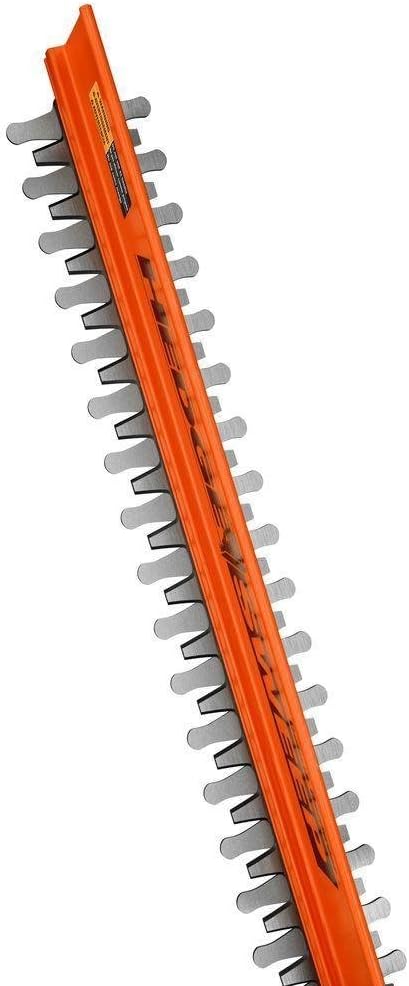
Figure 2: Close-up view of the 22-inch dual-action blades and the Hedge Sweep debris remover. This image highlights the cutting mechanism and the integrated debris clearing feature.
Setup
1. Unpacking
Carefully remove the hedge trimmer and any accessories from the packaging. Inspect the tool for any damage that may have occurred during shipping. Do not discard packaging until you are satisfied with the product.
2. Battery Installation
This hedge trimmer is sold as a tool-only unit. A RYOBI ONE+ 18V battery and charger are required and sold separately.
- Ensure the battery is fully charged before use.
- Align the ribs on the battery pack with the grooves in the tool's battery port.
- Slide the battery pack into the tool until it latches securely in place.
- To remove, press the release button on the battery pack and pull it out.
3. Handle Adjustment (Rotating Rear Handle)
The rear handle can be rotated to different positions for comfortable trimming at various angles.
- Locate the handle rotation release button or lever (refer to your specific model diagram if available).
- Press and hold the release mechanism.
- Rotate the handle to the desired position (e.g., 0°, 90° left, 90° right).
- Release the mechanism, ensuring the handle locks firmly into place before operation.
Operating Instructions
1. Starting and Stopping the Trimmer
To start the hedge trimmer, ensure a charged battery is installed. The tool typically requires a two-step activation for safety.
- Grip the front handle and the rear handle firmly with both hands.
- Press and hold the safety switch (usually located on the rear handle).
- While holding the safety switch, squeeze the trigger switch. The blades will begin to move.
- To stop the trimmer, release the trigger switch. The blades will stop.
2. Trimming Techniques
For best results and safety, use proper trimming techniques.
- Cutting Sides of Hedges: Hold the trimmer with the blades slightly tilted towards the hedge. Move the trimmer in a sweeping motion, cutting from the bottom upwards.
- Cutting Tops of Hedges: For flat tops, hold the trimmer level and move it across the top of the hedge. Utilize the rotating rear handle for comfortable horizontal cutting.
- Hedge Sweep: The integrated Hedge Sweep feature helps clear clippings as you trim, maintaining visibility and reducing cleanup.
- Avoid Overreaching: Do not overreach or stand on unstable surfaces. Maintain proper footing and balance at all times.

Figure 3: An individual demonstrating the use of the RYOBI hedge trimmer to trim the top of a hedge. This image illustrates the tool in action, showing how it is held during operation.

Figure 4: An individual using the RYOBI hedge trimmer to trim the side of a hedge. This image demonstrates the versatility of the tool for vertical trimming tasks.
Maintenance
Regular maintenance ensures optimal performance and extends the life of your hedge trimmer. Always remove the battery pack before performing any maintenance.
1. Blade Care
- Cleaning: After each use, clean the blades with a stiff brush to remove sap and debris. Use a resin solvent if necessary.
- Lubrication: Apply a light machine oil or blade lubricant to the blades after cleaning to prevent rust and ensure smooth operation.
- Sharpening: Dull blades can tear foliage and strain the motor. Sharpen blades annually or as needed by a qualified service center or using appropriate sharpening tools.
2. General Cleaning and Storage
- Wipe down the exterior of the tool with a clean, damp cloth. Do not use strong detergents or solvents.
- Store the hedge trimmer in a dry, secure location, out of reach of children.
- Ensure the blade sheath is in place when storing to prevent accidental contact with the blades.
- Remove the battery pack from the tool before storing for extended periods.
Troubleshooting
Refer to this section for common issues and their solutions.
| Problem | Possible Cause | Solution |
|---|---|---|
| Trimmer does not start | Battery not charged or improperly installed; Safety switch not engaged; Trigger not pressed. | Ensure battery is fully charged and securely installed. Press safety switch and then trigger. |
| Blades cut poorly or jam | Dull or dirty blades; Cutting material too thick; Debris caught in blades. | Clean and lubricate blades. Sharpen blades if dull. Do not attempt to cut branches exceeding 3/4 inch. Remove debris with battery removed. |
| Excessive vibration | Damaged or bent blades; Loose components. | Inspect blades for damage. Tighten any loose screws. If problem persists, seek professional service. |
| Reduced run time | Battery not fully charged; Battery nearing end of life; Operating in very cold conditions. | Ensure battery is fully charged. Consider replacing old batteries. Operate in recommended temperature ranges. |
Specifications
| Feature | Specification |
|---|---|
| Brand | RYOBI |
| Model Number | P2220 |
| Power Source | 18-Volt Lithium-Ion Battery (ONE+ System) |
| Blade Length | 22 Inches |
| Blade Type | Dual-Action |
| Cutting Capacity | Up to 3/4 Inch |
| Item Weight | 6 Pounds |
| Product Dimensions (L x W x H) | 22" x 8" x 10" |
| Material | Metal (Blades) |
Warranty and Support
For warranty information, please refer to the warranty card included with your product or visit the official RYOBI website. For technical support, replacement parts, or service inquiries, please contact RYOBI customer service through their official channels. Keep your purchase receipt as proof of purchase.
RYOBI Official Website: www.ryobitools.com