
1. Introduction
This manual provides detailed instructions for the Aolun Disco Lights Bluetooth Speaker, Model BlueSpeakerDS0108. This device combines a disco light, a Bluetooth speaker, and a night light into one unit, designed for various indoor and outdoor settings. Please read this manual thoroughly before use to ensure proper operation and to maximize your product experience.

Image 1: Aolun Disco Lights Bluetooth Speaker, showcasing its multi-color light projection and included remote control.
2. Package Contents
Verify that all items listed below are included in your package:
- 1 x Disco Ball Light
- 1 x Wireless Remote Control (with 2 button cells installed, plus an alternate button cell)
- 1 x USB Cable
- 2 x Screws & Wall Anchors
- 1 x User Manual

Image 2: Detailed view of the product and its accessories, including the USB cable, remote control, and mounting hardware.
3. Product Features
- Built-in Bluetooth Speaker: Connect to mobile phones, computers, or other Bluetooth-enabled devices for audio playback. Supports SD card (TF card not included) and USB for MP3/MP4 music formats. Features a high-quality speaker for clear audio.
- Sound Activated Party Lights: Offers 3 sound-activated modes (Light Off, Dynamic, Strobe Effects). A powerful voice-activated sensor synchronizes light changes with music or ambient sound.
- 3-in-1 Functionality: Functions as a multi-colored disco light, a night light with adjustable colors and brightness, and a Bluetooth speaker.
- USB Powered & Easy Installation: Powered via USB (does not support charging). Can be placed on a table, desk, or mounted on a wall or ceiling using the provided screws and anchors.
- Remote Control: Allows control of light modes, brightness, timing, and audio functions from a distance of 20-30 meters, even through obstacles.

Image 3: Overview of the Aolun Disco Lights Bluetooth Speaker's primary functions and features.
4. Setup
- Power Connection: Connect the provided USB cable to the device's DC 5V port and plug the other end into a USB power source (e.g., phone charger, computer USB port, power bank). The device does not have an internal battery and requires continuous USB power for operation.
- Remote Control Preparation: The remote control comes with button cells pre-installed. Before first use, remove the white plastic sheet from the battery compartment to activate the battery. If the remote stops working, replace the button cell with the alternate one provided.
- Placement: Place the disco light on a stable surface such as a table or desk. For a wider light projection, it can be fixed to a wall or ceiling using the included screws and wall anchors.
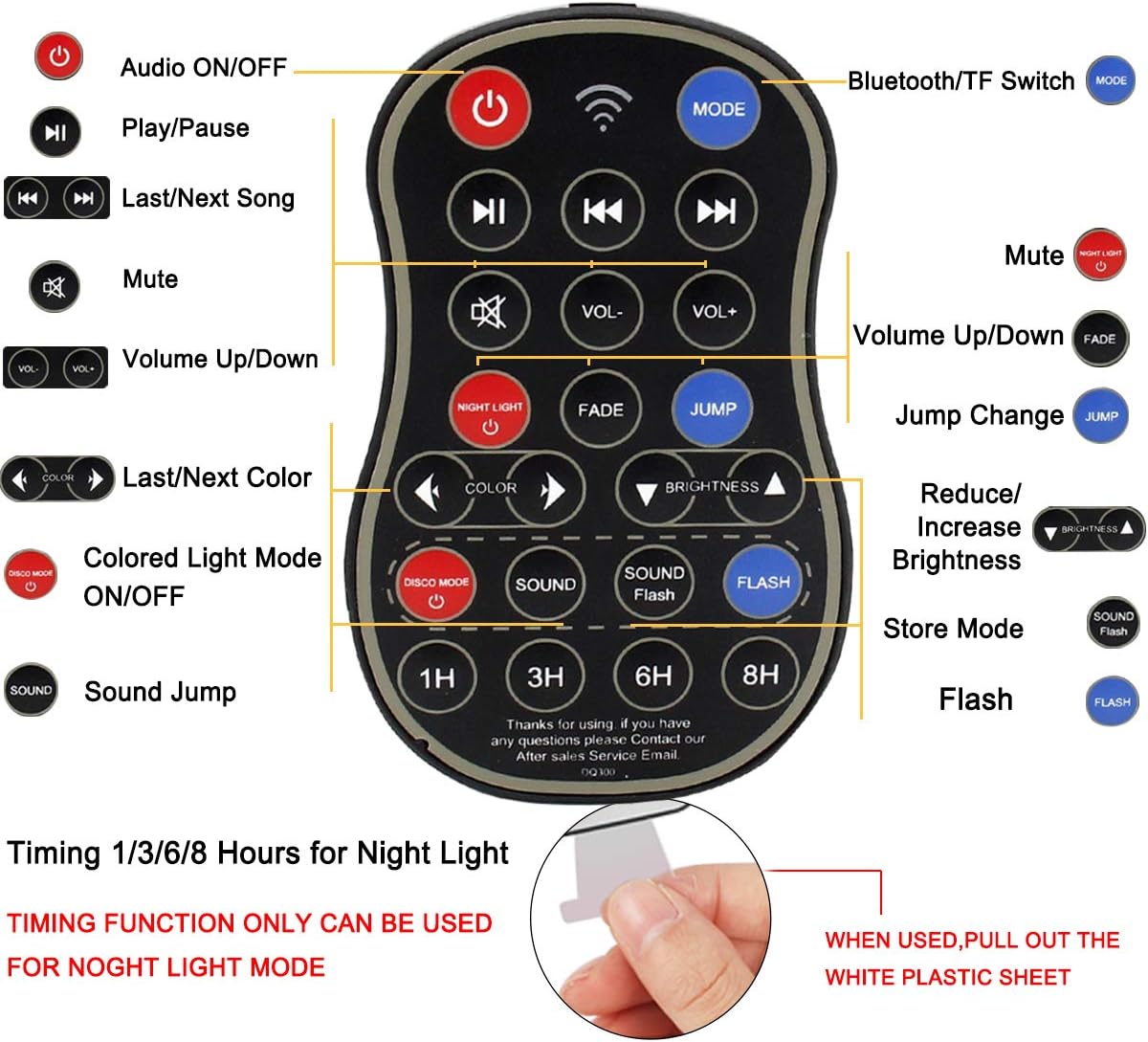
Image 4: Remote control layout and instructions for battery activation.
5. Operating Instructions
5.1. Bluetooth Pairing
- Ensure the disco light is powered on.
- On your mobile phone or other Bluetooth device, navigate to the Bluetooth settings.
- Search for available devices. The disco light will appear as "DQ-300".
- Select "DQ-300" to pair. A voice prompt will confirm successful connection.
- Once connected, you can play audio from your device through the speaker.

Image 5: Bluetooth pairing process with a smartphone.
Video 1: Demonstration of the 3-in-1 functions, including Bluetooth speaker pairing and light modes.
5.2. Disco Light Modes
Use the remote control to select various disco light modes:
- Color Modes: Press the "COLOR" button to cycle through different color combinations.
- Sound Activated Modes: Press the "SOUND" button to activate sound-sensitive lighting. The lights will change color and speed in response to music or ambient sounds.
- Flash Mode: Press the "FLASH" button for a strobe light effect.
- Jump Change: Press the "JUMP" button for rapid color transitions.
- Brightness Adjustment: Use the "BRIGHTNESS ▲" and "BRIGHTNESS ▼" buttons to adjust the intensity of the lights.

Image 6: Visual representation of the disco light, Bluetooth speaker, and night light functions.
5.3. Night Light Function
To use the device as a night light, cover the disco ball with the provided dome cover.
- Activate Night Light: Press the "NIGHT LIGHT" button on the remote.
- Color and Brightness: Adjust the night light color and brightness using the remote control.
- Timer Function: Set a timer for 1, 3, 6, or 8 hours using the corresponding buttons on the remote. This function is only available in night light mode.

Image 7: The Aolun Disco Lights Bluetooth Speaker used as a night light with timer options.
6. Maintenance
- Cleaning: Use a soft, dry cloth to clean the surface of the device. Do not use liquid cleaners or abrasive materials.
- Storage: When not in use for extended periods, store the device in a cool, dry place away from direct sunlight and moisture.
- Remote Control Battery: If the remote control will not be used for a long time, remove the white plastic sheet or the button cell to prevent power consumption.
7. Troubleshooting
| Problem | Possible Cause | Solution |
|---|---|---|
| Device does not power on. | No power supply or faulty USB cable. | Ensure the USB cable is securely connected to a working USB power source. Try a different USB cable or power adapter. |
| Remote control is not working. | Battery not activated or depleted. Obstruction between remote and device. | Remove the white plastic sheet from the remote's battery compartment. Replace the button cell if depleted. Ensure a clear line of sight to the device. |
| Bluetooth pairing fails. | Device not in pairing mode or too far from the speaker. | Ensure the speaker is powered on. Check that Bluetooth is enabled on your device. Move your device closer to the speaker. Restart both devices and try again. |
| Lights do not respond to music. | Sound activated mode not selected or ambient sound is too low. | Press the "SOUND" button on the remote. Increase the volume of the music or sound source. |
8. Specifications
- Model: BlueSpeakerDS0108
- Brand: Aolun
- Color: Bluetooth Speaker Disco Light
- Shape: Dome
- Material: Acrylonitrile Butadiene Styrene (ABS), Polycarbonate (PC)
- Finish Type: Powder Coated
- Light Source Type: LED
- Power Source: USB (5 Volts)
- Wattage: 4 watts
- Item Weight: 9.6 ounces (272 Grams)
- Product Dimensions: 4.7"L x 4.7"W x 4.1"H
- Mounting Type: Table Mount, Wall Mount
- Batteries: 2 Lithium Metal batteries required for remote (included)
- Special Features: Dimmable, Sound Activated, Remote Control
9. Warranty and Support
For warranty information or technical support, please refer to the contact details provided with your purchase or visit the official Aolun website. Keep your purchase receipt for warranty claims.