
EONON GA9465BN
Eonon E90X6S Car Stereo User Manual
Model: GA9465BN
1. Product Overview
The Eonon E90X6S is an advanced 9-inch Android 13 car stereo designed for select BMW 3 Series models. It features a Qualcomm QCM6225 Octa-core processor, 6GB RAM, 64GB ROM, and supports Wireless CarPlay, Android Auto, and various multimedia functions. This manual provides essential information for installation, operation, and maintenance.

Image: The Eonon E90X6S car stereo unit, showcasing its 9-inch display, 8-core processor, 6GB RAM, 64GB ROM, Android 13 operating system, 4G LTE capability, and included accessories like an external microphone and backup camera.
2. Compatibility and Installation (Setup)
2.1 Applicable Models
The E90X6S car head unit is compatible with BMW 3 Series 2005-2013 (E90/E91/E92/E93). Please verify your car's radio plug and system before installation.
- If your car radio plug has 8 speaker wires and fiber optic, direct installation is possible.
- If your car has a Logic 7 system, or if your car radio plug has fiber optic but no 8 speaker wires, an A0581 fiber optic decoder box (not included) is required for installation.
- Important Note: If your car has an iDrive system with an LCD display, the E90X6S is NOT compatible.

Image: Visual guide illustrating compatible and incompatible BMW 3 Series dashboards, along with notes on wiring harness configurations and the need for a fiber optic decoder box for certain setups.
2.2 Pre-Installation Steps
- Remove the plastic frame from the center console before installation.
- If you wish to retain the functionality of original buttons (e.g., climate control buttons), an additional ashtray button relocation kit (not included) may need to be purchased separately.

Image: Depicts the process of removing the factory car radio and installing the air conditioning control panel using the provided mounting bracket. It also shows the optional ashtray button relocation kit for retaining original button functionality.
2.3 Included Components (What's in the Box)
Verify that all components are present before beginning installation:
- Power Cable (x1)
- GPS Antenna (x1)
- 4G Antennas (x2)
- USB Adapters (x2)
- Audio/Video Adapters (x2)
- Reverse Camera Input Cable (x1)
- 15A Fuse (x1)
- SIM Card Holder (x1)
- External Microphone (x1)
- CANBUS (x1)
- User Manual (x1)
- Double-Sided Tape (x1)
- Radio Antenna Adapter (x1)
- Manual Climate Control Bracket (x1)
- Automatic Climate Control Bracket (x1)
- Installation Bracket (x1)
- Screws (x12)
- Installation Clips (x2)
- Small Speaker (x1)
- Screw Hole Plugs (x2)

Image: A detailed visual representation of all accessories and cables included with the Eonon E90X6S car stereo, clearly labeled for identification.
2.4 Wiring Diagram
Proper connection of all cables is crucial for full functionality, including steering wheel controls and backup camera operation. Refer to the detailed wiring diagram below for correct connections.

Image: A comprehensive wiring diagram showing all input and output connections for the Eonon E90X6S, including power, audio, video, GPS, 4G, USB, and CANBUS connections.
For more detailed installation instructions, please refer to the official Installation Manual (PDF).
3. Operating Instructions
3.1 Core Performance
The Eonon E90X6S is powered by a Qualcomm QCM6225 Octa-core processor with 6GB RAM and 64GB ROM, utilizing 6nm low-power process technology for high performance. It includes a built-in DSP and 4x48W max output power for enhanced audio quality.

Image: Highlights the Qualcomm Snapdragon 6225 8-core processor, 6nm LPP technology, 6GB RAM, 64GB ROM, and Adreno 610 GPU, emphasizing faster and stronger performance.

Image: Illustrates the built-in Digital Signal Processing (DSP) with RHOM 32107 chip and 48-band graphic equalizer, ST TDA7851 amplifier (4x48W), and optical/coaxial HD audio output for superior sound quality.
3.2 Display and User Interface
The unit features a 9-inch QLED display with 1280x720 resolution, offering vivid colors, brightness, and contrast. It supports split-screen multitasking, allowing two apps to be viewed simultaneously.

Image: Showcases the 9-inch QLED display with its benefits: more vivid colors, brighter image, higher contrast, 2.5D capacitive touchscreen, and 1280x720 resolution.

Image: Demonstrates the split-screen multitasking feature, allowing users to view and interact with two applications simultaneously on the 9-inch display.
The system comes with 3 built-in UI themes and allows customization of button colors, boot logos, and wallpapers.

Image: Shows various customization options including adjustable button colors, custom boot logos, changeable wallpapers, and draggable app icons for a personalized user experience.
3.3 Connectivity Features
The E90X6S offers seamless smartphone integration and robust connectivity options.
Wireless CarPlay & Android Auto
Connect your iPhone or Android device wirelessly via Bluetooth for a seamless in-vehicle experience. Both CarPlay and Android Auto provide access to navigation, music, calls, and messaging.

Image: Depicts the car stereo displaying Apple CarPlay and Android Auto interfaces, with voice commands like "Hey Siri, play music" and "Hey Google, navigate home" indicating voice assistant integration.
Screen Mirroring
Project content from your mobile phone onto the large screen for an immersive entertainment experience.
- For iOS: Click the Zlink5 app, turn on Wi-Fi and Bluetooth on iPhone, find 'EONON' in Bluetooth devices and pair, then use 'CarPlay'. For screen mirroring, turn on iPhone hotspot, connect to car stereo, then enable screen mirroring and select 'zj-airplay'.
- For Android: Click the Zlink5 app, turn on Wi-Fi and Bluetooth on phone, find 'EONON' in Bluetooth devices and pair. For screen mirroring, turn on phone hotspot, connect to car stereo, install Zplus app, and select 'wireless connection'.

Image: Step-by-step guide for connecting an iPhone wirelessly to Apple CarPlay via the Zlink5 app, Bluetooth, and Wi-Fi.

Image: Step-by-step guide for connecting an Android phone wirelessly to Android Auto via the Zlink5 app, Bluetooth, and Wi-Fi.
Bluetooth and FM/AM Radio
The upgraded built-in Bluetooth system supports hands-free calls, contact synchronization, and music playback. An external microphone is included for clear call quality. The unit also features FM/AM radio with RDS support.

Image: Highlights the independent Bluetooth 5.1 module and extra Bluetooth antenna, ensuring quick, stable connection and noise reduction for calls and music streaming.
Wi-Fi & 4G LTE
Equipped with Wi-Fi 6 and a built-in 4G module (SIM card not included) for internet connectivity.

Image: Details the Wi-Fi 6 and Wi-Fi 2.4/5 GHz readiness, along with the SIM card slot for the built-in 4G module (SIM card not included).
3.4 Retaining OEM Features
The E90X6S is designed for plug-and-play installation, retaining factory features such as steering wheel controls, door information display, and driving data display.

Image: Illustrates the retention of original car features like steering wheel controls, Harman Kardon audio system compatibility, parking sensor display, heated seats control, and door reminder functionality.
3.5 Optional Accessories Integration
The E90X6S supports various Eonon accessories (sold separately unless specified).
- Rearview Camera (A0127): Included with the unit. Provides reversing guidelines, 1080P AHD resolution, 160° rear viewing angle, and IP68 waterproof rating.
- Dashcam (A100): Supports 120° viewing angle, 360° adjustable, 1280x720 resolution, and video playback.
- OBD2 (V0056): Allows for vehicle fault diagnosis and real-time status monitoring via the Torque app.
- DAB+ Box (502): For digital audio broadcasting.

Image: Details the features of the included A0127 backup camera, including reversing guidelines, 1080P AHD, 160° rear viewing angle, and IP68 waterproof rating, shown with a car parking scenario.

Image: Describes the features of the optional A100 Dash Cam, including 120° viewing angle, 360° adjustability, 1280x720 resolution, and video playback capabilities, shown with a car driving on a road.
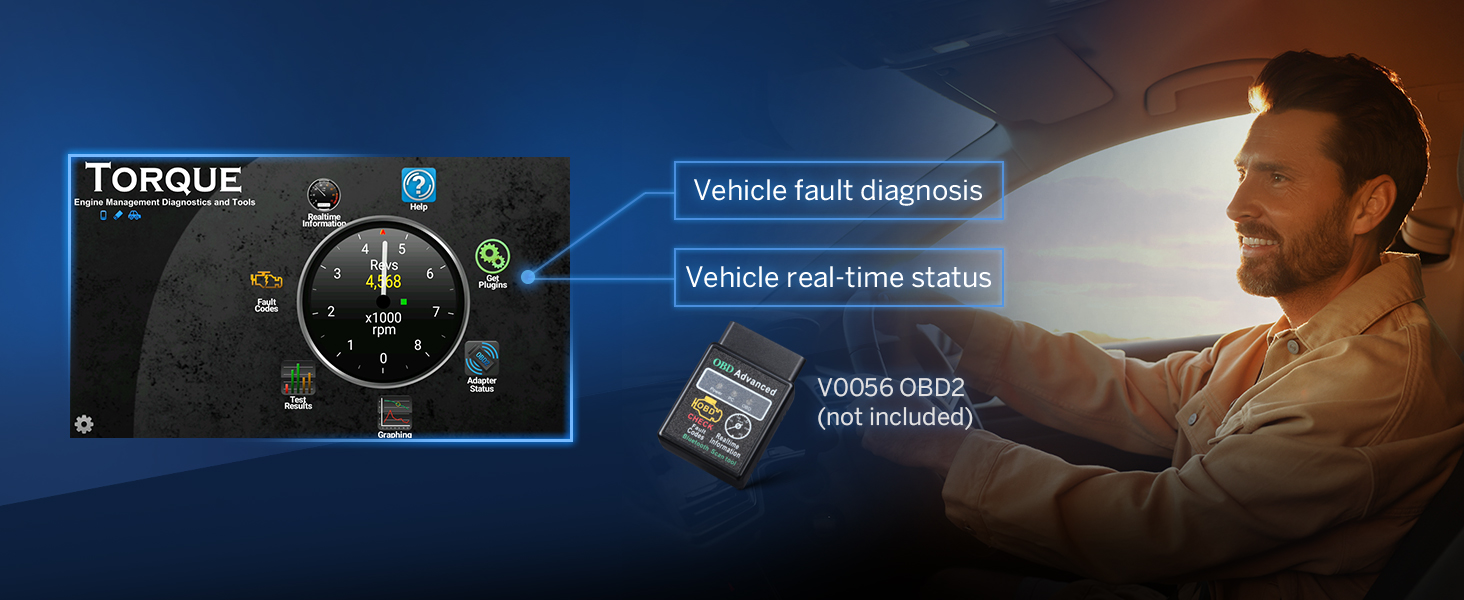
Image: Illustrates the functionality of the optional V0056 OBD2 device, which connects to the car stereo to provide vehicle fault diagnosis and real-time status information via the Torque app.
4. Maintenance
4.1 Software Updates (OTA)
The Eonon E90X6S supports Over-the-Air (OTA) firmware updates. These updates help fix software issues and enhance security. Simply follow the on-screen prompts to update your device. Note that these updates are for the software and do not upgrade the Android system version.
Image: A graphic representing the Over-the-Air (OTA) firmware update process, emphasizing its role in fixing software issues and enhancing security with simple taps.
5. Troubleshooting
If you encounter issues with your Eonon E90X6S, consider the following general troubleshooting steps:
- No Power: Check all power connections and the 15A fuse. Ensure the car's ignition is on.
- No Sound: Verify speaker wire connections. Check audio settings (volume, mute, DSP settings). Ensure the correct audio input/output is selected.
- No GPS Signal: Ensure the GPS antenna is properly connected and placed in an area with clear sky view.
- Bluetooth/Wi-Fi Connection Issues: Ensure Bluetooth/Wi-Fi is enabled on both the stereo and your device. Try restarting both devices.
- Steering Wheel Controls Not Working: Verify CANBUS connection and ensure proper configuration in the stereo settings.
- Backup Camera Not Displaying: Check the reverse camera input cable connection and ensure the camera is receiving power.
For specific technical issues or to verify product specifications, you can use diagnostic tools.

Image: Advises users to download a "Fake Device Test" app to verify the Android version, processor, memory (RAM), and storage (ROM) of the unit, helping to confirm actual specifications.
If problems persist, consult the full User Manual (PDF) or contact Eonon customer support.
6. Specifications
| Feature | Specification |
|---|---|
| Brand | EONON |
| Model Name | E90X6S |
| Item Model Number | GA9465BN |
| Product Dimensions | 11.57 x 9.68 x 5.23 inches |
| Item Weight | 2.86 pounds |
| Screen Size | 9 Inches |
| Display Resolution | 1280 x 720 |
| Processor | Qualcomm QCM6225 Octa-core (6nm LPP) |
| RAM | 6GB |
| ROM | 64GB |
| Operating System | Android 13 |
| Connectivity Technology | Bluetooth 5.1, USB, Wi-Fi 6, 4G LTE |
| Special Features | Android Auto, Apple CarPlay, Built-In Bluetooth, Touchscreen, DSP, Optical/Coaxial Audio Output |
| Audio Output Mode | Stereo (4x48W max output) |
| Map Type | Worldwide (Online/Offline map support) |
7. Warranty and Support
Eonon has been innovating automotive audiovisual experiences since 2002. For any support inquiries, technical assistance, or warranty information, please refer to the official Eonon website or the comprehensive User Manual (PDF) provided with your product.

Image: Highlights Eonon's long-standing reputation since 2002, featuring Trustpilot and ResellerRatings scores indicating high customer satisfaction.
Related documentsGA9465BN


Ask a question about this manual
Ask about setup, troubleshooting, compatibility, parts, safety, or missing instructions. Manuals+ will review the question and use this page’s manual context to help answer it.