
1. Introduction
The Celestron StarSense Explorer DX 102AZ is an innovative app-enabled refractor telescope designed to simplify stargazing for beginners and experienced astronomers alike. This telescope utilizes your smartphone to analyze the night sky in real-time, providing accurate guidance to celestial objects. Its high-quality 102mm refractor optics deliver bright and detailed views of the Moon, planets, and deep-sky objects.

Image: The Celestron StarSense Explorer DX 102AZ telescope set up on its tripod.
2. Setup
Follow these steps to assemble and prepare your Celestron StarSense Explorer DX 102AZ telescope for observation:
- Unpack Components: Carefully remove all components from the packaging. Ensure you have the optical tube, preassembled mount and tripod, 25mm and 10mm eyepieces, erect image diagonal, StarPointer finderscope, accessory tray, and StarSense Explorer phone dock.
- Assemble Tripod and Mount: The tripod and mount come preassembled. Extend the tripod legs to a suitable height and secure them. Attach the accessory tray to the tripod's spreader bars for added stability and storage.
- Attach Optical Tube: Secure the optical tube to the mount using the provided fasteners.
- Install Finderscope: Mount the StarPointer finderscope onto the optical tube. This will assist in initial targeting.
- Insert Diagonal and Eyepiece: Insert the erect image diagonal into the focuser, then insert either the 25mm or 10mm eyepiece into the diagonal.
- Attach StarSense Phone Dock: Securely attach the StarSense phone dock to the telescope. This dock holds your smartphone in position for sky recognition.
- Download and Launch StarSense Explorer App: Download the Celestron StarSense Explorer app from your smartphone's app store (compatible with Android 12+ and iOS 18+). Launch the app and follow the on-screen instructions for initial alignment. The app uses patented sky recognition technology to align with your telescope.

Image: Visual guide showing the three simple steps: Dock your smartphone, Launch the StarSense Explorer app, and Observe.

Image: Diagram illustrating how the StarSense app uses smartphone camera to analyze star patterns and calculate telescope position.
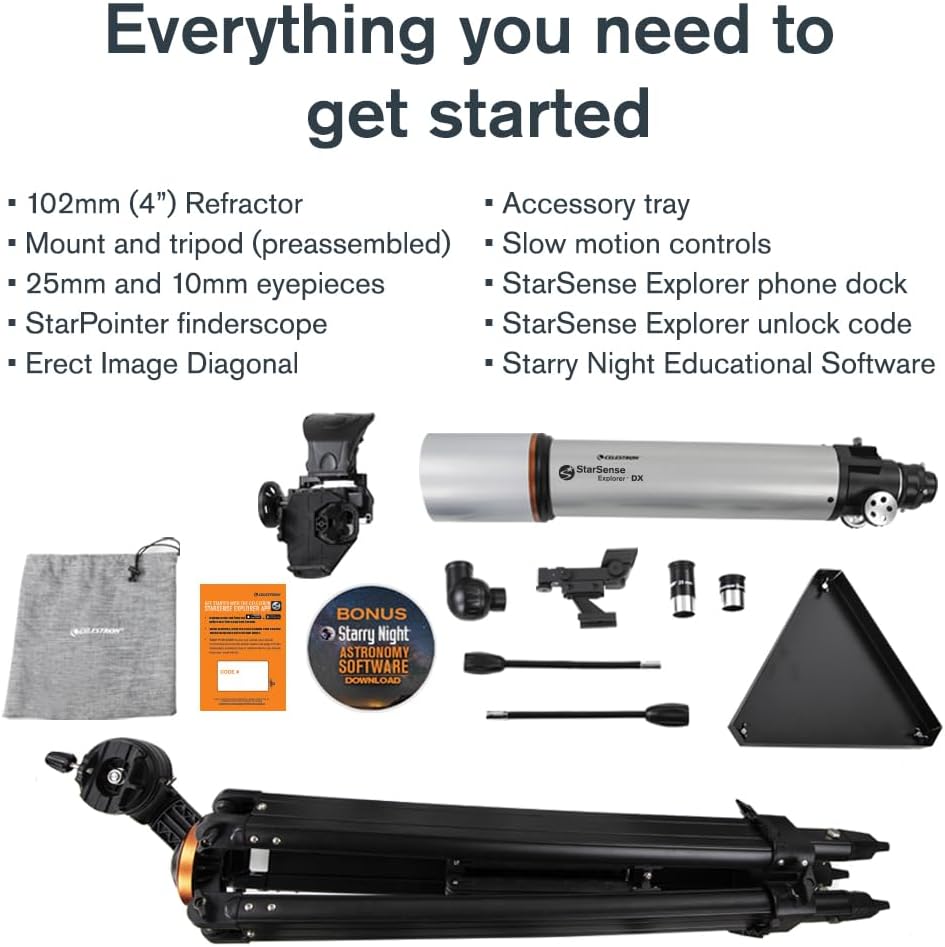
Image: A layout of all included accessories: optical tube, mount and tripod, eyepieces, diagonal, finderscope, accessory tray, and phone dock.
Setup Video Guide
Video: An official Celestron Direct video demonstrating the setup and initial use of the StarSense Explorer DX telescope.
3. Operating Your Telescope
Once your telescope is set up and the StarSense Explorer app is aligned, you are ready to explore the night sky:
- Select a Target: The app will generate a curated list of the best celestial objects visible from your location and time. Browse through planets, nebulae, galaxies, and star clusters.
- Follow On-Screen Arrows: Choose an object from the list. The app will display arrows on your screen, guiding you to manually move the telescope towards the selected object.
- Fine-Tune with Slow-Motion Controls: Use the manual altazimuth mount with dual-axis slow-motion controls for precise adjustments. When the bullseye on the app turns green, your target is centered in the eyepiece.
- Observe: Look through the eyepiece to view the celestial object. You can switch between the 25mm eyepiece for wider views and the 10mm eyepiece for higher magnification.
- No Cell Signal Required: The StarSense Explorer app works even without a cell signal, making it ideal for remote dark-sky locations.

Image: A smartphone screen displaying the StarSense Explorer app with a list of recommended celestial objects for viewing.

Image: A graphic comparing the accuracy and ease of use of StarSense Explorer's patented technology against basic astronomy apps.

Image: Visual representation of the magnification provided by the 25mm (26x) and 10mm (66x) eyepieces, showing the Moon at different magnifications.
4. Maintenance
Proper maintenance ensures the longevity and optimal performance of your telescope:
- Cleaning Optics: Use the provided cleaning cloth or a specialized optical cleaning kit to gently clean the lenses and mirrors. Avoid touching optical surfaces with bare hands. Always use lens caps when the telescope is not in use to protect the optics from dust and debris.
- Storage: Store the telescope in a dry, dust-free environment. If storing for extended periods, consider disassembling and placing components back in their original packaging or a protective case.
- Collimation: Periodically, the telescope's mirrors may require collimation (alignment). Refer to advanced astronomy resources or Celestron's support for detailed instructions on collimating a refractor telescope.
- General Care: Handle the telescope with care. Avoid sudden impacts or harsh movements that could misalign components.
5. Troubleshooting
If you encounter issues with your telescope, consider the following common solutions:
- App Alignment Issues: Ensure your smartphone is securely docked and the StarSense Explorer app has permission to access your camera and location. Make sure you are in an open area with a clear view of the sky for initial alignment.
- Blurry Views: Adjust the focuser knob until the image is sharp. Ensure the correct eyepiece is selected for your desired magnification. Atmospheric conditions can also affect image clarity.
- Smartphone Compatibility: Verify that your smartphone meets the minimum operating system requirements (Android 12+ or iOS 18+). Older phone models or specific Android devices might have limited functionality.
- Telescope Stability: Ensure the tripod legs are fully extended and locked, and the accessory tray is securely attached to provide maximum stability.
- No Image in Eyepiece: Double-check that the lens caps are removed from both ends of the optical tube and the eyepiece. Ensure the diagonal and eyepiece are correctly inserted.
6. Specifications
| Feature | Detail |
|---|---|
| Brand | Celestron |
| Model Name | StarSense Explorer DX 102 |
| Model Number | 22460 |
| Optical Design | Refractor |
| Objective Lens Diameter | 102 Millimeters (4 inches) |
| Focal Length | 650 millimeters |
| Focal Ratio | f/6.5 |
| Eyepieces Included | 25mm (26x magnification), 10mm (65x magnification) |
| Finderscope | StarPointer™ red dot finderscope |
| Mount Type | Manual Altazimuth Mount with slow-motion controls |
| Optical Tube Length | 812.8 Millimeters |
| Product Dimensions | 30"D x 32"W x 50"H |
| Item Weight | 14.2 Pounds |
| Compatible Devices | Smartphone (Android 12+ and iOS 18+) |
| Additional Features | App-enabled smartphone sky recognition technology |

Image: Visual representation of the telescope's dimensions and weight distribution.
7. Warranty and Support
Your Celestron StarSense Explorer DX 102AZ telescope comes with a 2-Year US Warranty. Celestron is a leading telescope brand known for its quality and customer support.
For any questions, technical assistance, or warranty claims, please contact Celestron's team of US-based experts. Unlimited support is available to ensure you have the best possible stargazing experience.
Visit the official Celestron website or refer to the contact information provided in your product packaging for support details.


