
TOPTECH Jet-4
Top Tech Audio Jet-4 Portable Speaker User Manual
Model: Jet-4
Brand: TOPTECH
1. Introduction and Overview
The Top Tech Audio Jet-4 is a versatile and powerful 400W Bluetooth portable speaker designed for both indoor and outdoor use. It offers seamless connectivity, enhanced karaoke features, and a long-lasting battery, making it ideal for various audio needs.

Figure 1: Front view of the Top Tech Audio Jet-4 Portable Speaker, showcasing its illuminated speaker grille and integrated handle.
Key Features:
- Seamless Connectivity: Built-in Bluetooth for wireless pairing, 3.5mm AUX jack, and support for TF/USB input.
- Enhanced Karaoke Mode: Features colorful lights, accompaniment and voice modes, and wired microphone compatibility.
- Simple Multi-Function Control: Intuitive console for adjusting sound effects, microphone settings, and mode switching.
- True Wireless Stereo (TWS): Pair two Jet-4 speakers for an immersive stereo experience.
- Extended Playtime: Up to 6 hours of continuous music playback on a single charge.
2. Setup Guide
2.1 Charging the Speaker
Before first use, fully charge the speaker. The Jet-4 is equipped with a rechargeable DC 5V battery. Use the provided USB cable to connect the speaker to a compatible power source.

Figure 2: The speaker's internal battery provides up to 6 hours of playtime.
2.2 Bluetooth Pairing
- Turn on the Jet-4 speaker using the ON/OFF switch located on the control panel.
- The speaker will enter Bluetooth pairing mode automatically.
- On your smartphone or tablet, enable Bluetooth and search for available devices.
- Select "JET-4" from the list of devices to connect. A confirmation sound will indicate successful pairing.
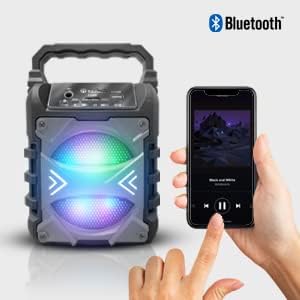
Figure 3: Easily pair your smartphone or other Bluetooth-enabled device with the Jet-4 speaker for wireless audio streaming.
2.3 True Wireless Stereo (TWS) Pairing (Optional)
For an enhanced stereo experience, you can pair two Jet-4 speakers together:
- Ensure both Jet-4 speakers are powered on and not connected to any other Bluetooth device.
- On one speaker (this will be the primary speaker), press and hold the TWS button (if available, or follow specific instructions in the minimal manual provided with the product).
- The speakers will automatically search and connect to each other. A confirmation sound will indicate successful TWS pairing.
- Connect your device to the primary speaker via Bluetooth as described in Section 2.2. Audio will now play through both speakers in stereo.

Figure 4: Achieve immersive sound by pairing two Jet-4 speakers using TWS functionality.
3. Operating Instructions
3.1 Control Panel Overview
The Jet-4 features an intuitive control panel for easy operation.
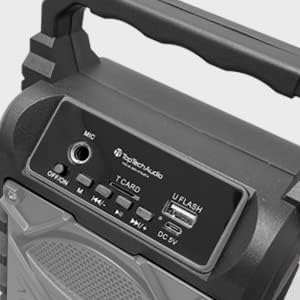
Figure 5: The top control panel includes ports for microphone, TF card, and USB, along with power and playback controls.
- ON/OFF Switch: Powers the speaker on or off.
- MIC Input: Connect a wired microphone for karaoke.
- T.CARD Slot: Insert a TF (microSD) card for direct audio playback.
- U FLASH (USB) Port: Insert a USB flash drive for direct audio playback.
- DC 5V: Charging port for the speaker.
- M (Mode) Button: Switches between Bluetooth, AUX, TF card, and USB input modes.
- Playback Controls: Buttons for Play/Pause, Previous Track, and Next Track.
- Volume Control: Adjust volume directly from your connected device or via the speaker's controls.
3.2 Karaoke Mode
Activate Karaoke Mode to enhance your singing experience:
- Connect a wired microphone to the MIC input.
- The speaker's colorful lights will activate, creating a dynamic atmosphere.
- Toggle between accompaniment and voice modes using the designated button (refer to the minimal manual for specific button identification if not clearly marked).
3.3 Using AUX, TF Card, and USB Inputs
The Jet-4 supports multiple audio input methods:
- AUX Input: Connect non-Bluetooth devices using a 3.5mm audio cable to the AUX jack.
- TF Card: Insert a TF (microSD) card into the T.CARD slot. The speaker will automatically detect and play compatible audio files.
- USB Input: Insert a USB flash drive into the U FLASH port. The speaker will automatically detect and play compatible audio files.
- Use the 'M' (Mode) button to switch between these input sources.
4. Maintenance
To ensure the longevity and optimal performance of your Top Tech Audio Jet-4 speaker, follow these maintenance guidelines:
- Cleaning: Use a soft, dry cloth to clean the exterior of the speaker. Avoid using abrasive cleaners, solvents, or strong chemicals, as these can damage the finish.
- Storage: When not in use for extended periods, store the speaker in a cool, dry place away from direct sunlight and extreme temperatures.
- Battery Care: To preserve battery life, avoid fully discharging the battery frequently. Recharge the speaker regularly, even if not in constant use.
- Water Exposure: While designed for outdoor use, avoid submerging the speaker in water or exposing it to heavy rain.
- Handle with Care: Do not drop the speaker or subject it to strong impacts, as this can damage internal components.
5. Troubleshooting
If you encounter issues with your Jet-4 speaker, refer to the following common troubleshooting steps:
| Problem | Possible Cause | Solution |
|---|---|---|
| No power/Speaker won't turn on | Low battery; Power switch off | Charge the speaker fully; Ensure the ON/OFF switch is in the 'ON' position. |
| Cannot pair via Bluetooth | Speaker not in pairing mode; Device Bluetooth off; Too far from device | Ensure speaker is on and in Bluetooth mode; Turn on Bluetooth on your device; Move device closer to speaker (within 100ft). |
| No sound/Low volume | Volume too low on speaker or device; Incorrect input mode selected; Corrupt audio file (for TF/USB) | Increase volume on both speaker and connected device; Press 'M' button to cycle through modes; Try a different audio file. |
| TWS pairing failed | Speakers too far apart; Already connected to another device | Ensure both speakers are close to each other; Disconnect any existing Bluetooth connections before TWS pairing. |
| Karaoke microphone not working | Microphone not properly connected; Microphone switch off | Ensure microphone is securely plugged into the MIC input; Check if the microphone has its own ON/OFF switch. |
If the problem persists after trying these steps, please contact TOPTECH customer support for further assistance.
6. Product Specifications
| Feature | Detail |
|---|---|
| Brand | TOPTECH |
| Model | Jet-4 |
| Power Output | 400W |
| Connectivity Technology | Bluetooth, USB |
| Connector Type | USB |
| Power Source | Battery Powered (DC 5V) |
| Battery Life | Up to 6 hours |
| Item Weight | 0.7 Kilograms (1.54 pounds) |
| Number of Channels | 2 |
| Audio Input | Guitar & Karaoke Inputs (via MIC port), AUX, TF Card, USB |
| Compatible Devices | Smartphone, Tablet, MP3 Players (via AUX) |
| Color | Grey |
| Package Dimensions | 9.17 x 4.65 x 4.33 inches |
| Country of Origin | China |
| UPC | 689259388932 |
7. Warranty and Support
TOPTECH stands behind the quality of its products. For specific warranty information and terms, please refer to the documentation included with your purchase or visit the official TOPTECH website.
For technical support, troubleshooting assistance, or any inquiries regarding your Jet-4 speaker, please contact TOPTECH customer service. Have your product model and UPC ready when contacting support.
Manufacturer: TOPTECH
UPC: 689259388932
Date First Available: January 9, 2020
You can also visit the TOPTECH Store on Amazon for more product information and support resources.
Ask a question about this manual
Ask about setup, troubleshooting, compatibility, parts, safety, or missing instructions. Manuals+ will review the question and use this page’s manual context to help answer it.