
TOPTECH JET-4-BLUE
TOPTECH Jet-4 Bluetooth Speaker User Manual
Model: JET-4-BLUE
Introduction
Thank you for choosing the TOPTECH Jet-4 Portable Bluetooth Speaker. This manual provides essential information for setting up, operating, and maintaining your speaker to ensure optimal performance and longevity. Please read this manual thoroughly before using the product.

Image: The TOPTECH Jet-4 Bluetooth Speaker, showcasing its compact design and vibrant LED lighting.
Safety Information
To prevent fire or shock hazards, always follow basic safety precautions when using this product:
- Do not expose the speaker to rain or moisture.
- Do not disassemble or modify the speaker. Refer all servicing to qualified personnel.
- Keep the speaker away from direct sunlight, heat sources, and extreme temperatures.
- Avoid dropping or subjecting the speaker to strong impacts.
- Use only the specified charging cable and power adapter.
Package Contents
- TOPTECH Jet-4 Bluetooth Speaker
- USB Charging Cable
- User Manual
Product Overview
Controls and Ports
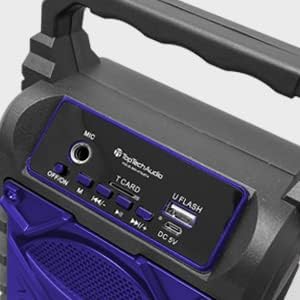
Image: Detailed view of the speaker's top control panel, showing various buttons and input ports.
- MIC Input: Connect an external microphone for karaoke.
- OFF/ON Switch: Power the speaker on or off.
- M (Mode) Button: Switch between Bluetooth, AUX, USB, and TF Card modes.
- Previous / Volume Down Button: Short press for previous track, long press to decrease volume.
- Play / Pause Button: Play or pause audio playback.
- Next / Volume Up Button: Short press for next track, long press to increase volume.
- T CARD Slot: Insert a TF (MicroSD) card for direct audio playback.
- U FLASH (USB) Port: Insert a USB flash drive for direct audio playback.
- DC 5V Port: Connect the USB charging cable to power and charge the speaker.
Key Features

Image: An infographic showing the TOPTECH Jet-4 speaker with icons representing its key features: easy portability, mic port, mode karaoke, disco light, TF card port, and USB port.
- Powerful Sound: Dual-driver stereo output delivers crisp highs and deep bass for a premium audio experience.
- Multi-Mode Playback: Supports Bluetooth, AUX, USB, and TF card input for versatile music streaming.
- Karaoke Ready: Built-in karaoke mode with light effects and mic support makes any party more fun.
- TWS Pairing Support: Connect two speakers wirelessly for immersive, room-filling sound.
- Long Battery Life: Enjoy up to 6 hours of playtime with a rechargeable battery, perfect for all-day events.
Setup
Initial Charge
Before first use, fully charge the speaker. Connect the provided USB charging cable to the DC 5V port on the speaker and the other end to a USB power adapter (not included) or a computer USB port.

Image: A visual representation of a fully charged battery, symbolizing the speaker's long battery life.
The charging indicator light will illuminate during charging and turn off or change color when fully charged. A full charge typically takes a few hours.
Operating Instructions
Bluetooth Pairing
- Turn on the speaker by sliding the OFF/ON switch to the 'ON' position. The speaker will enter Bluetooth pairing mode automatically, indicated by a flashing LED light and an audible prompt.
- Enable Bluetooth on your smartphone, tablet, or other Bluetooth-enabled device.
- Search for available Bluetooth devices and select "JET-4" from the list.
- Once connected, the speaker will provide an audible confirmation, and the LED light will stop flashing.
- You can now play audio from your device through the speaker.
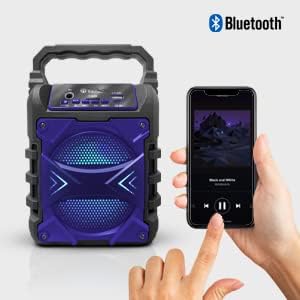
Image: The TOPTECH Jet-4 speaker positioned next to a smartphone, illustrating the seamless Bluetooth connection process.
Playback Modes (AUX, USB, TF Card)
Press the 'M' (Mode) button to cycle through available playback modes:
- AUX Mode: Connect an external audio device using a 3.5mm audio cable (not included) to the AUX input.
- USB Mode: Insert a USB flash drive into the 'U FLASH' port. The speaker will automatically detect and play compatible audio files.
- TF Card Mode: Insert a TF (MicroSD) card into the 'T CARD' slot. The speaker will automatically detect and play compatible audio files.
Karaoke Mode
To use the karaoke function, connect a microphone (not included) to the 'MIC' input port. Adjust the microphone volume as needed. The speaker's built-in light effects will enhance the karaoke experience.
TWS Pairing (True Wireless Stereo)
For an enhanced stereo sound experience, you can pair two TOPTECH Jet-4 speakers together:
- Ensure both Jet-4 speakers are powered on and not connected to any Bluetooth device.
- On one speaker (this will be the primary speaker), long press the 'M' (Mode) button until you hear a pairing tone.
- The two speakers will automatically connect to each other. Once connected, you will hear a confirmation tone.
- Now, connect your Bluetooth device to the primary speaker as described in the 'Bluetooth Pairing' section. Audio will play through both speakers in stereo.

Image: Two TOPTECH Jet-4 speakers wirelessly connected to a smartphone, demonstrating the True Wireless Stereo (TWS) pairing feature for expanded sound.
Maintenance
- Clean the speaker with a soft, dry cloth. Do not use abrasive cleaners or solvents.
- Store the speaker in a cool, dry place when not in use.
- Avoid prolonged exposure to extreme temperatures or humidity.
Troubleshooting
| Problem | Solution |
|---|---|
| Speaker does not power on. | Ensure the battery is charged. Connect the speaker to a power source using the USB cable. |
| No sound from the speaker. | Check the volume level on both the speaker and your connected device. Ensure the correct playback mode is selected. |
| Bluetooth pairing fails. | Ensure the speaker is in pairing mode. Turn off Bluetooth on your device and turn it back on. Try restarting both the speaker and your device. Make sure no other devices are connected to the speaker. |
| Poor sound quality. | Move the speaker closer to your Bluetooth device to reduce interference. Ensure the audio source is of good quality. |
Specifications
| Feature | Detail |
|---|---|
| Brand | TOPTECH |
| Model Number | JET-4-BLUE |
| Power Source | Battery Powered |
| Connectivity Technology | Bluetooth, USB |
| Audio Input | Guitar Input, Karaoke Input, USB |
| Number of Channels | 2 |
| Material | Plastic, Metal |
| Item Weight | 1.54 pounds |
| Package Dimensions | 9.29 x 6.38 x 4.17 inches |
| UPC | 689259338593 |
Warranty and Support
For warranty information and customer support, please refer to the contact details provided on the product packaging or visit the official TOPTECH website. Keep your purchase receipt as proof of purchase for any warranty claims.
Related documentsJET-4-BLUE


Ask a question about this manual
Ask about setup, troubleshooting, compatibility, parts, safety, or missing instructions. Manuals+ will review the question and use this page’s manual context to help answer it.