
GreenForest BEET-1CARAMELWOOD-JB-GW
GreenForest L Shaped Computer Desk Instruction Manual
Model: BEET-1CARAMELWOOD-JB-GW | Brand: GreenForest
Introduction
This instruction manual provides comprehensive guidance for the assembly, operation, maintenance, and troubleshooting of your GreenForest L Shaped Computer Desk. Designed for versatility and space-saving, this desk offers a comfortable and efficient workspace for various needs, including home office, study, and gaming.

Figure 1: Overview of the GreenForest L Shaped Computer Desk in Rustic Brown finish.
Setup and Assembly
The GreenForest L Shaped Computer Desk is designed for straightforward assembly. All necessary tools and clearly labeled parts are included to facilitate the process. Please follow the steps carefully to ensure proper construction and stability.
Included Components:
- 1 x L Shaped Desk
- 1 x Monitor Stand
- 1 x CPU Stand
- 1 x Installation Tool
- 1 x Manual (this document)
Assembly Steps:
- Unpack all components and verify against the parts list.
- Identify the main frame components and begin assembling the X-shaped legs according to the provided diagrams.
- Attach the desktop panels to the assembled frame. Note that the L-shape is reversible, allowing you to configure the longer side to either the left or right based on your space requirements.
- Install the movable monitor stand on the desired side of the desktop.
- Place the CPU stand in its designated area under the desk.
- Ensure all screws and fasteners are securely tightened for stability.

Figure 2: Detailed dimensions of the L Shaped Computer Desk, showing 58 inches (long side) x 44 inches (short side) x 18.9 inches (width) and 29.5 inches height.

Figure 3: Illustration of the reversible L-shape configuration, allowing the longer side to be set up on either the left or right.
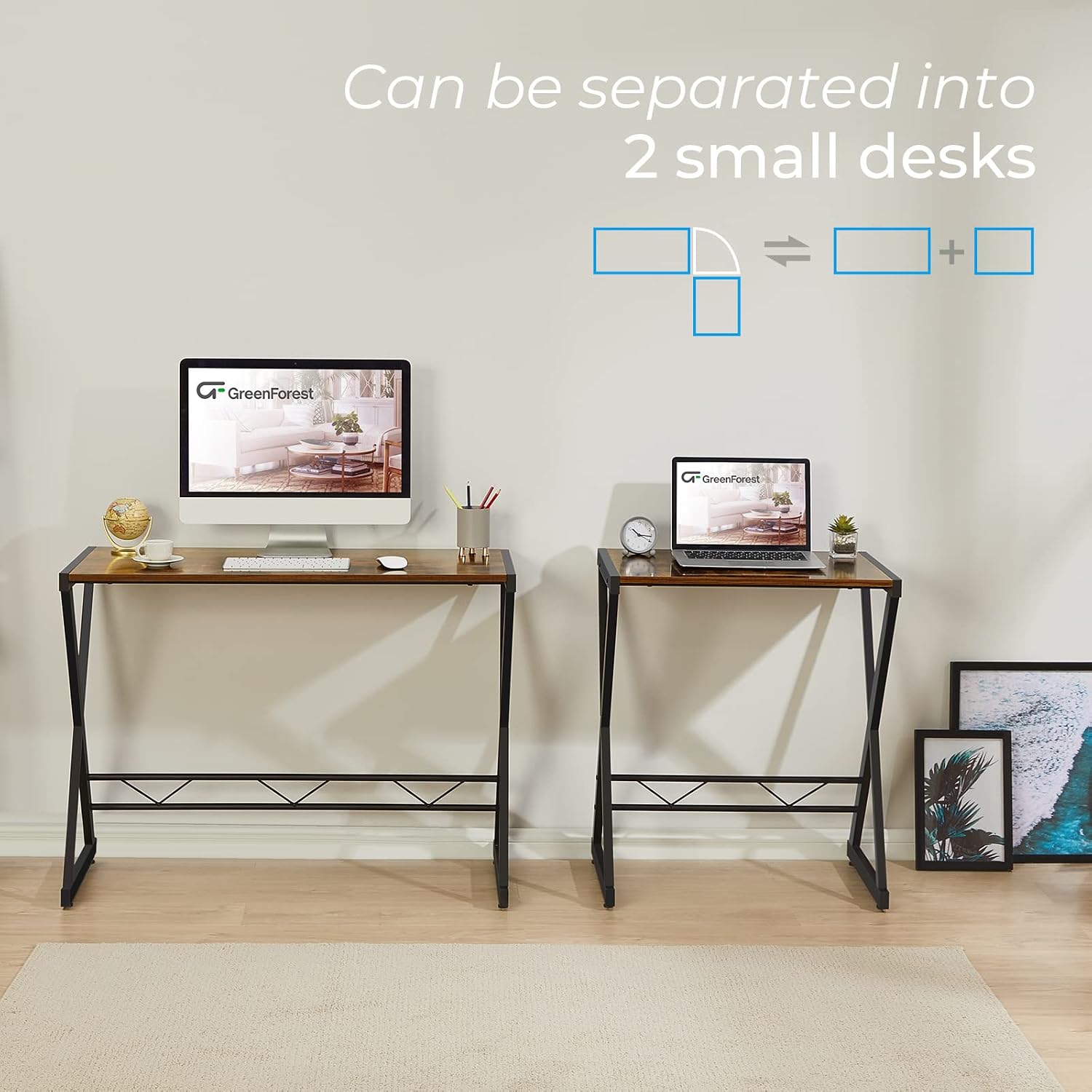
Figure 4: The desk can be separated into two individual writing desks by detaching the corner panel, offering multi-purpose functionality.
Video 1: A visual guide demonstrating the reversible L-shaped configuration and the ability to separate the desk into two individual units.
Features and Operation
The GreenForest L Shaped Computer Desk is designed with user convenience and functionality in mind, providing ample space and robust support for your computing and work needs.
Reversible L-Shape Design:
The desk's L-shape can be configured to have the longer side on either the left or right, adapting to various room layouts and personal preferences. This flexibility also allows for combining two identical desks to form a large U-shaped workstation.

Figure 5: Two L-shaped desks can be combined to create a larger U-shaped workspace, ideal for extensive setups.
Large Desktop with Monitor and CPU Stands:
The spacious desktop provides ample room for multiple monitors, keyboards, mice, and other accessories. It includes a movable monitor stand to elevate your screen to an ergonomic height and a dedicated CPU stand to keep your computer tower off the floor, saving space and protecting it from dust.

Figure 6: Detail of the large, movable monitor stand, providing elevated space for displays.

Figure 7: The specialized CPU power tray stand, designed to keep your computer tower off the floor for space-saving and protection.
Durable and Sturdy Construction:
Constructed with thickened "X" legs (40x20mm), the desk offers strong support and stability. Adjustable footpads are included on each leg to ensure the desktop remains level on uneven surfaces, preventing wobbling.

Figure 8: The robust X-shaped leg design provides enhanced stability and support for the desk.
Maintenance
To ensure the longevity and appearance of your GreenForest L Shaped Computer Desk, follow these simple maintenance guidelines:
- Cleaning: Wipe the desktop and frame regularly with a soft, damp cloth. Avoid abrasive cleaners or harsh chemicals that could damage the finish.
- Spills: Immediately wipe up any spills to prevent staining or water damage to the engineered wood surface.
- Heat Protection: Use coasters or protective pads under hot items to prevent heat marks.
- Weight Distribution: Distribute weight evenly across the desktop to maintain stability and prevent stress on the frame. The desk has a maximum weight-bearing capacity of 300 lbs.
- Fasteners: Periodically check and tighten all screws and fasteners to ensure the desk remains sturdy and wobble-free.
Troubleshooting
If you encounter any issues with your GreenForest L Shaped Computer Desk, refer to the following common troubleshooting tips:
- Wobbling Desk:
- Ensure all assembly screws are fully tightened.
- Adjust the footpads on each leg to compensate for uneven flooring. Rotate them clockwise or counter-clockwise until the desk is level and stable.
- Missing Parts/Hardware:
- Carefully check all packaging materials, as small parts can sometimes be overlooked.
- Refer to the "Included Components" list and contact GreenForest customer support if any essential parts are genuinely missing.
- Difficulty with Reversible Setup:
- Review the assembly diagrams in this manual, particularly Figure 3, which illustrates the two-way setup options.
- Ensure the corner panel is correctly oriented for your desired configuration.
Specifications
| Attribute | Detail |
|---|---|
| Brand | GreenForest |
| Model Number | BEET-1CARAMELWOOD-JB-GW |
| Product Dimensions | 58"D x 44"W x 29.5"H |
| Color | Brown |
| Style | Modern |
| Base Material | Engineered Wood |
| Finish Type | Particleboard |
| Special Feature | Reversible |
| Recommended Uses | Working, Writing |
| Item Weight | 45.5 Pounds |
| Required Assembly | Yes |
| Shape | L-Shape |
| Maximum Weight Capacity | 300 lbs (approximate, based on feature bullets) |
Warranty and Support
For warranty information, product support, or to inquire about replacement parts, please contact GreenForest customer service. Refer to the contact details provided with your purchase or visit the official GreenForest website for assistance.
You can also visit the GreenForest Store on Amazon for more information and product offerings.
Related documentsBEET-1CARAMELWOOD-JB-GW


Ask a question about this manual
Ask about setup, troubleshooting, compatibility, parts, safety, or missing instructions. Manuals+ will review the question and use this page’s manual context to help answer it.