
AUTOOL BT760
AUTOOL BT-760 Car Battery Tester User Manual
Model: BT760

Image: The AUTOOL BT-760 battery tester, its carrying case, battery clamps, and user manual.
1. Product Overview
The AUTOOL BT-760 is an advanced 12V and 24V battery system tester designed for comprehensive analysis of automotive batteries, cranking systems, and charging systems. It provides quick and accurate diagnostic results, making it an essential tool for vehicle maintenance. The device features a user-friendly interface with a high-definition color screen and a built-in thermal printer for immediate report generation.

Image: The BT-760 tester displaying its main menu with options for Battery Test, Cranking Test, Charging Test, Load Test, Languages, and Help.
2. Setup Guide
2.1 Unpacking
Carefully remove all components from the packaging. Ensure the following items are present:
- AUTOOL BT-760 Battery System Tester
- Battery Clamps Cable
- User Manual
- Thermal Printer Paper Roll
- Carrying Case
2.2 Connecting the Tester
To begin testing, connect the battery clamps to the vehicle's battery terminals. Ensure a secure connection to obtain accurate readings.
- Connect the RED clamp to the positive (+) battery terminal.
- Connect the BLACK clamp to the negative (-) battery terminal.
- The tester will power on automatically once connected correctly.
3. Operating Instructions
3.1 Navigating the Interface
The BT-760 features a 3.2-inch high-definition color screen for clear display of measurement results. Use the directional buttons and the 'OK' button to navigate through the menu options.

Image: A detailed view of the BT-760's 3.2-inch HD color screen, highlighting its clear display and intuitive icons for various tests.
3.2 Performing a Battery Test
The tester utilizes advanced conductive battery testing technology to quickly identify battery health. Select 'Battery Test' from the main menu and follow the on-screen prompts. The test typically completes in less than 3 seconds.
3.3 Cranking System Test
To evaluate the vehicle's cranking system, select 'Cranking Test' from the main menu. The tester will guide you through the process, analyzing the starter motor's performance.
3.4 Charging System Test
Assess the vehicle's charging system by selecting 'Charging Test'. This function checks the alternator and other charging components to ensure proper voltage regulation.
3.5 Load Test
Perform a load test to simulate real-world conditions and determine the battery's ability to deliver current under demand. Select 'Load Test' and follow the instructions.
3.6 Printing Test Results
The BT-760 is equipped with a built-in thermal printer. After completing a test, you can print a detailed diagnostic report directly from the device. This allows for easy record-keeping and sharing of results.

Image: The BT-760 tester with a printed diagnostic report emerging from its integrated thermal printer, showing a sample report on the screen.
3.7 Language Settings
The device supports 14 different languages. To change the language, navigate to the 'Languages' option in the main menu and select your preferred language.

Image: The BT-760's screen displaying a list of 14 available languages, including English, Portuguese, Spanish, French, German, Italian, Russian, Turkish, Thai, Japanese, Traditional Chinese, Simplified Chinese, Korean, and Polish.
3.8 Compatible Battery Types
The BT-760 is compatible with a wide range of 12V and 24V lead-acid batteries, including:
- Conventional Flooded Batteries
- AGM Flat Plate Batteries
- AGM Spiral Batteries
- EFB (Enhanced Flooded Battery)
- GEL Batteries
It supports various rating standards such as CCA, BCI, CA, MCA, JIS, DIN, IEC, EN, SAE, and GB, with a capacity range of 30 to 2000 CCA.

Image: An illustration showing different types of batteries (EFB, GEL, AGM Flat, Flooded Regular, AGM Spiral) that are compatible with the BT-760 tester.
4. Maintenance
To ensure the longevity and optimal performance of your AUTOOL BT-760, follow these maintenance guidelines:
- Keep the device clean and free from dust and debris. Use a soft, dry cloth for cleaning.
- Avoid exposing the tester to extreme temperatures or direct sunlight for prolonged periods.
- Ensure the battery clamps are clean and free of corrosion before and after each use.
4.1 Storage
Store the BT-760 and its accessories in the provided carrying case when not in use. The case is designed to protect the device from impacts and ensure convenient transport.

Image: A person carrying the AUTOOL BT-760 in its black storage bag, with an inset showing the tester and its accessories neatly packed inside the case.
5. Troubleshooting
If you encounter issues with your AUTOOL BT-760, consider the following common troubleshooting steps:
- No Power: Ensure the battery clamps are securely connected to the correct battery terminals. Check for any damage to the cable or clamps.
- Inaccurate Readings: Verify that the battery type and CCA rating entered into the tester match the battery being tested. Ensure clean connections to the battery terminals.
- Printer Not Working: Check if the thermal paper is correctly loaded and if there is enough paper remaining. Ensure the printer cover is properly closed.
- Device Freezes: Disconnect the tester from the battery, wait a few seconds, and then reconnect it. If the issue persists, contact customer support.
For more complex issues or persistent problems, refer to the warranty and support section for contact information.
6. Technical Specifications
| Parameter | Value |
|---|---|
| Product Dimensions | 21 x 1.1 x 4 cm; 920 g |
| Item Model Number | BT760 |
| Brand | AUTOOL |
| Power Source | Battery Powered |
| Color | Black |
| Min. Operating Voltage | 12 Volts |
| Measurement Type | Voltmeter, Ammeter |
| Voltage Measurement Range | 8-30V |
| Current Measurement Range | 15mA~5A |
| Operating Temperature | -20°C~50°C |
| CCA Test Range | 30-2000 |
| IEC Test Range | 30-2500 |
| EN Test Range | 30-3000 |
| DIN Test Range | 30-2500 |
| JIS Test Range | 28A19R-N135 |
| GB Test Range | 30-300AH |

Image: A visual representation of the BT-760's technical parameters and test standards, including voltage, current, operating temperature, and various CCA ranges.
7. Warranty and Support
AUTOOL provides a Free Three-Year Warranty for the BT-760 Battery System Tester, covering damages caused by non-human factors. Additionally, lifetime maintenance support is offered.
For any questions, technical assistance, or warranty claims, please do not hesitate to contact AUTOOL customer support. We are committed to providing 24-hour support to resolve your inquiries.
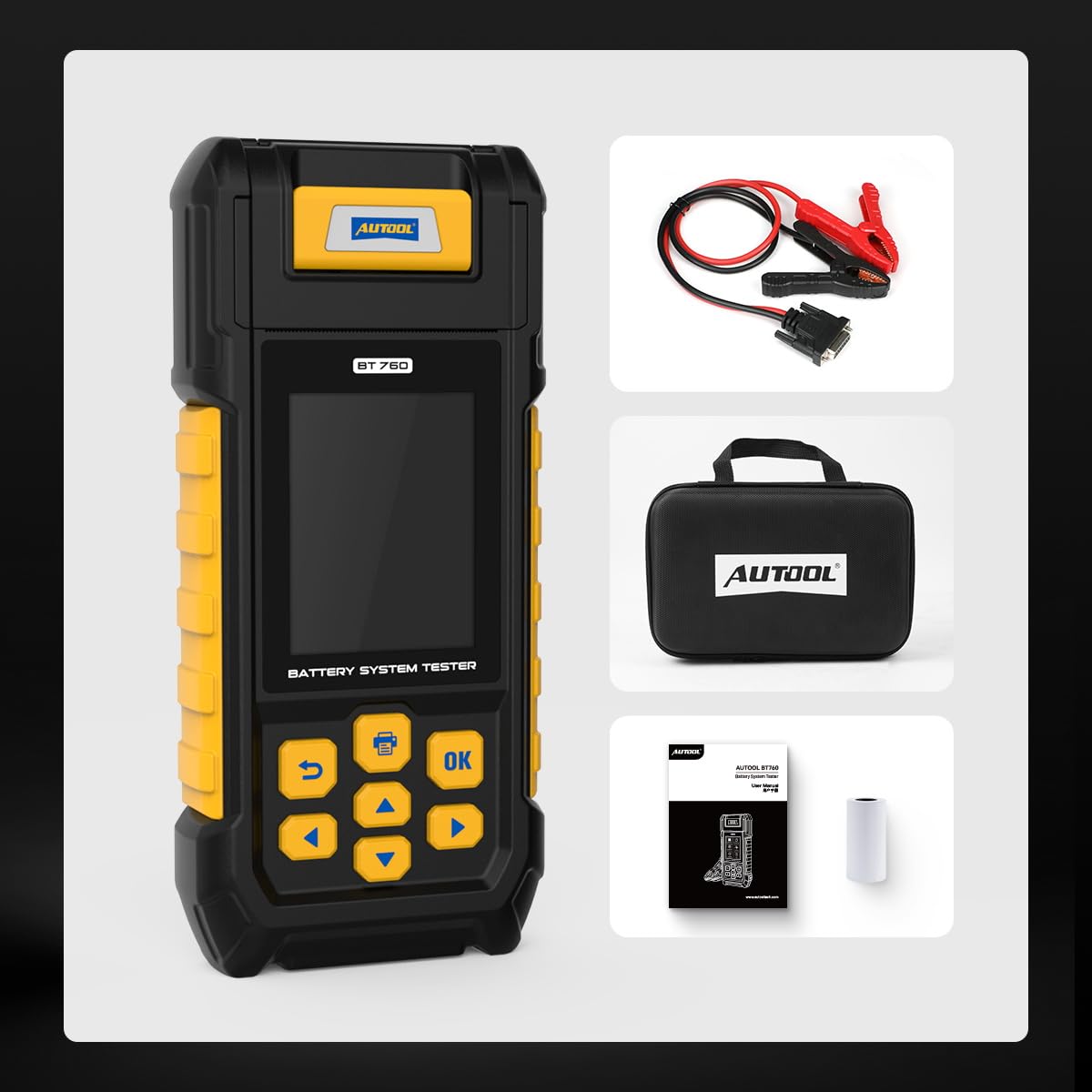
Image: Badges indicating 24/7 customer support, a 3-year warranty, and compliance with CE, RoHS, and FCC standards.
Related documentsBT760


Ask a question about this manual
Ask about setup, troubleshooting, compatibility, parts, safety, or missing instructions. Manuals+ will review the question and use this page’s manual context to help answer it.