
1. Introduction
This manual provides detailed instructions for the safe and efficient operation of your Haisito HB6AC LiPo Balance Charger. This versatile charger features a built-in power supply and is designed to simplify battery charging for a wide range of RC battery types, minimizing the need for additional accessories.
2. Safety Precautions
Always prioritize safety when operating the charger. Failure to follow these guidelines may result in injury or damage to property.
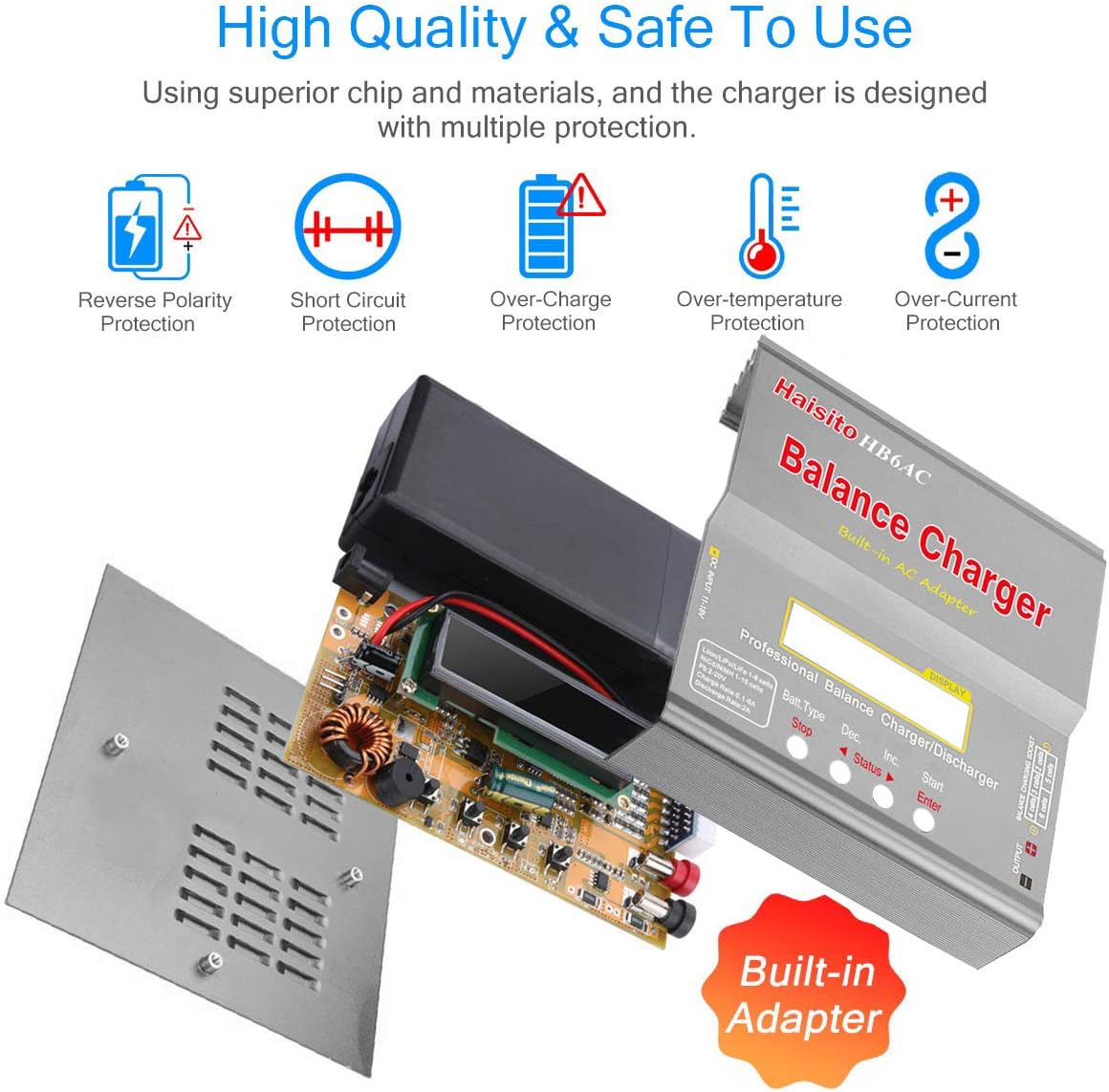
- Reverse Polarity Protection: The charger is equipped with protection against incorrect battery connection.
- Short Circuit Protection: Prevents damage in case of a short circuit.
- Over-Charge Protection: Automatically stops charging when the battery reaches full capacity.
- Over-Temperature Protection: Monitors internal temperature to prevent overheating.
- Over-Current Protection: Safeguards against excessive current draw.
- Ensure proper ventilation during operation.
- Do not attempt to charge damaged batteries.
- Keep the charger away from moisture and flammable materials.
WARNING: Risk of electric shock. Do not open the charger casing.
3. Package Contents
Verify that all items listed below are included in your package:
- 1 x Haisito HB6AC LiPo Battery Charger
- 1 x T-plug Discharge Cable
- 1 x Alligator Clip Power Cable
- 4 x Charging Converter Cables (various connectors)
- 1 x English User Manual
- 1 x AC Power Supply Cable

This image displays the Haisito HB6AC Balance Charger along with its complete set of accessories, including various charging cables, power cables, and the instruction manual.
4. Product Overview
Familiarize yourself with the charger's components and connection points.
This image highlights the various connection points on the Haisito HB6AC charger, including the output positive and negative electrodes, 2S, 3S, 4S, 5S, and 6S balance ports on the front, and AC input (100-240V), DC input (11-18V), and temperature sensor interface on the rear.

An exploded view of the Haisito HB6AC charger revealing its internal circuitry and highlighting key safety protections: Reverse Polarity Protection, Short Circuit Protection, Over-Charge Protection, Over-Temperature Protection, and Over-Current Protection. It also indicates the built-in AC adapter.
5. Technical Specifications
| Feature | Specification |
|---|---|
| Operating Voltage Range | DC 11.0 ~ 18.0 Volt or AC 100V ~ 240V 50/60Hz |
| Circuit Power (AC to DC Adapter) | DC 11.0 ~ 18.0V / 5A |
| Max. Charge Power | 80W |
| Max. Discharge Power | 10W |
| Charge Current Range | 0.1 ~ 6.0A |
| Discharge Current Range | 0.1 ~ 2.0A |
| Current Consumption for Balancing Li-Po | 300 mAh / cell |
| NiCd / NiMH Battery Cell Count | 1 ~ 15 cells |
| Li-Ion / Li-Polymer Cell Count | 1 ~ 6 series |
| Pb Battery Voltage | 2V ~ 20V |
| Dimensions | 20.5 x 16 x 5.5 cm |
| Weight | 780 g |
6. Battery Compatibility
The Haisito HB6AC charger offers wide compatibility with various battery chemistries and cell configurations:
- NiMH / NiCd: 1.2V-18V (1S-15S), including popular 6V, 7.2V, 9.6V, 12V options.
- LiPo / Li-ion: 3.7V-22.2V (1S-6S), including 7.4V, 11.1V, 14.8V options.
- LiFePO4: 3.2V-19.2V (1S-6S), including 9.6V, 12.8V, 16V options.
- SLA (PB): 2V-20V.

This image illustrates the wide range of battery types compatible with the Haisito HB6AC charger, including Li-Ion (1-6S), LiPo (1-6S), LiFe (1-6S), NiCd (1-15S), NiMH (1-15S), and PB (2-20V) batteries.
7. Initial Setup
- Power Connection: Connect the AC power cable to the charger and a wall outlet, or connect a DC power source (11-18V) to the DC input port. The charger will power on and display the main menu.
- Battery Connection: Connect your battery to the appropriate main charging port (T-plug or via converter cables) and the balance port (if applicable for LiPo/Li-Ion/LiFe batteries). Ensure correct polarity.
8. Operating Instructions
The charger features an intuitive LCD screen and buttons for navigation and settings.
General Operation Flow:
- Select Battery Type: Press the "Batt. Type" button to cycle through and select the correct battery chemistry (e.g., LiPo, NiMH).
- Enter Parameter Settings: After selecting the battery type, press the "Start" button twice to enter the charging parameter settings.
- Adjust Current and Voltage: Use the "Dec." (Decrease) or "Inc." (Increase) buttons to adjust the charging current and voltage (if applicable). Press "Start" to confirm each setting.
- Start Charging: Once all parameters are set, press and hold the "Start" button for 3 seconds to begin the charging process. The charger will perform a safety check before starting.
- Monitor Progress: The LCD screen will display real-time charging status, including current, voltage, and elapsed time.
- Stop Charging: Press the "Stop" button at any time to end the charging process.
Advanced Functions:
- Storage Mode: Select this mode to charge or discharge LiPo/Li-Ion/LiFe batteries to their optimal storage voltage, prolonging battery life.
- Discharge Mode: Allows controlled discharge of batteries.
- Cyclic Charge/Discharge: Perform 1 to 5 continuous cycles to refresh and balance batteries, particularly useful for NiMH/NiCd.
- Data Storage: Store up to 5 different battery profiles to quickly recall settings for frequently used batteries.

This visual guide demonstrates the four main steps for operating the Haisito HB6AC charger: 1. Press 'Batt. Type' to select battery type. 2. Press 'Start' twice for parameter settings. 3. Press 'Dec.' or 'Inc.' and 'Start' to set current and voltage. 4. Press and hold 'Start' for 3 seconds to begin charging.
9. Maintenance
- Keep the charger clean and free from dust and debris. Use a soft, dry cloth for cleaning.
- Store the charger in a cool, dry place when not in use.
- Regularly inspect cables and connectors for any signs of wear or damage. Replace if necessary.
10. Troubleshooting
If you encounter issues with your charger, refer to the following common problems and solutions:
| Problem | Possible Cause | Solution |
|---|---|---|
| Charger does not power on | No power supply; faulty cable | Check power connections; try a different outlet or cable. |
| "Connection Break" error | Battery not connected properly | Ensure main and balance leads are securely connected. |
| "Cell Error" or "Voltage Error" | Incorrect battery type/cell count selected; damaged battery | Verify battery type and cell count settings; inspect battery for damage. |
| Charger gets hot | Normal during operation; poor ventilation | Ensure adequate airflow around the charger. If excessively hot, stop operation and allow to cool. |
| Charging process stops prematurely | Over-charge protection triggered; battery fault | Check battery health; ensure correct charging parameters. |
11. Warranty and Support
Your Haisito HB6AC Balance Charger includes an 18-month warranty from the date of purchase. This warranty covers manufacturing defects and ensures reliable performance under normal use.
For technical support, warranty claims, or further assistance, please contact Haisito customer service through your retailer or the official Haisito support channels.

