1. Introduction
Thank you for choosing the Selvim 4-in-1 Phone Camera Lens Kit. This comprehensive kit is designed to enhance your smartphone photography, allowing you to capture a wide range of shots from distant subjects to intricate close-ups. Please read this manual carefully to ensure proper setup, operation, and maintenance of your new lens kit.

Figure 1: Selvim 4-in-1 Phone Camera Lens Kit components.
Video 1: Overview of the Selvim 4-in-1 Camera Lens Kit, demonstrating setup and usage of various lenses.
2. Product Components
The Selvim 4-in-1 Phone Camera Lens Kit includes the following items:
- 22X Telephoto Lens: For magnifying distant subjects.
- 235° Fisheye Lens: For creating unique circular, mystical results.
- HD 0.62X Super Wide Angle Lens: For capturing a wide field of view with minimal distortion.
- 25X Macro Lens: For precision-focus on intricate details (not for zooming distant objects).
- Flexible Clamp: To securely attach lenses to your phone.
- Phone Clip: For mounting the phone onto the tripod.
- Upgraded Metal Tripod: For stable shooting.
- Eyecup: For comfortable viewing through the telephoto lens.
- Cleaning Cloth: For maintaining lens clarity.
- Storage Case: For convenient and safe transport of all components.

Figure 2: All components of the Selvim Lens Kit in the portable storage case.
3. Setup and Installation
3.1 Identifying Your Phone's Main Camera
To ensure optimal performance, it is crucial to align the lens with your phone's main camera. Follow these steps (also demonstrated in Video 1, 0:02-0:14):
- Turn on your phone's camera application.
- Use your finger to cover each back camera lens one by one.
- The main camera is the one that causes the screen to become blurry or dark when covered.
For multi-camera phones, the lens screw ring on the clip is slidable to help you align it with the main camera. Refer to the diagrams below for common iPhone and Samsung main camera locations:

Figure 3: Main Camera Location Mark for iPhone Series Phones.
3.2 Attaching the Lens Clip and Mounting the Lens
Follow these steps to attach the lens clip and mount your desired lens (also demonstrated in Video 1, 0:15-0:33):
- Remove the front and rear protective caps from the desired lens.
- Align the clip ring with the center of your phone's main camera.
- Mount the lens onto the clip by screwing it into the threaded opening.
- Tighten the screw on the clip to secure it firmly to your phone.
Note: Do not use the wide-angle (0.5X) function of your phone after fixing the lens to avoid switching the main camera. Always keep your phone's zoom level at 1x magnification when using Selvim lenses.

Figure 4: Step-by-step installation guide for the Selvim phone camera lens.
3.3 Using the Tripod
For stable shots, especially with the telephoto lens, use the included tripod (also demonstrated in Video 1, 0:44-1:05):
- Install the phone clip onto the tripod's screw mount.
- Securely place your phone into the phone clip.
- Attach the lens clip with the desired lens to your phone, then install the lens onto the clip.
- Adjust the tripod legs to a suitable position for stability.
- Adjust the tripod head to the best shooting position and tighten the screw.
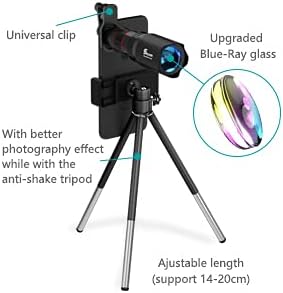
Figure 5: Selvim telephoto lens mounted on a phone with the adjustable tripod.
4. Operating Instructions
4.1 Using the 22X Telephoto Lens
The 22X Telephoto Lens allows you to capture distant subjects with clarity. To focus (also demonstrated in Video 1, 1:06-1:11):
- Rotate the focus wheel on the telephoto lens until the image is clear.
- Do not touch your phone screen to focus when using the telephoto lens, as this may cause the phone to switch to a different camera or lose focus.

Figure 6: Capturing distant subjects with the 22X Telephoto Lens.
4.2 Using the 25X Macro Lens
The 25X Macro Lens is designed for extreme close-up photography, revealing intricate details. For best results (also demonstrated in Video 1, 0:34-0:43):
- Position the macro lens 1-2 inches (2.5-5 cm) away from your subject.
- Adjust the distance slightly until the subject is in sharp focus.

Figure 7: Example of macro photography with the 25X Macro Lens.
4.3 Using the 235° Fisheye Lens
The 235° Fisheye Lens creates a unique, wide-angle, spherical effect, perfect for artistic shots and capturing broad scenes.

Figure 8: Creative shots using the 235° Fisheye Lens.
4.4 Using the 0.62X Wide Angle Lens
The 0.62X Wide Angle Lens expands your phone's field of view, allowing you to capture more of the scene, ideal for landscapes, group photos, and architecture.

Figure 9: Demonstrating the expanded view with the 0.62X Wide Angle Lens.
5. Maintenance
To ensure the longevity and optimal performance of your Selvim lens kit, follow these maintenance guidelines:
- Cleaning: Use the provided cleaning cloth to gently wipe the lens surfaces. Avoid using abrasive materials or harsh chemicals that could damage the multi-resistant coating.
- Storage: Always store all lens kit components snugly and safely in the provided travel case when not in use. This protects them from dust, scratches, and impacts.
- Handling: Handle the lenses and accessories with care. Avoid dropping them on hard surfaces.

Figure 10: The 10+10 multi-layer coating on Selvim lenses helps prevent smears and fingerprints.
6. Troubleshooting
If you encounter any issues with your Selvim Phone Camera Lens Kit, refer to the following common problems and solutions:
| Problem | Possible Cause / Solution |
|---|---|
| Image is blurry or out of focus. | Ensure the lens is properly aligned with your phone's main camera. For telephoto, rotate the focus wheel on the lens. For macro, adjust the distance between the lens and the subject (1-2 inches). Ensure your phone's native zoom is set to 1x. |
| Phone camera switches lenses automatically (e.g., on iPhone 13). | This can happen if your phone's auto-macro feature is enabled. To disable: Go to Settings > Camera and turn off "Auto Macro" (or similar setting depending on your phone model/OS version). This forces the phone to use the main lens. |
| Images are shaky or unstable, especially with telephoto. | Use the included tripod for stability. For maximum stability, consider using a Bluetooth shutter release (not included) to trigger the camera without touching the phone. |
| Telephoto lens cannot be screwed into the lens clip. | This may occur if the metal ring of the eyepiece cover is left on the telephoto lens after using it as a monocular. Remove the metal ring from the telephoto lens, put it back on the eyecup, then screw the telephoto lens to the lens clip. |

Figure 11: Correcting telephoto lens attachment issues.
7. Specifications
- Product Dimensions: 0.39 x 0.47 x 0.47 inches
- Item Weight: 14.6 ounces
- Model Number: 002
- Lens Types: 22X Telephoto, 235° Fisheye, 0.62X Wide Angle, 25X Macro
- Compatible Mountings: Compatible with most iOS (iPhone XS MAX, XS, XR, X, SE, 12, 11, 8 Plus, 8, 7 Plus, 7, 6 Plus, 6, 5S, 5C, 5, 4S) and Android phones (Samsung Galaxy S9 Plus, S9, S8 Plus, S8, S7 Edge, S7, S6 Edge+, S6 Edge, S6, LG, iPad, Motorola, HTC, One Plus, HUAWEI, etc.).
- Manufacturer: Selvim
8. Safety Information
Please handle the product with care. Do not drop it on the floor or hard surfaces, as this may cause damage to the lenses or accessories.
9. Warranty and Support
Selvim is committed to providing quality products. If you encounter any problems or have questions regarding your lens kit, please do not hesitate to contact our customer support. We are here to assist you.
For support, please visit the official Selvim website or contact us through your purchase platform.


