
Introduction
The Definitive Technology Demand D17 High-Performance Tower Speakers are engineered to deliver full-range, room-filling sound with precise imaging. Featuring advanced acoustic technologies, these speakers are designed for an immersive audio experience in both Hi-Fi and home theater setups. This manual provides essential information for the proper setup, operation, and maintenance of your D17 speakers.
Safety Instructions
- Placement: Ensure speakers are placed on a stable, level surface to prevent tipping. Keep them away from heat sources, direct sunlight, and moisture.
- Ventilation: Do not block any ventilation openings. Proper airflow is essential for preventing overheating.
- Power: These are passive speakers and require an external amplifier or receiver. Ensure your amplifier's output power matches the speaker's impedance and power handling capabilities.
- Cables: Use high-quality speaker cables and ensure all connections are secure to prevent short circuits or damage to your equipment.
- Cleaning: Disconnect from power before cleaning. Use a soft, dry cloth. Avoid liquid cleaners or aerosols.
- Servicing: Do not attempt to service these speakers yourself. Refer all servicing to qualified service personnel.
Package Contents
Verify that your package contains the following items:
- Definitive Technology Demand D17 Tower Speaker (Left)
- Magnetic Grille
- Stabilizer Feet/Spikes (for carpeted surfaces) or Glides (for hard floors)
- User Manual (this document)
Setup
1. Unpacking
Carefully remove the speaker from its packaging. Retain all packaging materials for future transport or storage.
2. Attaching Stabilizer Feet
The D17 speakers are designed to be floor-standing. Attach the included stabilizer feet to the base of the speaker. Use spikes for carpeted floors to penetrate the carpet and couple the speaker to the subfloor, or use glides for hard surfaces to protect the floor and provide stability.
3. Speaker Placement
Optimal speaker placement is crucial for sound quality. Position the speakers equidistant from your primary listening position. Experiment with toe-in (angling the speakers slightly towards the listener) to achieve the best stereo imaging. Keep speakers away from corners and walls to avoid excessive bass resonance.

Image: Definitive Technology Demand D17 speakers in a living room, illustrating typical placement.
4. Connecting to Your Amplifier/Receiver
The D17 speakers feature high-quality binding posts for secure connections. Use appropriate gauge speaker wire for the distance between your amplifier and speakers. Connect the positive (+) terminal of the speaker to the positive (+) terminal of the amplifier, and the negative (-) terminal of the speaker to the negative (-) terminal of the amplifier. Ensure all connections are tight and free from stray wire strands that could cause a short circuit.

Image: Rear panel of the D17 speaker with binding posts for amplifier connection.
Operating Instructions
1. Initial Playback
Once connected, select your audio source on your amplifier/receiver and begin playback at a low volume. Gradually increase the volume to a comfortable listening level. Verify that sound is coming from both speakers and that the stereo image is balanced.
2. Break-in Period
Like many high-performance speakers, the Demand D17 benefits from a break-in period. During the first 50-100 hours of use, the drivers will loosen up and reach their optimal performance. You may notice an improvement in bass response and overall clarity as the speakers break in. Play a variety of music at moderate volumes during this period.
3. Amplifier Compatibility
Ensure your amplifier is capable of driving an 8-ohm load and provides sufficient power for your listening preferences. While the D17 speakers are efficient, a quality amplifier will allow them to perform at their best.
Maintenance
Cleaning the Cabinet
Use a soft, lint-free cloth to gently wipe the speaker cabinet. For stubborn marks, slightly dampen the cloth with water. Avoid harsh chemicals, abrasive cleaners, or solvents, as these can damage the finish.
Cleaning the Grille
The magnetic grille can be carefully removed. Use a soft brush or a vacuum cleaner with a brush attachment on a low setting to remove dust from the grille fabric.
Driver Care
Avoid touching the speaker drivers (tweeter, midrange, woofers) directly, as this can cause damage. If dust accumulates, use a soft brush or compressed air from a distance.
Troubleshooting
- No Sound:
- Check all speaker wire connections at both the speaker and amplifier. Ensure positive (+) and negative (-) terminals are correctly matched.
- Verify the amplifier is powered on and the correct input source is selected.
- Check the amplifier's volume level and mute settings.
- Distorted Sound:
- Reduce the volume level. Distortion often occurs when the amplifier is overdriven.
- Inspect speaker wires for frayed strands or loose connections.
- Ensure the speaker impedance is compatible with your amplifier.
- Check the audio source for distortion.
- Unbalanced Sound (one speaker louder/softer):
- Check speaker wire connections for the affected speaker.
- Verify the balance settings on your amplifier/receiver.
- Ensure both speakers are placed symmetrically in the room.
Specifications
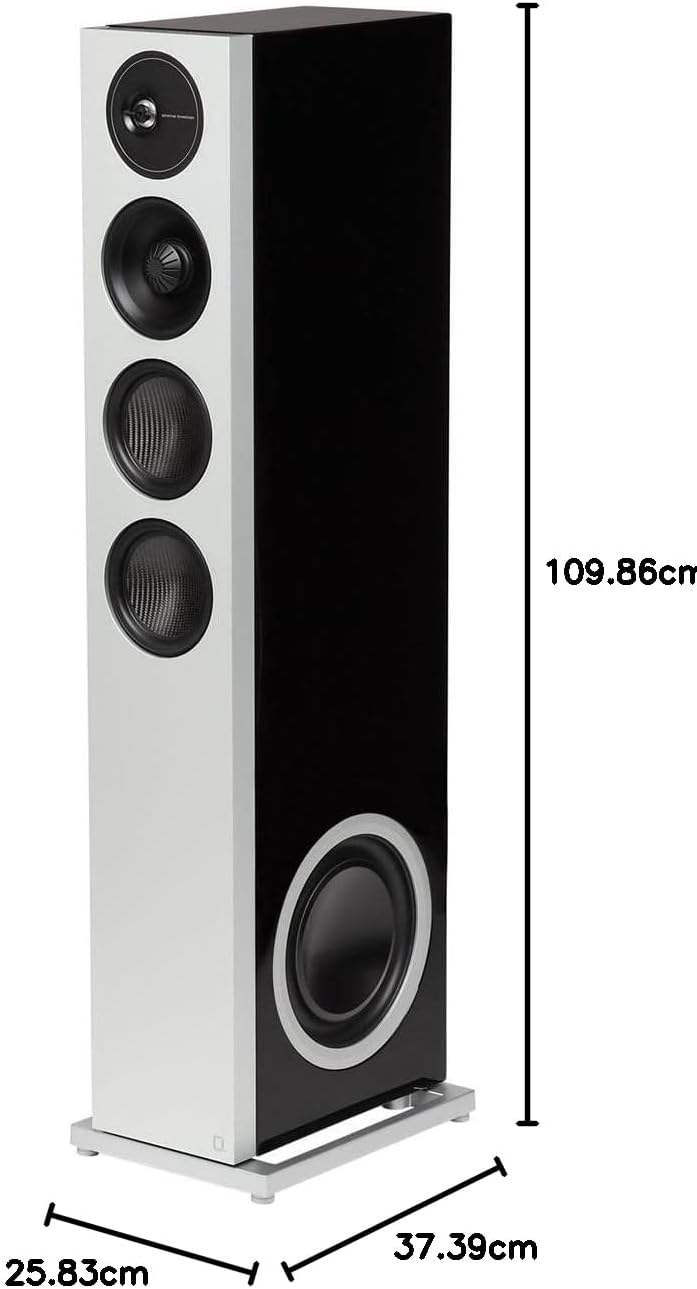
Image: Dimensions of the D17 Tower Speaker.
| Feature | Specification |
|---|---|
| Model Number | 300025-01-00-005 |
| Speaker Type | Tower, 3-way full-range |
| Dimensions (H x W x D) | 109.86 cm x 25.83 cm x 37.39 cm (43.25 in x 10.17 in x 14.72 in) |
| Weight | 3.95 kg (8.7 lbs) |
| Tweeter Diameter | 1 Inch (Annealed Aluminum Dome) |
| Woofer Diameter | 10 Inches (Carbon Fiber) |
| Midrange Driver | 6.5 Inches (BDSS - Balanced Double Surround System) |
| Impedance | 8 Ohms |
| Speaker Maximum Output Power | 3 Watts (Note: This typically refers to a minimum amplifier power for safe operation, not the speaker's maximum handling capacity. Consult your amplifier's manual for compatible loads.) |
| Connectivity Technology | Coaxial (via binding posts) |
| Enclosure Material | Aluminum |
| Specific Uses | Home theater, Hi-Fi audio listening |
Warranty Information
Definitive Technology provides a 5-year manufacturer's warranty for the Demand D17 Tower Speakers. This warranty covers defects in materials and workmanship under normal use. Please retain your proof of purchase for warranty claims. For full terms and conditions, refer to the warranty card included with your product or visit the official Definitive Technology website.
Support
For technical assistance, troubleshooting beyond this manual, or warranty inquiries, please contact Definitive Technology customer support. You can typically find contact information on the official Definitive Technology website or through your authorized dealer.
Online Resources: Visit the Definitive Technology Store on Amazon for additional product information and support.


