
1. Introduction
This manual provides essential information for the safe and effective operation and maintenance of your WEN GN4500 4500-Watt Portable Generator. This generator is designed to provide reliable power for various applications, from emergency backup to recreational use. It features a 212cc OHV 4-stroke engine, delivering up to 4500 surge watts and 3600 running watts. The control panel includes multiple outlets and a digital data meter for monitoring performance.
Please read this manual thoroughly before operating the generator and keep it for future reference. Proper understanding and adherence to these instructions will ensure optimal performance and extend the lifespan of your unit.
2. Safety Information
WARNING: Operating a generator can be hazardous. Failure to follow safety instructions may result in serious injury or death.
- Carbon Monoxide Hazard: Never operate the generator indoors or in enclosed spaces. Generators produce carbon monoxide, an odorless, colorless, and deadly gas. Use outdoors only, far away from windows, doors, and vents.
- Electrical Shock Hazard: Do not operate the generator in wet conditions. Ensure all electrical connections are dry and properly grounded. Use only approved extension cords that are rated for outdoor use and the generator's power output.
- Fire Hazard: Gasoline is highly flammable. Refuel in a well-ventilated area with the engine off and cool. Do not smoke or allow open flames near the generator. Store fuel in approved containers away from heat sources.
- Hot Surfaces: The generator's engine and muffler become extremely hot during operation and remain hot for some time after shutdown. Avoid contact to prevent burns.
- Moving Parts: Keep hands, feet, hair, and clothing away from moving parts of the engine and generator.
- Grounding: Always properly ground the generator before operation to prevent electrical shock.
- Children and Pets: Keep children and pets away from the generator at all times.
3. Package Contents
Upon unpacking, ensure all items are present and undamaged. The WEN GN4500 generator package typically includes:
- WEN GN4500 Portable Generator Unit
- Control Panel with various outlets
- Owner's Manual
- Spark Plug Wrench (may vary by package)
- Oil Funnel (may vary by package)
Note: The WEN GNA410 Wheel and Handle Kit for transportation is sold separately.
4. Setup
4.1 Initial Assembly (if applicable)
If you have purchased the optional wheel and handle kit, follow the instructions provided with that kit for assembly. Ensure all bolts are securely tightened.
4.2 Adding Engine Oil
The generator is shipped without engine oil. It is crucial to add the correct amount and type of oil before the first start-up.
- Place the generator on a level surface.
- Locate the oil fill cap/dipstick on the engine.
- Remove the cap/dipstick and slowly add the recommended engine oil (e.g., SAE 10W-30) until it reaches the upper mark on the dipstick. Do not overfill.
- Securely replace the oil fill cap/dipstick.

Image: Side view of the WEN GN4500 generator, highlighting the engine and general layout.
4.3 Adding Fuel
Use fresh, unleaded gasoline with an octane rating of 87 or higher. Do not use E85 fuel.
- Ensure the generator engine is off and cool.
- Open the fuel tank cap.
- Carefully pour gasoline into the fuel tank, avoiding spills. Do not fill above the red indicator line or the bottom of the filler neck. The tank capacity is 4 gallons.
- Securely close the fuel tank cap.

Image: Top-down view of the WEN GN4500 generator, showing the fuel tank and cap.
4.4 Grounding the Generator
For safety, the generator must be properly grounded. Connect a grounding wire (not included) from the grounding nut on the control panel to an appropriate ground source, such as a ground rod.
5. Operating Instructions
5.1 Pre-Start Checks
- Check engine oil level.
- Check fuel level.
- Ensure all electrical devices are unplugged from the generator.
- Verify the generator is on a level, stable surface, outdoors, and away from any structures.
5.2 Starting the Engine
- Turn the fuel valve to the 'ON' position.
- Move the choke lever to the 'CHOKE' position (if the engine is cold).
- Flip the engine switch to the 'ON' position.
- Pull the recoil starter handle firmly and steadily until the engine starts. Do not let the rope snap back.
- Once the engine starts, gradually move the choke lever to the 'RUN' position.
5.3 Connecting Electrical Loads
The WEN GN4500 features a versatile control panel:
- Four standard 120V 20A household duplex outlets (5-20R)
- One 120V 30A RV outlet (TT-30R)
- One 120V three-prong transfer-switch-ready 30A outlet (L5-30R)
After the engine is running smoothly, plug in your electrical devices. Do not overload the generator. Monitor the digital data meter for voltage and frequency.

Image: Front view of the WEN GN4500 control panel, showing all available outlets.
5.4 Digital Data Meter
The digital data meter displays important operational information:
- Voltage (V): Indicates the electrical potential.
- Frequency (Hz): Shows the cycles per second of the AC power.
- Session Runtime: Tracks the duration of the current operation.
- Total Runtime: Records the cumulative operating hours, useful for scheduling maintenance.
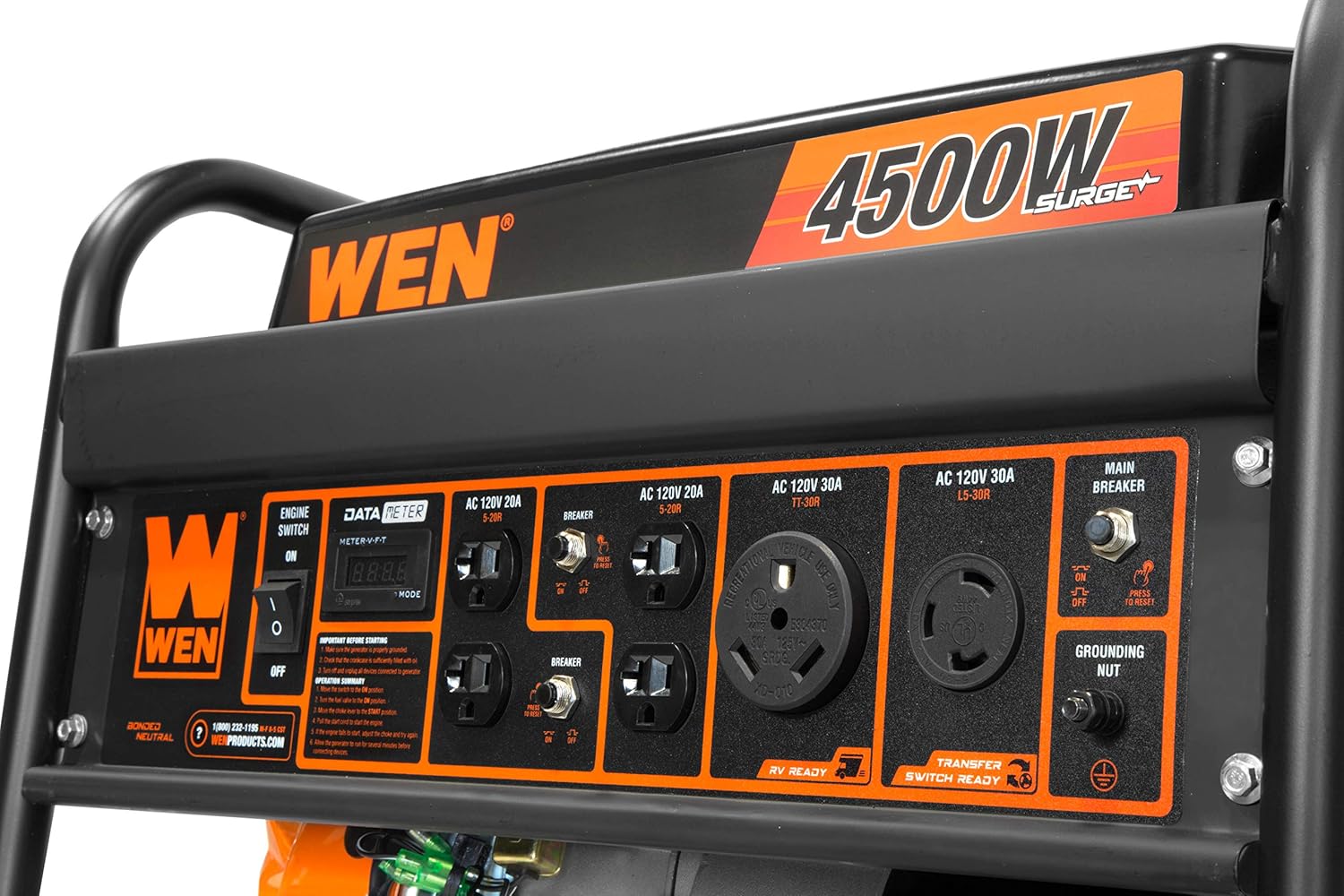
Image: Close-up of the digital data meter and engine switch on the WEN GN4500 control panel.
5.5 Stopping the Engine
- Unplug all electrical devices from the generator.
- Turn the engine switch to the 'OFF' position.
- Turn the fuel valve to the 'OFF' position.
6. Maintenance
Regular maintenance is essential for the longevity and reliable operation of your generator.
6.1 Maintenance Schedule
| Item | Before Each Use | Every 25 Hours / Monthly | Every 100 Hours / Annually |
|---|---|---|---|
| Engine Oil | Check Level | Change | |
| Air Filter | Check | Clean | Replace |
| Spark Plug | Inspect/Clean | Replace | |
| Fuel Filter | Inspect/Replace |
6.2 Engine Oil Change
Change the engine oil after the first 5 hours of operation, then every 25 hours or monthly thereafter. Refer to the oil fill cap image in the Setup section for location.
6.3 Air Filter Maintenance
Inspect the air filter regularly. Clean or replace it as needed, especially in dusty conditions. A dirty air filter can reduce engine performance and increase fuel consumption.

Image: Close-up of the WEN GN4500 engine, indicating the location of the air filter housing.
6.4 Spark Plug Inspection
Inspect the spark plug every 100 hours or annually. Clean or replace it if it is fouled or damaged. Ensure the gap is set correctly according to the specifications.
7. Troubleshooting
This section addresses common issues you might encounter with your generator.
7.1 Engine Will Not Start
- No Fuel: Check fuel level and add fresh gasoline if necessary.
- Low Oil: Check engine oil level. The generator has a low-oil shutdown feature. Add oil if low.
- Choke Position: Ensure the choke is in the 'CHOKE' position for a cold engine and moved to 'RUN' after starting.
- Engine Switch: Verify the engine switch is in the 'ON' position.
- Spark Plug: Inspect the spark plug for fouling or damage. Clean or replace if needed.
7.2 No Power Output
- Circuit Breakers: Check if any circuit breakers on the control panel have tripped. Reset them if necessary.
- Overload: Reduce the total load connected to the generator.
- Connections: Ensure all power cords are securely plugged into the generator outlets.
7.3 Engine Runs Rough
- Stale Fuel: Drain old fuel and refill with fresh gasoline.
- Dirty Air Filter: Clean or replace the air filter.
- Spark Plug: Inspect the spark plug for proper gap and condition.
8. Specifications
| Specification | Value |
|---|---|
| Model Number | GN4500 |
| Brand | WEN |
| Engine Type | 212cc 4-Stroke OHV |
| Starting Wattage | 4500 Watts |
| Running Wattage | 3600 Watts |
| Fuel Type | Gasoline |
| Fuel Tank Capacity | 4 Gallons |
| Half-Load Runtime | Up to 13 hours |
| Voltage | 120 Volts |
| Outlets | 4x 120V 20A (5-20R), 1x 120V 30A RV (TT-30R), 1x 120V 30A Transfer Switch (L5-30R) |
| Item Weight | 108 Pounds |
| Product Dimensions (L x W x H) | 23.25" x 18" x 18.75" |
| Compliance | EPAIII and CARB Compliant |

Image: Dimensional drawing of the WEN GN4500 portable generator.
9. Warranty and Support
The WEN GN4500 4500-Watt Portable Generator is backed by a two-year warranty. WEN maintains a nationwide network of skilled service technicians and a dedicated customer support line to assist with any product-related inquiries or issues.
- Customer Support Line: 1-800-232-1195
- Website: WENPRODUCTS.com
Please have your model number (GN4500) and purchase information ready when contacting support.


